The best ecommerce platforms for small business depend on how you sell. Shopify fits a managed product store, WooCommerce suits a WordPress team and Square Online fits merchants who also sell at a counter. The right choice depends on the total cost of an order, catalog complexity and who'll maintain the system.
A good ecommerce platform must accept payments, preserve stock accuracy, handle returns and support the people who fulfill orders. Start with those workflows, then compare templates and promotional prices. For a broader list across store sizes, see our guide to the best ecommerce platforms; this page stays focused on stores with one to a few staff and a limited budget.
Which ecommerce platform should a small business choose?
A small business should choose the platform that matches its main sales workflow and technical capacity. A physical shop, a content-led studio and a merchant with complex SKUs need different strengths, and no single subscription is cheapest for every store.
 Best for managed product-first storesShopifyOne hosted admin for products, checkout and channels, with no server to run.
 Best for an existing WordPress teamWooCommerceA store inside the WordPress site you already run, with full control over the stack.
 Best for complex growing catalogsBigCommerceA structured catalog and APIs for stores with complex or fast-growing product data.
 Best for design-led local sellersWixA visual editor and a modest store in one place for a local, brand-led business.
 Best for visual brands and studiosSquarespaceDesign-led pages and a simple store in one hosted site.
 Best for selling in person and onlineSquare OnlineOne system for the counter and the web store, if you already use Square.
 Best for adding checkout to an existing siteEcwidA store embedded into the website you already have.
 Best for makers with focused catalogsBig CartelA small, quick-to-launch shop for makers and artists.
How do small business ecommerce platforms compare?
Compare hosting responsibility, product-data control, payment fees and the time it takes to operate the store.
| Tool | Main job | Operational fit | Starting price |
|---|---|---|---|
| Shopify | Hosted ecommerce | Catalog to checkout and inventory | Basic $29/mo billed annually |
| WooCommerce | WordPress ecommerce | WordPress products to checkout | Free core; hosting and extensions extra |
| BigCommerce | Hosted ecommerce | Catalog to storefront and payments | Core $29/mo billed annually |
| Wix | Website builder | Visual editor to catalog and checkout | Confirm US price at checkout |
| Squarespace | Website builder | Content to store and checkout | Confirm US price at checkout |
| Square Online | Online store and POS | Counter and online orders in one system | Free $0/mo; Plus $49/location/mo |
| Ecwid | Embeddable ecommerce | Existing website to store | Venture $29/mo billed annually |
| Big Cartel | Hosted storefront | Focused catalogs for makers | Platinum $15/mo after 7-day trial |
 The Ecom Director Our product The Ecom Director Our product | Product feed checks and monitoring | Checks product feeds before they reach Merchant Center and compares each new version | $9/month |
Vendor prices and G2 ratings checked October 29, 2026. Wix and Squarespace prices vary by country, so confirm the US price at checkout.
What costs matter beyond the monthly store subscription?
The true cost of a small ecommerce store includes payment processing, apps or extensions, shipping, support and maintenance. A platform with a low entry subscription can quickly become expensive if the store needs paid add-ons or a developer to keep checkout working.
Build a budget around a representative order, including its average value, payment method and shipping destination, and add refunds, chargebacks and return handling. If you run more than one location, check whether the plan charges per location. If you're growing, check whether sales thresholds force an upgrade. Compare the resulting monthly total, not the subscription headline.
What do small business plans cost side by side?
| Platform | Entry plan (US) | Online card rate | Fee or limit to check |
|---|---|---|---|
| Shopify | Basic $29/month, annual | 2.9% + 30 cents | 2% gateway fee on Basic if you use another provider |
| WooCommerce | Free core plugin | Set by your gateway | Hosting $25 to $350/month, extensions $29 to $299/year each |
| BigCommerce | Core $29/month, annual | From 2.89% + 29 cents | Upgrade at $30,000 trailing-twelve-month GMV |
| Wix | Confirm US price at checkout | Set by your gateway | Plan prices are localized by country |
| Squarespace | Confirm US price at checkout | Set by your gateway | 2% transaction fee on Basic |
| Square Online | Free $0, Plus $49 per location | 3.3% + 30 cents Free; 2.9% + 30 cents Plus | Per-location pricing |
| Ecwid | Venture $29/month, annual | Set by your gateway | 100-product limit on Venture; no Ecwid transaction fees |
| Big Cartel | Platinum $15/month after 7-day trial | Set by your gateway | Free Gold plan is limited |
Rates and prices come from the vendors' US pricing pages and support documentation as checked on October 29, 2026. Treat them as a starting point for your own order math. They aren't a quote.
- CatalogProduct source
- WooCommerce
- BigCommerce
- Shopify
Breaks when nobody owns the SKU and inventory source. - StorefrontCustomer-facing pages
- Wix
- Squarespace
- Big Cartel
Breaks when product pages break on a phone. - CheckoutPayment and order
- Shopify
- Square Online
- Ecwid
Breaks when fees surprise you or orders never reach staff. - FulfillmentStock and returns
- Square Online
- BigCommerce
Breaks when refunds don't reverse stock.
Best ecommerce platforms for small business by workflow
The eight best ecommerce platforms for small business below address different operating models. Each entry explains how a store uses the product, the main trade-off and when to choose something else.
Shopify: Best for managed product-first stores
Shopify
Hosted store with one admin for products, orders and channels
Shopify keeps the catalog, checkout and sales channels in one hosted admin, so a small team can sell without running any servers.
Shopify's US pricing page lists Basic at $29 per month on annual billing, with online card rates starting at 2.9% plus 30 cents on that plan. Using a payment provider other than Shopify Payments adds a third-party gateway fee, which the pricing page shows as 2% on Basic, 1% on Grow and 0.6% on Advanced. Paid apps and themes come on top, so price the app stack you'll really need before you compare subscriptions.
- you want hosted checkout, catalog and inventory in one admin
- your products have variants that need separate stock counts
- you need unrestricted checkout code or self-hosting
- you rely on an outside payment provider and a 2% gateway fee on Basic would hurt your margin
How it works in practice
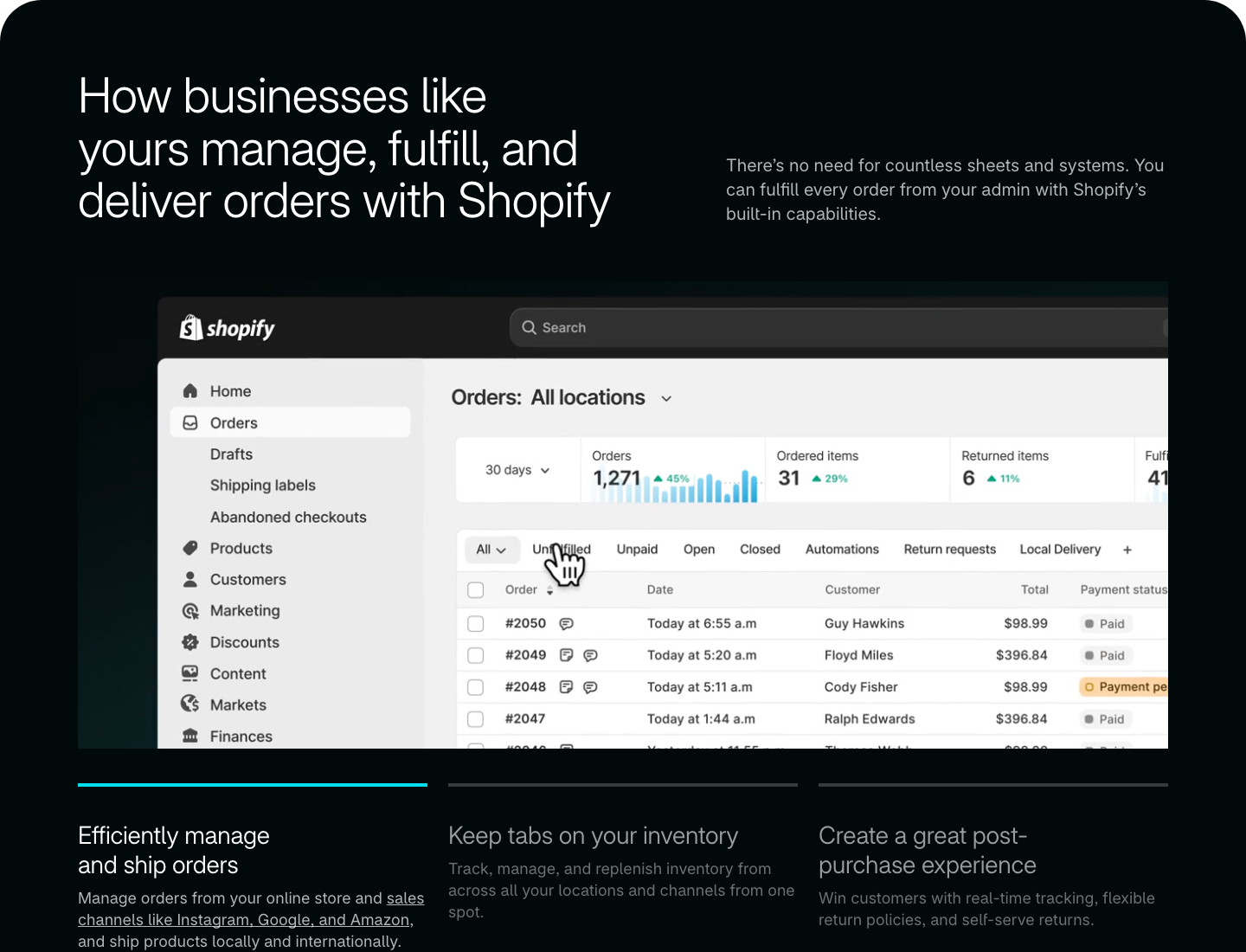
Shopify is a hosted commerce platform that lets a small retailer manage products, checkout and sales channels without operating a server. A practical workflow starts in Products: add an item, set its price and inventory, then choose which channels can show it. Shopify documents active, draft and unlisted product states, which helps a merchant stage a seasonal collection or share a direct-link-only item. Variants carry separate stock and price settings, which matters when sizes and colors sell at different rates.
The operational advantage is one admin for catalog and channel visibility. A listing on the storefront isn't proof that a shopping feed carries the right identifiers or stock, though. Export the data and check it before you send it to an advertising platform or marketplace, and test a refund with an inventory reversal, not only a successful checkout.
G2 shows Shopify at 4.4 out of 5 from 5,150 reviews. Shopify fits a merchant that values managed infrastructure and a structured catalog, but it's a weaker fit when unrestricted checkout code or self-hosting is essential.
- Starting price
- Basic $29/mo billed annually
- Online card rate
- 2.9% + 30 cents on Basic
- Best fit
- Managed product-first stores
WooCommerce: Best for an existing WordPress team
WooCommerce
Open-source store plugin for WordPress
WooCommerce turns an existing WordPress site into a store, which makes it the natural pick for a team that already publishes on WordPress.
WooCommerce's pricing page says the core plugin is free and estimates hosting at $25 to $350 per month for most stores, with extensions at $29 to $299 per year each. Those are component ranges, and they're not a quote for your shop. A store with many paid extensions can end up costing more than one that's on a hosted subscription.
- you already run WordPress with a reliable maintenance process
- you want control over hosting, plugins and checkout
- nobody owns backups, security updates and emergency fixes
- you want one vendor responsible for uptime
How it works in practice
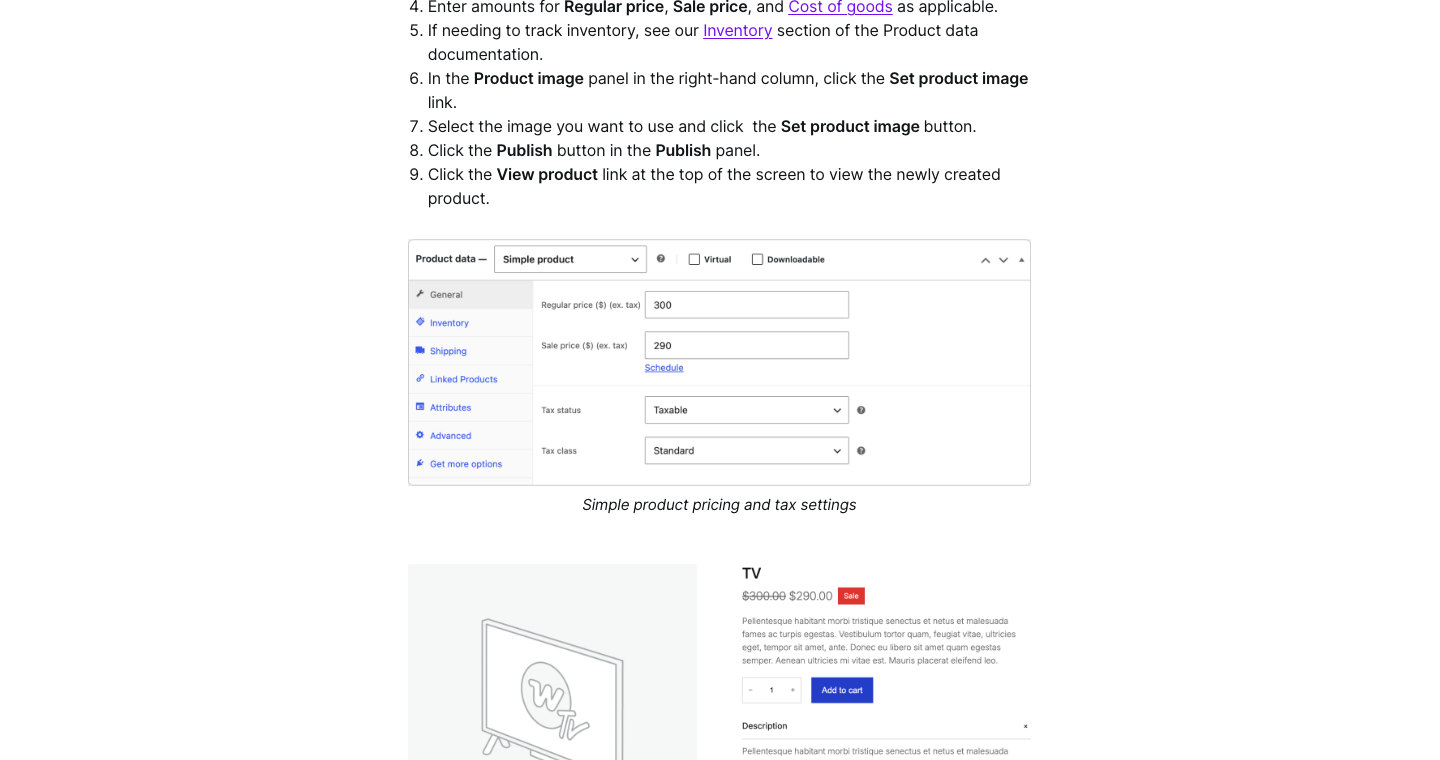
WooCommerce adds a store to a WordPress website. The editor can create a product, choose its type and configure price, inventory and shipping. WooCommerce distinguishes simple, grouped, external and variable products, and a variable product can carry a separate SKU, price and stock count for each variation. That's what lets a clothing store sell out of one size without hiding the whole item.
The freedom to assemble the stack is the main advantage: the business chooses its hosting, payment gateway, theme and extensions. That also creates maintenance work. A WordPress team keeps its publishing workflow and can customize product pages deeply, but it needs backups, staging, security updates and someone who can resolve plugin conflicts. Before launching, place a test order after updating the theme and the payment extension, because a checkout that works today can break after an update that wasn't coordinated.
G2 lists WooCommerce at 4.4 out of 5 across 1,283 reviews. WooCommerce suits a business with technical ownership, yet it's a weaker fit when the founder wants one vendor responsible for every component.
- Starting price
- Free core; hosting and extensions extra
- Hosting estimate
- $25 to $350/month for most stores
- Best fit
- Existing WordPress teams
BigCommerce: Best for complex growing catalogs
BigCommerce
Hosted store with a structured catalog and GMV-based plans
BigCommerce is a hosted platform built around a structured catalog and open APIs, aimed at stores whose products are more complicated than a handful of variants.
BigCommerce's US pricing page lists Core at $29 per month on annual billing, Growth at $79 and Scale at $299. Core covers up to $30,000 in trailing-twelve-month GMV and upgrades automatically to Growth at that threshold; Growth covers up to $100,000 before it moves to Scale. Card processing begins at 2.89% plus 29 cents per transaction on all plans. Model your expected sales against those thresholds before you assume the entry price stays fixed.
- your products have options, SKU-level stock or ERP connections
- you can forecast sales against the plan GMV thresholds
- you want the simplest visual builder for a handful of products
- you need a bill that never changes as revenue grows
How it works in practice
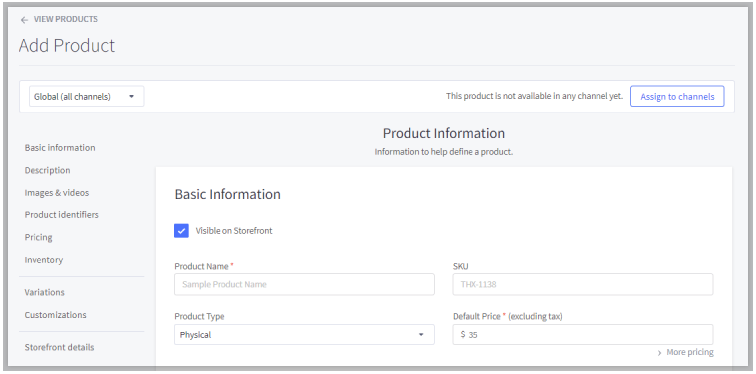
BigCommerce provides hosted ecommerce with a structured catalog and developer-facing APIs. Its catalog documentation covers physical and digital products, variants and SKU-specific inventory. A growing merchant can model a complex item with options, discounts and stock changes before choosing a storefront design. That matters for spare parts, configurable goods and businesses that connect an ERP or warehouse, where the data model counts for more than the number of templates.
The most revealing evaluation uses the hardest SKU in the catalog. Import it, add several variants, apply a promotional price and change inventory. Then check whether the update reaches the connected system. Test checkout with the payment provider you'll use under the exact plan; an integration diagram isn't evidence that the data reconciles.
G2 shows BigCommerce at 4.2 out of 5 from 584 reviews. BigCommerce is attractive when product complexity justifies a more structured platform. It's less compelling for a tiny store whose owner only needs a simple visual builder, and a seller whose revenue is going to cross the GMV thresholds quickly shouldn't wait to price the next tier.
- Starting price
- Core $29/mo billed annually
- Core GMV limit
- $30,000 trailing twelve months
- Best fit
- Complex growing catalogs
Wix: Best for design-led local sellers
Wix
Website builder with a built-in store
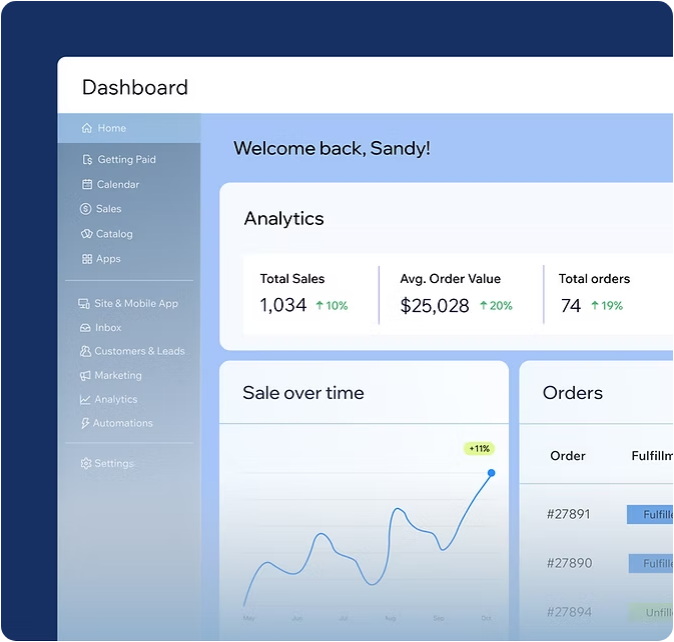
Wix pairs a visual website editor with Wix Stores, which suits a local seller who wants pages, products and branding managed in one place.
Wix localizes its plan prices by country, and its plans page lists Core, Business and Business Elite as the ecommerce tiers. Amounts shown outside the US include local tax and are marked as USD reference values, so confirm the US price, billing period and plan limits at checkout and keep that quote with your budget.
- you edit product and marketing pages visually
- you sell products with size or color variants on a small team
- you need complex backend order orchestration
- you need extensive custom commerce logic
How it works in practice
Wix combines a visual website editor with Wix Stores. A founder can create the homepage, add products and maintain a modest catalog without operating a separate WordPress installation. Wix's support documentation says stock can be tracked by product or by variant, with a simple in-stock or out-of-stock status as an alternative, and the mobile app can scan an existing SKU barcode to find a product. Those details matter when the owner of a small boutique also handles purchasing and stock, because there's no one else to catch a miscount.
The product-options guide documents variant-specific prices, inventory, weights, preorders and cost-of-goods information. That lets a merchant track sizes separately rather than treating every option as one inventory pool. A visual editor helps with landing pages and brand presentation, but it doesn't replace fulfillment routines, tax settings or returns management, so test the exact order flow and the export options before you commit, and note what you can't export.
G2 shows Wix at 4.2 out of 5 from 1,903 reviews. Wix fits a content-rich local business with a modest store. A retailer with complex pricing or many warehouses should test those workflows before choosing it.
- Starting price
- Confirm US price at checkout
- Ecommerce tiers
- Core, Business, Business Elite
- Best fit
- Design-led local sellers
Squarespace: Best for visual brands and studios
Squarespace
Website builder with commerce and a Basic-plan fee
Squarespace is a hosted website builder with commerce built in, a good match for a studio or lifestyle brand where photography and editorial pages drive sales.
Squarespace's support documentation lists a 2% commerce transaction fee on the Basic plan and 0% on Core, Plus and Advanced. That fee can make the cheapest plan the most expensive one for a store with steady sales, although it's fine for a hobby shop. Squarespace's pricing page shows local-currency amounts by region, so confirm the current US plan price at checkout before you budget.
- you sell alongside content or services on a design-led site
- your product catalog is straightforward
- you rely on complex fulfillment or wholesale catalogs
- you expect to stay on Basic with high sales volume, where the 2% fee adds up
How it works in practice
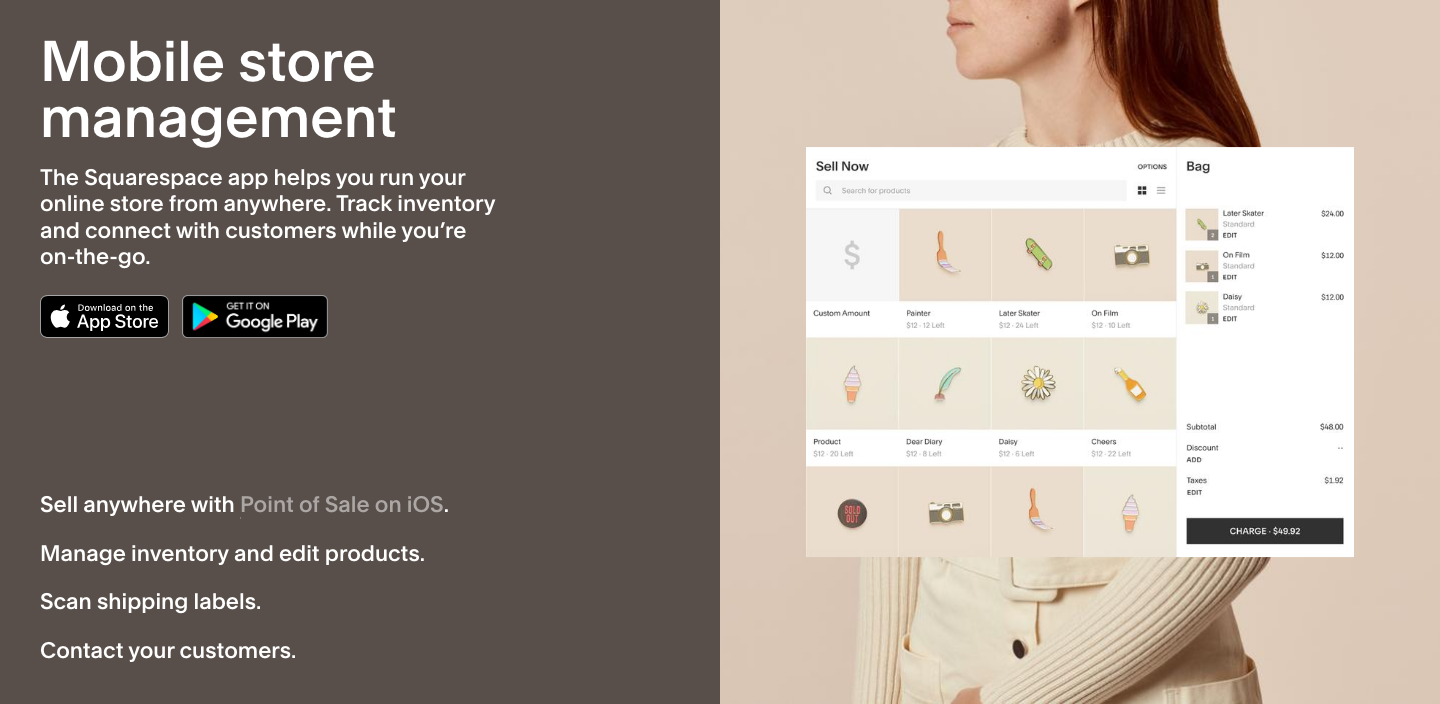
Squarespace manages content and a modest product catalog in one system without a server to maintain. It's especially relevant to a studio or lifestyle brand whose product photography and editorial pages drive purchases. The migration workflow deserves as much attention as the templates, though. Squarespace's help center documents CSV imports and bulk edits, with field rules for products and variants.
The essential limitation is that a CSV import is a one-time copy, not a continuous sync. If the old store keeps taking orders while the new Squarespace site is prepared, its inventory changes won't appear on the new site automatically. A migration therefore needs a data freeze or a controlled final import, followed by checks on stock, images and URLs, and that's work you'll want to schedule. If you're selling on several channels, look for a real integration rather than assuming an import keeps systems aligned.
G2 lists Squarespace at 4.4 out of 5 from 1,137 reviews. Squarespace is a strong choice for a visual, content-led store with manageable data. It's less suitable when the storefront is one endpoint of a heavily automated product operation.
- Starting price
- Confirm US price at checkout
- Commerce transaction fee
- 2% on Basic; 0% on Core, Plus, Advanced
- Best fit
- Visual brands and studios
Square Online: Best for selling in person and online
Square Online
Online store tied to Square's point of sale
Square Online extends the Square ecosystem to the web, so a shop that already takes card payments at a counter can add online orders without a second system.
Square's US pricing page lists Free at $0 per month per location, Plus at $49 and Premium at $149. The online card rate is 3.3% plus 30 cents on Free and 2.9% plus 30 cents on both Plus and Premium, so Premium doesn't lower the online rate. The per-location pricing matters if you've got more than one shop. The Free tier also costs more per sale, so it's worth running the numbers to see when Plus pays for itself, and it's easy to do.
- you already take payments with Square at a counter or market
- you want pickup, delivery and shipping orders in the same system
- you need a heavily customized editorial storefront
- you want to choose your own payment processor
How it works in practice
Square Online connects a hosted online store with Square's payments ecosystem. A shop or cafe already using Square should compare it before buying a separate ecommerce platform. The practical workflow starts with items in the merchant's Square environment, extends them to online ordering and routes the order to the people handling pickup or shipping. The goal's simple: cut duplicate product and payment administration. A store that can't route orders reliably to staff gains little from a polished homepage, and that's the point of testing fulfillment first.
Operational fit depends on fulfillment. Test pickup, local delivery, shipping and returns against the exact setup the business will use. If staff must copy data into a second system for every exception, the simplicity you're paying for disappears. If you've got a custom editorial storefront or an unusual checkout, you may also find the builder's design controls restrictive.
Square Online fits an operator whose physical counter and online order queue share an owner. It's weaker for deeply customized B2B storefronts.
- Starting price
- Free $0/mo; Plus $49/location/mo
- Online card rate
- 3.3% + 30 cents on Free; 2.9% + 30 cents on Plus and Premium
- Best fit
- Selling in person and online
Ecwid: Best for adding checkout to an existing site
Ecwid
Store widget that embeds into an existing website
Ecwid by Lightspeed adds a store to a website you already have, so the original site stays the marketing home while Ecwid handles products and checkout.
Ecwid's pricing page lists Starter at $5 per month for up to 10 products, Venture at $29 for up to 100 products, Business at $49 for up to 2,500 products and Unlimited at $119, all billed annually. Its FAQ says Ecwid charges no setup or transaction fees on any plan, although payment providers charge their own, so the checkout total won't be zero. The product limits are the real constraint for a growing catalog, so count your SKUs before you pick a tier.
- you want to add a store to a site you already have
- you want to keep your current website as the main site
- you need a fully custom checkout
- you plan more than 100 products but want to stay on Venture

How it works in practice
Ecwid's help center explains how to embed an entire store, a category, a product card or a Buy button into WordPress, Wix and custom sites. That's useful for a small company with an established content site that wants to start selling without rebuilding every page. Products and orders are managed in Ecwid while the original site remains the main marketing destination.
Ecwid's variation guide explains how a seller can assign a separate SKU, price, image and stock count to each variation, which lets a store grow beyond a few simple Buy buttons. It also introduces a system boundary: you've got to decide which system owns descriptions, product URLs and search indexing. Test the actual embedded page and its structured data before you assume it'll behave like a native catalog.
G2 shows Ecwid at 4.7 out of 5 from 405 reviews. Ecwid is attractive when an existing site needs a commerce layer. It's less suitable when the business wants complete control over every part of checkout and the backend.
- Starting price
- Venture $29/mo billed annually
- Venture product limit
- Up to 100 products
- Best fit
- Adding checkout to an existing site
Big Cartel: Best for makers with focused catalogs
Big Cartel
Simple hosted shop for artists and makers
Big Cartel is a hosted storefront for independent artists and makers, built for a small, focused shop that doesn't need a complicated ecommerce stack.
Big Cartel's pricing page shows a free Gold plan with limited features, Platinum at $15 per month after seven days free and Diamond at $30 per month. The seven free days aren't part of the recurring price, and plan product limits differ, so check the exact tier before you upload a large catalog that you'll have to re-upload later.
- you sell a small, curated range such as prints, apparel or music
- you want to be live without configuring a full ecommerce stack
- you need extensive variants, wholesale pricing or many integrations
- you run several warehouses or locations
How it works in practice
Big Cartel helps a seller list a focused collection, accept orders and manage a small shop without a week of software setup. Its site highlights physical and digital products, print-on-demand connections, discounts and social selling. For a maker preparing a limited release, the important workflow is photographing an item, publishing it and shipping the order.
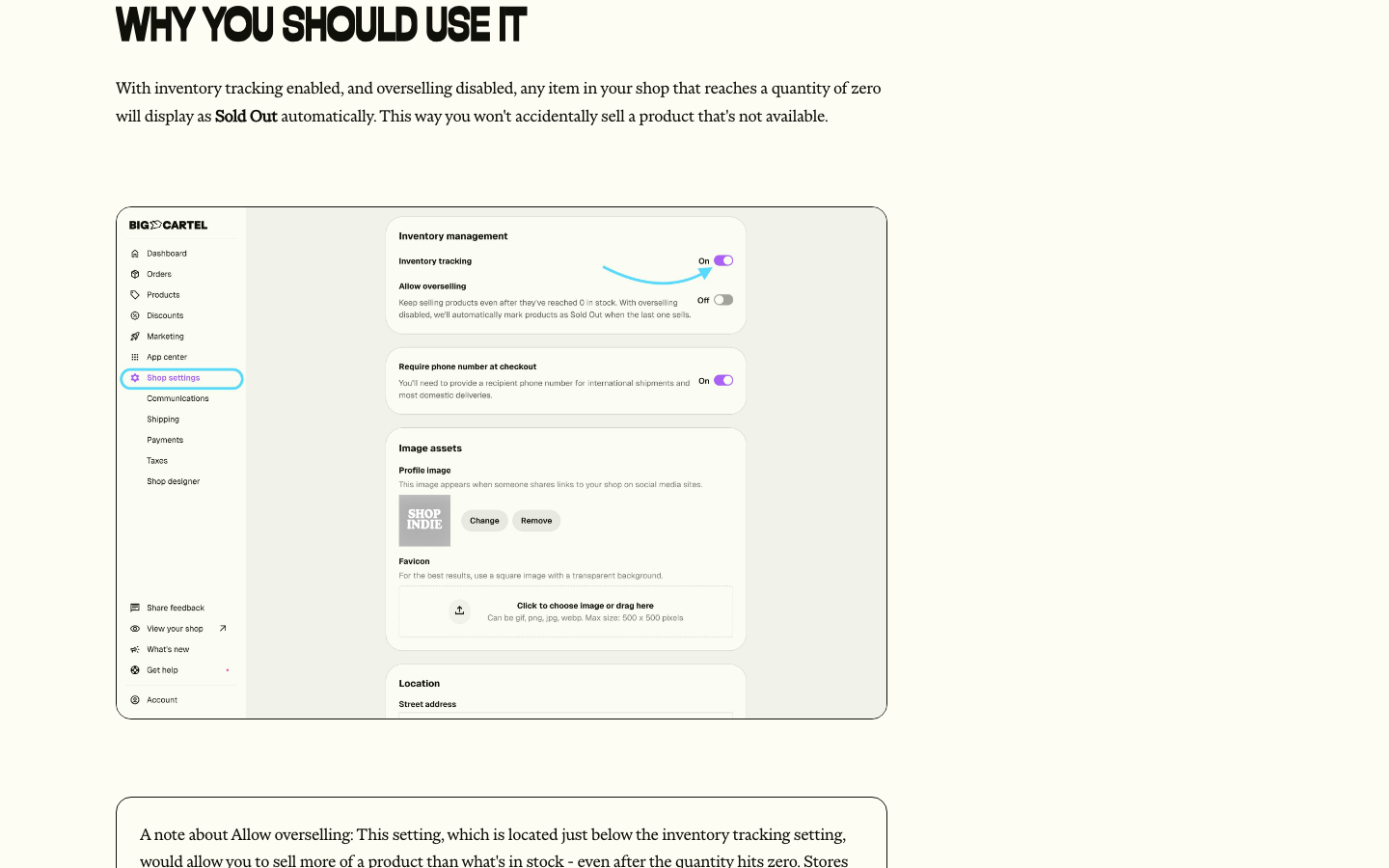
Its help center documents inventory tracking in shop settings, which covers the basic need: you won't oversell a limited run. If the business needs extensive variants, wholesale pricing or multiple warehouses, request a demonstration of those requirements instead of assuming every ecommerce builder supports them. Estimate when manual spreadsheets or outside tools become necessary, since you'll end up paying for them.
G2 shows Big Cartel at 4.6 out of 5 from 105 reviews, a much smaller sample than the larger platforms. Big Cartel fits a creative seller with a curated assortment and straightforward shipping. It's less compelling for complex retail operations or for sellers who need detailed SKU-level analytics and many integrations.
- Starting price
- Platinum $15/mo after 7-day trial
- Top plan
- Diamond $30/month
- Best fit
- Makers with focused catalogs
How should a small business test a platform before migrating?
A small business should test its hardest real product, a real payment method and a complete order-to-refund workflow. Feature tables often hide the work needed to move stock, images and customer-facing URLs between systems.
Export a sample containing a simple item, a variant-heavy item and an out-of-stock product. Import those records into the candidate platform and check SKUs, images, prices and URLs. Place an order with the intended processor, fulfill it, then cancel or refund it, and compare the resulting inventory and payment records. Repeat with the shipping and tax settings you'll actually use.
Assign owners for redirects, product data, DNS, payment setup and rollback. Without an inventory freeze or a controlled final import, the old and new sites can end up selling different quantities. If the platform uses a one-time CSV import, don't assume later changes will synchronize automatically.
Map the catalog
Export products, variants, images, SKUs and stock.
Price a real order
Include processing, shipping, apps and refunds.
Run the order lifecycle
Place, fulfill, cancel and refund a test order.
Plan the cutover
Assign owners for redirects, data freeze and rollback.
What should a small business avoid when choosing a platform?
Never choose solely on a promotional price or an attractive theme. Check sales-based plan upgrades, payment-provider rules, product export paths and the staff time needed to resolve errors. A self-hosted store gives more control but needs an owner for updates and security, while a hosted store reduces infrastructure work but may restrict checkout customization.
Don't treat a product import as an integration either, because they're different things. An import copies data at a point in time; an integration keeps changes aligned afterward. If you sell on multiple channels, decide which system owns price and inventory before going live, otherwise stock errors can appear even when each storefront looks right.
- Confirm the source of truth for every SKU.
- Get a US price quote with billing terms.
- Test an order, refund and stock reconciliation.
- Check variant and sales-channel limits.
- Budget support, hosting, extensions and migration.
- Assign a storefront owner after launch.
Where do product feed checks belong in ecommerce operations?
Product feed checks belong between the source catalog and each destination channel. A feed can carry a wrong price, a missing identifier or stale availability even when the storefront looks fine, so review the actual exported data before blaming an advertising platform or marketplace.
A feed quality check isn't a catalog editor or a tool that publishes products, yet it's still worth a place in the routine. It's a focused verification step: use it to catch data problems before a channel consumes a new export, then trace the problem back to the catalog or the export process.
Which platform fits each stage of small business growth?
Each stage of small business growth needs a different platform strength. If you're launching a first product, a simple hosted shop such as Big Cartel, Shopify or Square Online lets you sell without a developer. If you already have a website, Ecwid or WooCommerce adds a store to it instead of replacing it. If your catalog has many options or you're connecting a warehouse or ERP, BigCommerce's structured catalog is built for that, and Shopify's variants cover simpler cases. If brand presentation drives your sales, Wix and Squarespace put the design tools first.
Growth also changes the budget math. A store passing $30,000 in trailing-twelve-month GMV hits BigCommerce's Core limit, a catalog above 100 products outgrows Ecwid's Venture tier, and a second location doubles a Square Online Plus bill. Check what a threshold costs before you reach it, because you can't undo an automatic upgrade.
The most useful platform demo clearly uses your own data. Ask the vendor to import a difficult item, change a variant's stock, place an order, issue a refund and show the resulting records. If the process needs a paid app, get the app's exact cost and support owner, then ask what happens when you open another location or pass a sales threshold.
How do payment rules change the platform decision?
Payment rules can make two platforms with similar subscription prices very different in practice. List the payment methods your customers actually use, including cards, wallets and any local option, then check which of them the tier you're considering supports and whether an outside payment provider triggers an extra platform fee. A lower processing percentage can be offset by a higher fixed subscription, and a store with low order volume won't have the same economics as one that processes thousands of small orders.
Run the calculation with the real average order value and number of orders, not a hypothetical $100 purchase if most customers buy $18 items. On an $18 order, a 30 cent fixed fee alone is more than 1.6% of the sale, so the fixed part of the rate matters as much as the percentage. Include refunds and chargebacks because these create work and may leave nonrefundable processing charges. If a business sells internationally, check currency conversion and cross-border rates. A platform's advertised entry price rarely includes every cost that matters to the finance team.
The payment decision also affects the customer experience. Test the exact checkout on mobile, including an address correction, a declined payment and a refund. Confirm who sees the order after a payment succeeds and what staff do when it fails. The best platform isn't the one with the most payment logos in a feature grid, it's the one your team can operate consistently.
What should a small business do after its ecommerce launch?
Many owners want more sales channels quickly, but a small business should review product data, payments and fulfillment right after launch, before adding any. During the first week, reconcile paid orders against processor settlements and inventory changes, and check that shipping and pickup notifications reach the right people. Record the customer questions that need manual work, and don't wait for a pattern before you act, then decide whether a process change or an integration would remove that work.
Review product pages on a phone and inspect the actual exported feed if you run shopping ads. Compare the feed's identifiers, prices and availability with the source catalog, because a correct storefront doesn't guarantee a correct export. When a mismatch appears, find out whether it started in a manual edit, an import or the channel mapping. Keep a log of fixes so you don't rediscover the same problem during the next promotion.
Assign ownership for routine tasks. Someone should review failed orders, someone should approve price changes and someone should maintain the website or extensions. In a very small business one person may own all three jobs, but they're still three jobs and it helps to name them. The right platform makes these routines manageable without hiding them.
When is it worth switching ecommerce platforms?
A platform switch is worth considering when the current system repeatedly blocks a workflow you need or costs more to operate than a realistic alternative. Examples include stock that can't stay aligned across channels, checkout rules that depend on fragile workarounds or an integration that staff repair every week. A redesign alone is rarely enough reason to move the whole store.
Before switching, compare the cost of fixing the current problem with the full migration cost. That includes product and customer exports, URL redirects, payment setup, design, testing and the time you'll spend running two systems during the transition. Estimate the risk of lost product data or order history as well. If a focused extension solves the problem safely, staying put may be the better call. If the platform can't support the core business model, a carefully planned migration is justified.
Where should you read next?
If you're weighing the biggest hosted platforms by pricing, read our Shopify pricing and BigCommerce pricing breakdowns. If you're choosing between store builders rather than platforms, the best online store builders guide compares them by catalog, payment and fulfillment tests.
Frequently asked questions about small business ecommerce platforms
What is the best ecommerce platform for a small business?
There's no single best. Shopify suits a managed product store, WooCommerce suits a team already on WordPress, Square Online suits a shop that already uses Square, and Ecwid suits a business that wants to keep its current website. Test your own hardest product and a real order before you decide, because that's where platforms differ.
Can I start an online store for free?
Partly. WooCommerce's core plugin is free but hosting and extensions aren't. Square Online has a $0 plan with a 3.3% plus 30 cents online card rate, and Big Cartel has a free Gold plan with limited features. Payment processing, apps or hosting still cost money, so "free" never means you won't pay anything.
Is WooCommerce cheaper than Shopify?
Not automatically. WooCommerce has no platform subscription, but its pricing page estimates hosting at $25 to $350 per month and extensions at $29 to $299 per year each. Shopify Basic is $29 per month on annual billing plus app costs. Price your own setup, since your hosting and extension choices decide what you'll pay.
Which platform works for an in-person retailer?
Square Online is worth evaluating when the retailer already takes payments with Square, because items and payments live in one system. Check pickup, inventory and refund flows before you commit, so you aren't surprised later.
Will a CSV import keep my products synchronized?
No. Squarespace describes its CSV import as a one-time copy, so later stock changes in the old store won't carry over. Plan a data freeze or use a real integration for ongoing sync, or you'll sell stock that isn't there.
Does the plan price include payment fees?
No. Card processing is charged on top of the subscription. For example, Square lists 2.9% plus 30 cents online on its Plus plan, and BigCommerce says processing begins at 2.89% plus 29 cents on all plans.