The best online store builders are Shopify for a commerce-first store, Wix for visual editing and Square Online for merchants who also sell in person. BigCommerce, Squarespace, WooCommerce and Ecwid solve different storefront jobs. Choose a store builder by its catalog and order workflow, not by the nicest template alone, because that's what you'll live with after launch.
The comparison below focuses on the work an ecommerce director actually owns: catalog integrity, checkout economics, fulfillment handoffs, changes made by nontechnical staff and the cost of operating the store after launch. We reviewed public US-facing vendor pages and help documentation on October 27, 2026. This comparison rests on public vendor pages and documentation, not on hands-on product tests, and it doesn't assign numerical ratings.
Which online store builder fits each business?
An online store builder fits when its editing model, product data and payment terms match the team running the store. The shortlist separates visual-first tools, commerce-first tools and ways to add a store to an existing site. Use the picks to narrow a trial, then run the scenarios in the evaluation section.
 Best for growing direct-to-consumer storesShopifyHosted commerce platform
 Best for visual merchandising by small teamsWixVisual website builder with Wix Stores
 Best for design-led product catalogsSquarespaceHosted website and commerce builder
 Best for structured catalogs and sales growthBigCommerceHosted ecommerce platform
 Best for stores connected to in-person sellingSquare OnlineOnline storefront tied to Square commerce tools
 Best for WordPress ownership and customizationWooCommerceOpen-source WordPress commerce plugin
 Best for adding a store to an existing websiteEcwidEmbeddable ecommerce platform
How do online store builders compare on cost and workflow?
Online store builders differ in who maintains the site, how product changes are handled and which charges sit outside the base subscription. The prices below are US list prices from the vendors' own pages. Wix and Squarespace show location-dependent amounts, so they're listed without a quote. That doesn't mean they're free.
| Tool | Store type | Operational fit | Starting price |
|---|---|---|---|
| Shopify | Hosted ecommerce | Catalog to checkout and inventory | Basic $29/mo billed yearly |
| Wix | Website builder | Visual editor to catalog and checkout | Paid commerce-capable plan; US checkout price varies |
| Squarespace | Website builder | Content to store and checkout | Paid plan; US checkout price varies |
| BigCommerce | Hosted ecommerce | Catalog to storefront and payments | Core $39/mo monthly or $29/mo annually |
| Square Online | Online storefront tied to Square commerce tools | In-person and online operations in one vendor ecosystem | Free plan with processing fees |
| WooCommerce | WordPress ecommerce | WordPress products to checkout | Free core; hosting, extensions and maintenance extra |
| Ecwid | Embeddable ecommerce | Existing website to store | Venture $35/mo monthly or $29/mo annually |
 The Ecom Director Our product | Product feed checks and monitoring | Checks product feeds before they reach Merchant Center and compares each new version | $9/month |
US prices checked October 27, 2026. Wix and Squarespace need a US checkout quote.
Don't read the table as a ranking by price. A lower subscription can easily be offset by app fees, gateway charges or labor. An existing WordPress team may accept more maintenance, while a retailer using Square may gain more from a consistent point-of-sale workflow than from another theme editor.
The best online store builders for different store workflows
The strongest online store builders solve different operating problems. Shopify emphasizes a managed commerce workflow, Wix and Squarespace emphasize site presentation and BigCommerce requires close attention to GMV-based pricing. Square Online, WooCommerce and Ecwid are useful when an existing business system determines the architecture. Each profile includes the scenario to test and the condition that should disqualify it.
Shopify: best for growing direct-to-consumer stores
Shopify
Hosted commerce operations with location inventory and processor-dependent fees
A hosted commerce platform for stores that expect checkout, inventory and orders to run as one operational system.
- The team wants a managed store and plans to coordinate inventory and orders across channels.
- Owning the application stack and its deployment process matters more than reducing platform maintenance.
Operational review and trade-offs
Shopify is a hosted commerce platform for a store that expects its checkout and order volume to become an operational system, not just a brochure with a cart. A new merchant can select a theme, enter products, configure shipping and tax settings and then start taking orders. The important distinction isn't the first day of setup. It's what happens when the business adds warehouses, marketplaces and staff members who need to touch the catalog without breaking the storefront.
For example, imagine a home-goods merchant with a retail stockroom and a fulfillment partner. Shopify tracks stock by location and uses fulfillment configuration to route orders. The operations team should test what happens when one location sells out while another still has inventory. Don't treat a polished product page as evidence that the order will be routed correctly. It clearly isn't. Run that edge case in a trial store before signing a longer commitment.
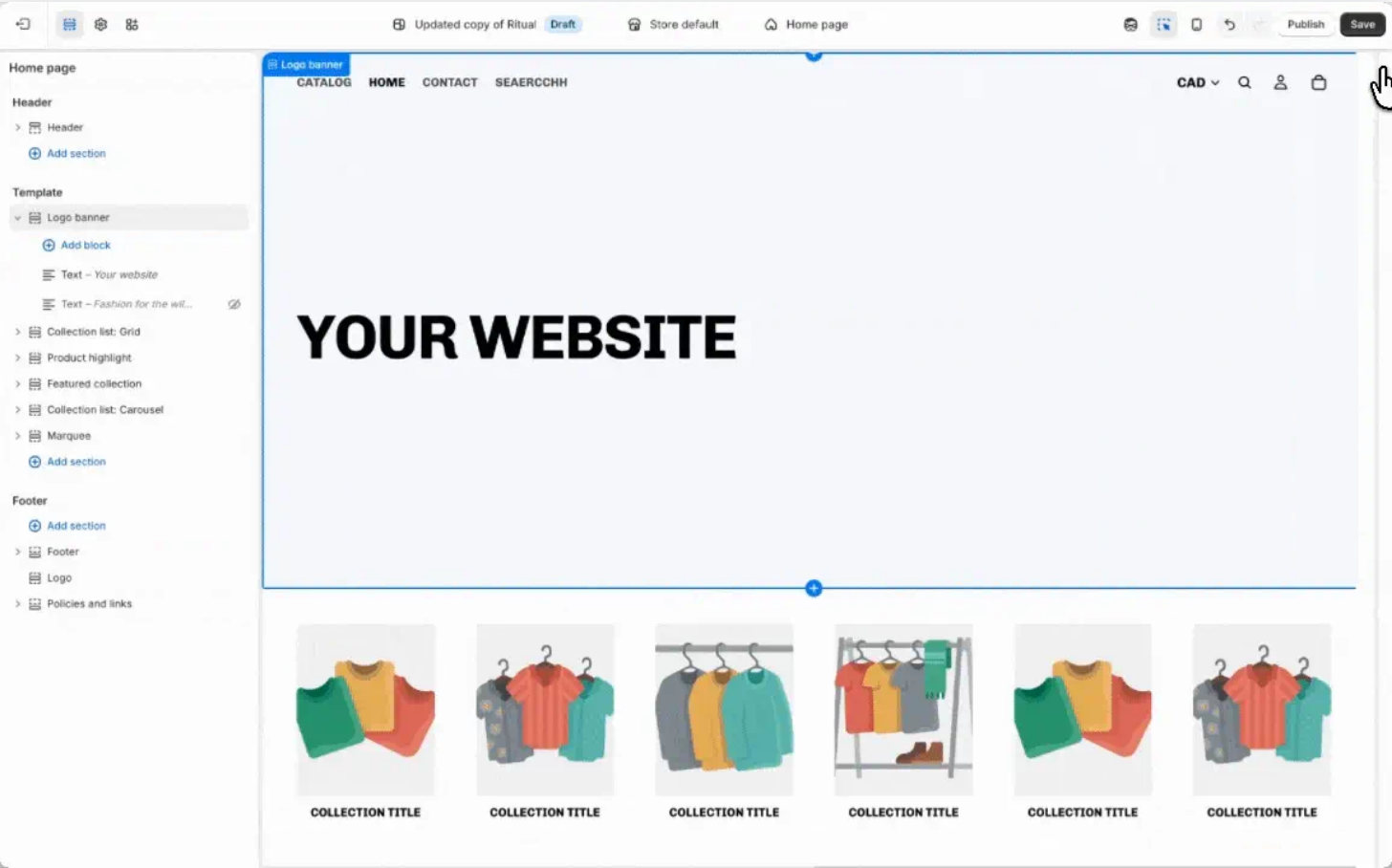
The theme editor offers a preview pane and section controls, which makes routine merchandising possible without a developer. Deeper changes to the theme or unusual checkout behavior may still require specialist work or an app. That's the central trade-off: the merchant gets a managed hosting and checkout foundation but accepts the platform's extension model. Put app subscription costs into the launch budget rather than pretending the base plan is the whole expense.
Shopify lists Basic at $29 per month with annual billing and $39 when paid monthly. Grow is $79 per month annually and Advanced is $299 per month annually. Those are platform subscription prices, not all-in processing costs, and they're only the starting point. Card fees, paid themes and extensions can change the economics. Choose Shopify when the team wants a managed store and plans to coordinate inventory and orders across channels. Skip it when owning the application stack and its deployment process matters more than reducing platform maintenance.
Shopify fits when you'll add locations or channels later, and it isn't the right pick if you'd rather own every layer of the stack. Budget for apps before you've signed anything, because that's where the real monthly cost shows up.
- Starting price
- Basic $29/mo billed yearly
- Best operational use
- Storefront, inventory and multichannel sales
Wix: best for visual merchandising by small teams
Wix
Site builder with variant inventory
A visual website builder with Wix Stores, suited to small teams that merchandise through the site editor.
- A small team needs flexible presentation and straightforward product variants.
- The project centers on complex wholesale account rules or a large custom fulfillment architecture.
Operational review and trade-offs
Wix is a visual website builder with ecommerce capabilities for merchants whose homepage, landing pages and content layout matter as much as the catalog. The practical workflow starts in the site editor. A marketer arranges the presentation, creates product pages and adds the store's payment and delivery settings. That division of labor can be useful when the person designing campaigns is also responsible for the storefront.
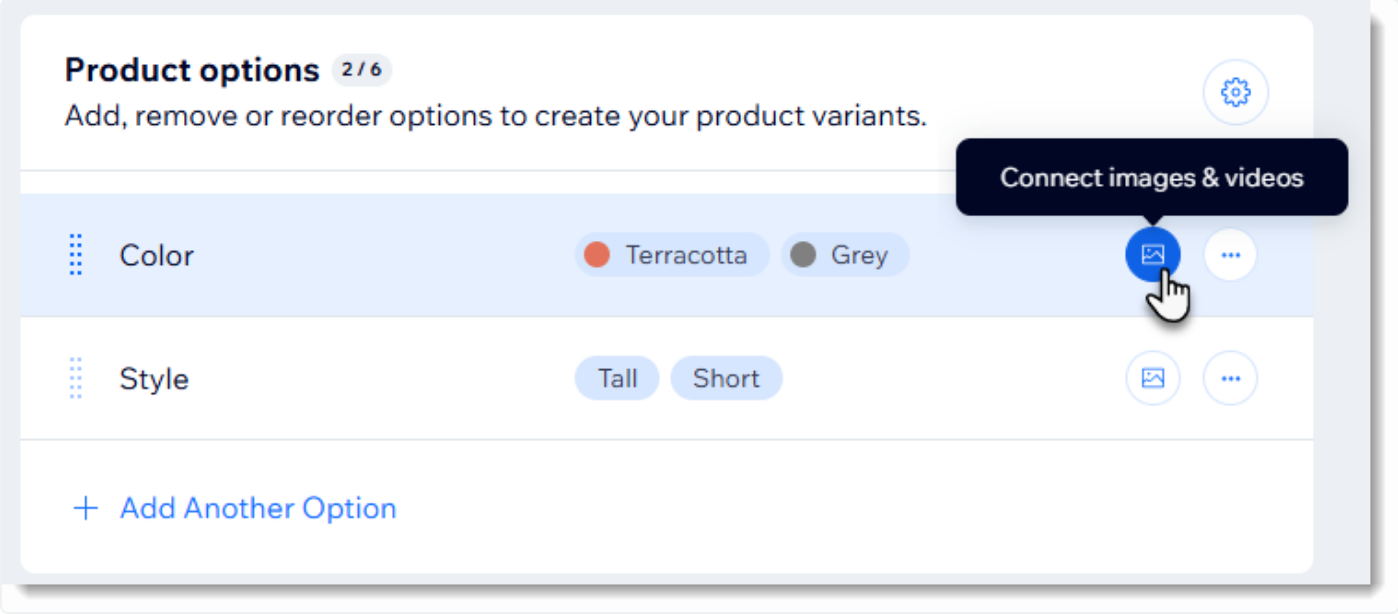
A small ceramics brand illustrates the fit. The team may sell a modest set of handmade products but needs editorial photography, story pages and seasonal landing pages. Wix lets the merchant work on the visual site while maintaining store products in the dashboard. Product options can create variants, and the support documentation shows variant-level pricing, inventory, SKU and shipping weight. That matters when a bowl comes in several finishes and each finish has a separate stock count.
Wix documentation says products can have up to six option types, though you should still test the resulting variant combinations against the actual catalog. The platform's ease of editing doesn't eliminate the need for careful SKU design. If two options produce an unexpected combination, a beautiful product selector won't fix incorrect fulfillment data. Set up one complex item, test its inventory and review the order record before importing the rest.
The pricing page is location-sensitive in the available public view, so no displayed amount is quoted here as a US price. Ask Wix for the exact US ecommerce-capable plan and payment terms before comparing it with a competitor's annual rate. Choose Wix when a small team needs flexible presentation and straightforward product variants. Skip it when the project centers on complex wholesale account rules or a large custom fulfillment architecture that would be better evaluated in a commerce-first platform.
Here's the short version for Wix: it's a strong match when the people who write the campaigns are also the people who'll run the store. You shouldn't expect it to behave like a commerce-first platform, and you'll want to confirm the US price before you've committed to anything.
- Starting price
- Paid commerce-capable plan; US checkout price varies
- Best operational use
- Drag-and-drop design with variant inventory
Squarespace: best for design-led product catalogs
Squarespace
Content-first commerce with Basic plan transaction fee
A hosted website and commerce builder for brands that lead with editorial design and a manageable catalog.
- Content and visual consistency lead the purchase.
- The main requirement is complicated warehouse allocation, customized checkout logic or ERP-driven product updates.
Operational review and trade-offs
Squarespace is a hosted website builder with online selling tools, well suited to brands that want a coherent editorial site and a manageable product catalog. The decision is less about whether a template looks attractive and more about whether the store's product structure fits its publishing model. Product pages, campaign pages and photography should work together without forcing the team to maintain a separate content site.
Consider a skincare brand that sells a small range of products and uses long-form ingredient stories to explain them. Squarespace allows the brand to organize its site around those stories and connect them to store pages. Its Products panel centralizes inventory for published, scheduled and hidden items. The support documentation also notes that removing a store page removes its products from inventory. That's an operational warning for anyone restructuring navigation after launch.
Squarespace documentation distinguishes version-specific catalog limits. In version 7.1 it lists up to 10,000 products per store page. That figure isn't a promise that every large catalog will be easy to merchandise. You should still test how product categories, filters, variant combinations and bulk changes behave with representative data. When a product has several sizes and scents, make sure the desired SKU and stock workflow is practical before importing the complete catalog.
Pricing and payment charges depend on the plan and location. Squarespace's public pricing page varies by location, so this article quotes no list price. Request the current US commerce plan and check transaction fees separately from card processing. Choose Squarespace when content and visual consistency lead the purchase. Skip it if your main requirement is complicated warehouse allocation, highly customized checkout logic or extensive ERP-driven product updates. The design editor can't replace those operational tests.
What you'll notice with Squarespace is that it's built around the page first and the product second. That's a plus if the brand story sells the product, but it doesn't help if you've got a catalog that changes daily. Confirm the current US plan at checkout, since the public pricing page doesn't give one stable number.
- Starting price
- Paid plan; US checkout price varies
- Best operational use
- Editorial design with centralized product panel
BigCommerce: best for structured catalogs and sales growth
BigCommerce
GMV-based plan thresholds and Open Payment Provider Fee
A hosted ecommerce platform built around catalog depth, with plan thresholds tied to sales volume.
- The built-in commerce workflow and payment-provider options fit, after you model the GMV thresholds.
- You want an unrestricted gateway choice without provider fees, or an unexpected plan upgrade would break the economics.
Operational review and trade-offs
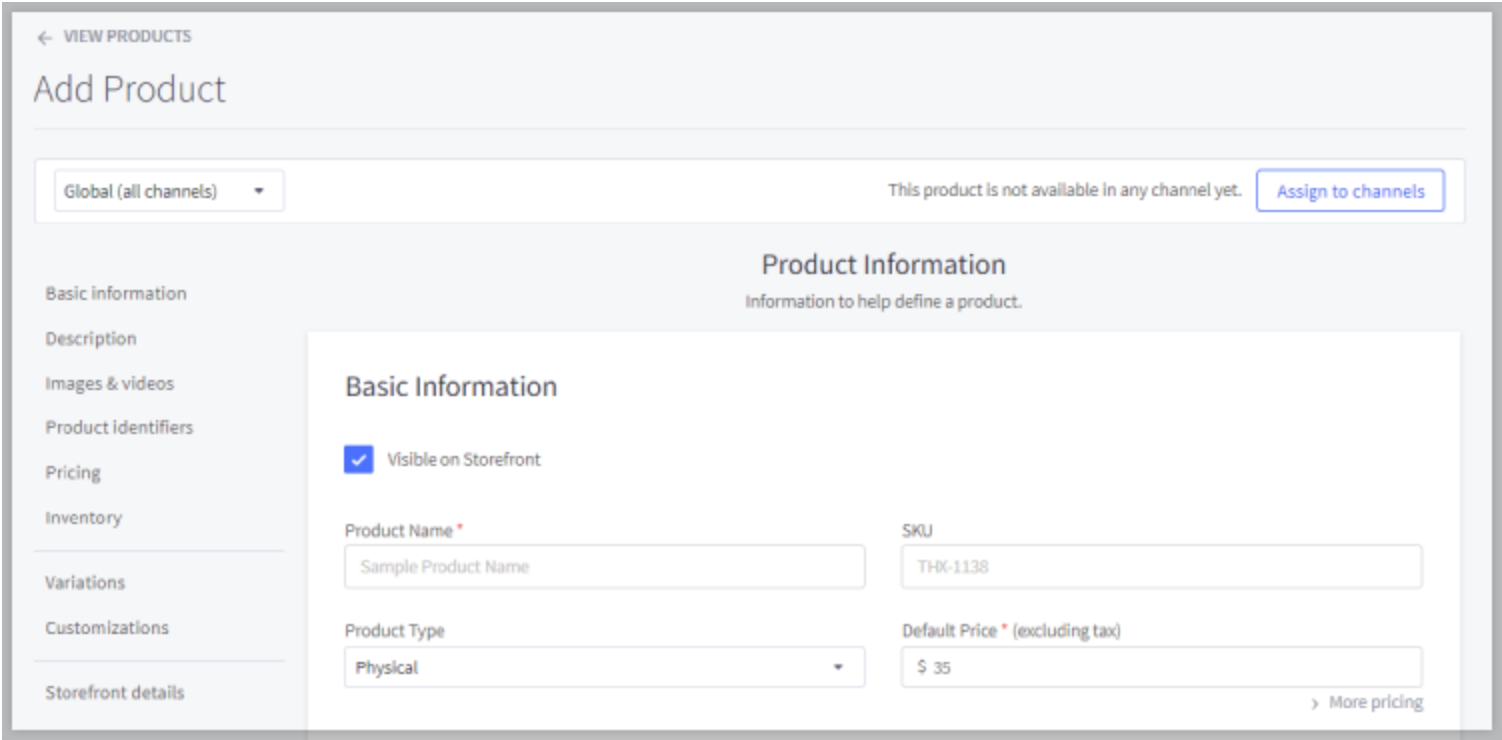
BigCommerce is a hosted ecommerce platform for merchants who want a commerce-focused catalog and prefer not to operate their own hosting stack. The platform can support a store with more demanding merchandising requirements, but the current pricing rules make revenue forecasting part of the software decision. A team evaluating BigCommerce should examine both the product workflow and the commercial terms before it chooses a plan.
Start with a representative catalog: a configurable product, a promotional price, an inventory change and a refund. Have merchandising staff edit the product while finance checks the transaction record. Then model the store's trailing sales against the platform's GMV rules. BigCommerce's current Core plan is $39 with monthly billing or $29 per month with annual billing, and it has a $30,000 trailing-twelve-month GMV threshold. Growth is $105 monthly or $79 annually, with a $100,000 threshold. Those thresholds can trigger upgrades as sales rise.
The newer Scale plan is $399 monthly or $299 per month billed annually. It has a published monthly GMV allowance and a 0.9% overage on GMV above $33,333 per month. BigCommerce also distinguishes embedded payment providers from open providers. The latter can add platform fees of 2.0% on Core, 1.0% on Growth and 0.6% on Scale for eligible order GMV. These are separate from the processor's card charges, so the gateway choice belongs in the budget.
BigCommerce is a strong candidate when catalog and checkout operations matter more than a purely visual editor. It isn't automatically the cheapest managed platform. Choose it if the built-in commerce workflow and payment-provider options match the merchant's needs, after modeling GMV thresholds. Skip it if the business wants an unrestricted gateway choice without checking provider fees or if an unexpected plan upgrade would make the economics unacceptable. The pricing page reflects the 2026 plan framework, so older Standard, Plus and Pro comparisons are unreliable.
With BigCommerce, it's the commercial terms that you'll want to study before the features. A store that's growing quickly can cross a GMV threshold sooner than planned, which is why finance shouldn't be left out of the trial. Model it before you've picked a plan, not after. It's an hour of work, and it's certainly cheaper than a surprise upgrade.
- Starting price
- Core $39/mo monthly or $29/mo annually
- Best operational use
- Catalog, multiple storefronts and plan GMV thresholds
Square Online: best for stores connected to in-person selling
Square Online
Online storefront for merchants already running on Square
An online storefront tied to Square point-of-sale and payment tools.
- An existing Square setup is the anchor and the site should serve the same inventory and customers.
- You need unusual storefront behavior, deep custom catalog rules or a payment-provider strategy that conflicts with Square.
Operational review and trade-offs
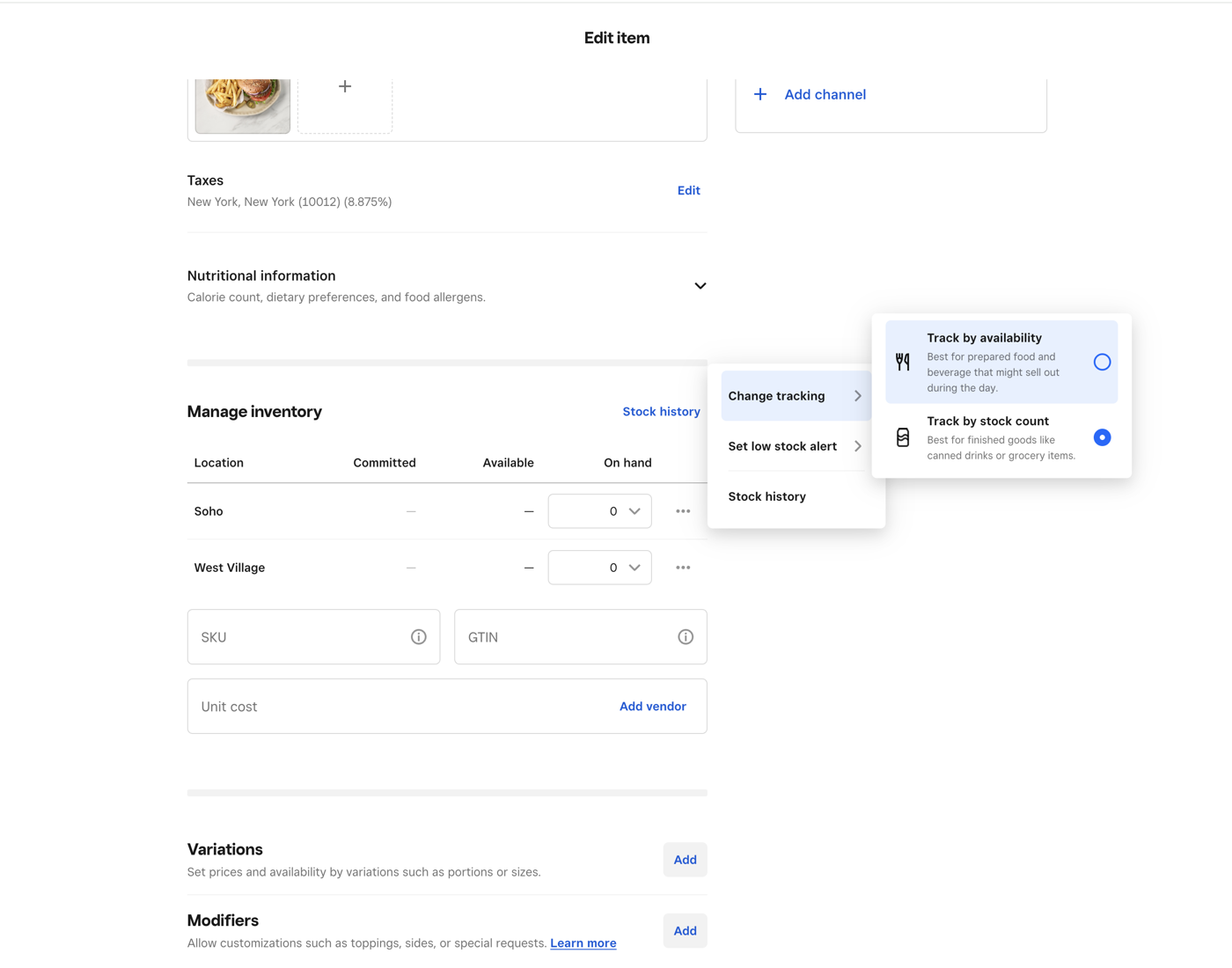
Square Online is a storefront option for a merchant whose existing business already runs on Square's point-of-sale and payment ecosystem. A bakery, gift shop or small retailer may care more about keeping an online catalog aligned with the physical counter than about having the most flexible theme system. The right evaluation starts with the inventory and order workflow between the two channels, not a homepage mockup.
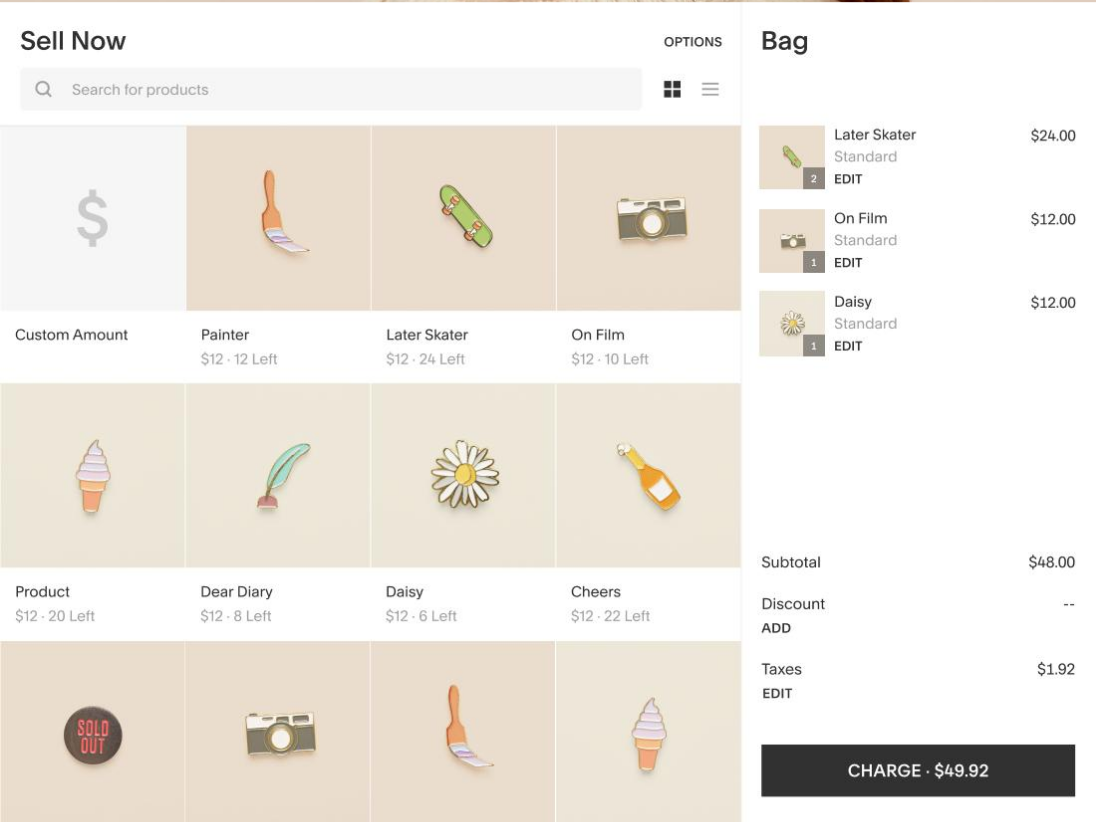
Picture a shop that takes pickup orders online while also selling the same products at a register. The team needs to understand which item records are shared, how stock changes propagate and what happens when a customer orders the last available unit. Square's online plans sit within its broader payment and business toolkit. Test one item sold at the counter, one placed online for pickup and one refunded. Record where the quantity and sales reports change. That exercise tells you more than a long feature checklist.
Square's US plan page confirms that Square Free has no monthly subscription charge and that merchants pay processing fees when they take payments. The same page lists free trials for Square Plus and Square Premium. The processing fee varies by plan, so don't assume a free subscription means free transactions. Hardware, add-on software and other business services may also be separate expenses. Compare a realistic mix of in-person and online payments rather than applying one rate to every order. You'll get a truer number that way.
Choose Square Online when the store's existing Square setup is the anchor and the ecommerce site should serve the same inventory and customers. Skip it if the business needs unusual storefront behavior, deep custom catalog rules or a payment-provider strategy that conflicts with Square's model. Before committing, verify whether the exact features required for pickup, delivery and promotions are included in the selected US plan. A simple storefront is valuable only when the order flow remains simple too.
The question for Square Online isn't whether the storefront is pretty. It's whether the counter and the website agree on stock, and you'll only find that out by running the test sale. If they don't agree, you've learned it cheaply, which is the point of the exercise, and you won't need a developer to run it.
- Starting price
- Free plan with processing fees
- Best operational use
- In-person and online operations in one vendor ecosystem
WooCommerce: best for WordPress ownership and customization
WooCommerce
Merchant controls hosting and extensions
The open-source commerce plugin for WordPress, with hosting, extensions and maintenance in the owner's hands.
- WordPress is already strategic and the team can maintain it.
- You want the provider to own hosting and routine platform operations.
Operational review and trade-offs
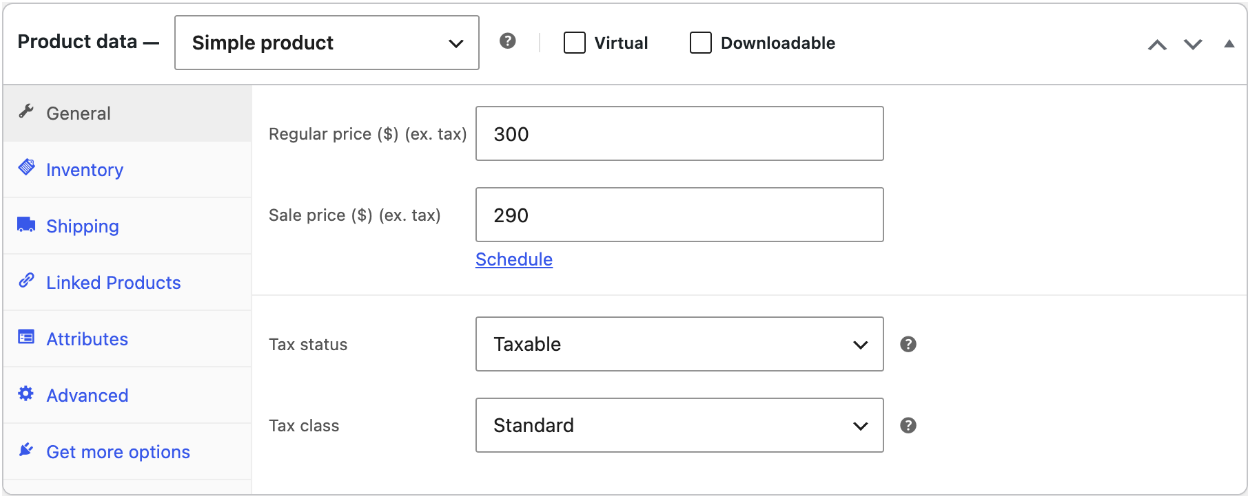
WooCommerce is the open-source commerce plugin for WordPress. Its strongest argument isn't that a merchant can launch without paying a platform license. It's that the store owner can choose hosting, themes, extensions and development practices rather than accepting a single hosted vendor's boundaries. The cost of that freedom is the need to operate and maintain the software stack.
A publisher selling physical products alongside articles may already have a WordPress editorial workflow. Adding WooCommerce lets the team manage products within that environment. A developer can extend product and checkout behavior when necessary, while editors keep using familiar publishing tools. The merchant still needs a plan for hosting capacity, backups, updates, security, payment plugins and compatibility testing. Ownership without an operator is a liability, not an advantage. That's the honest trade. Nobody's going to patch the stack for you.
WooCommerce says its core software has no monthly subscription or platform revenue share. Its pricing guidance estimates hosting at $25 to $350 per month for many stores and lists extensions as separate expenses. Those are vendor-provided planning ranges, not a guaranteed hosting quote for a particular catalog. A small site with a basic theme might spend less on extensions than a subscription store with custom shipping logic. Compare the full stack, including developer time and incident response, with a hosted alternative.
The most revealing trial is a maintenance exercise. Install the desired theme, configure the necessary payment and shipping extensions, then simulate a plugin update in a staging environment. Verify checkout, tax display, product variants and order emails afterwards. If nobody owns that checklist, the flexibility you're paying for can turn into downtime. Choose WooCommerce when WordPress is already strategic and the team can maintain it. Skip it when the buyer wants the provider to own hosting and routine platform operations. Don't confuse a free plugin with a zero-cost store.
For WooCommerce, it's worth being honest about who'll run it. A team that's comfortable with updates and staging gets real control, while a team that isn't will feel every plugin conflict. That's something you'd rather learn before launch than after.
- Starting price
- Free core; hosting, extensions and maintenance extra
- Best operational use
- WordPress content with extensible checkout
Ecwid: best for adding a store to an existing website
Ecwid
Embedded store and Business-tier variation stock
An embeddable store for adding a full shop, product cards or Buy buttons to a site you already run.
- The goal is to add commerce to a site the team wants to keep.
- The project calls for a custom commerce backend, complex account pricing or an ERP-led catalog transformation.
Operational review and trade-offs
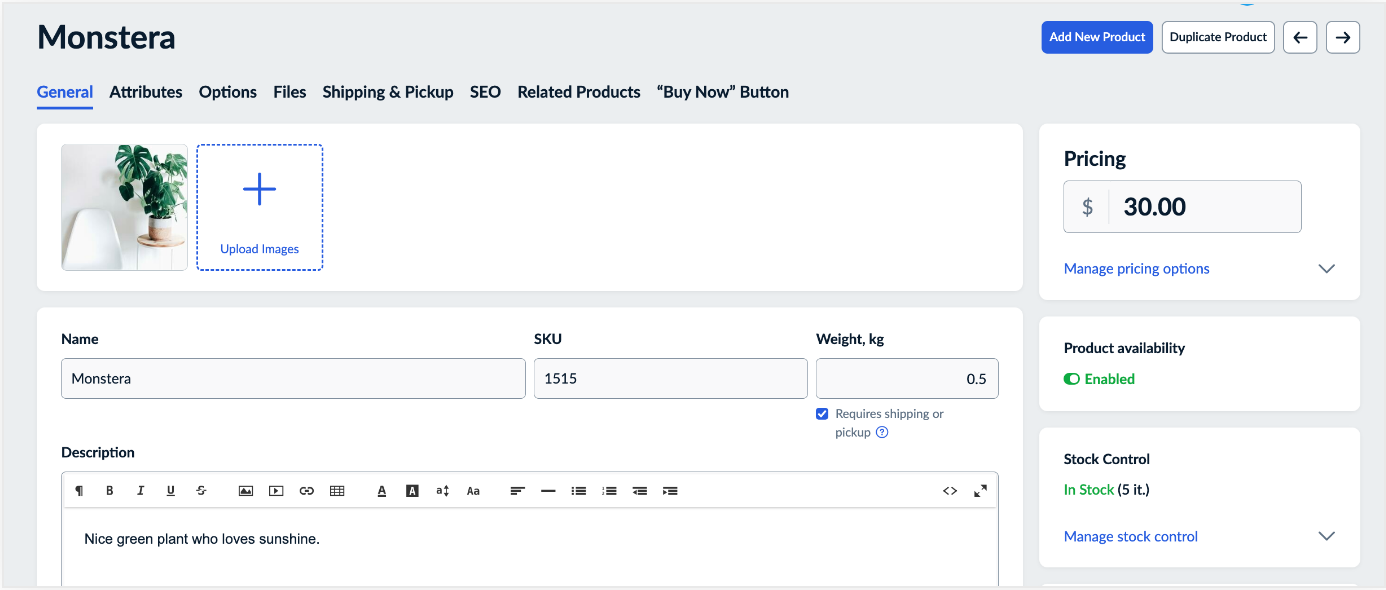
Ecwid is an ecommerce platform built around adding shopping functionality to an existing website as well as offering its own Instant Site. The buyer doesn't necessarily need a complete redesign. A service business with an established content site can place product cards or a store section alongside its existing pages and keep the original site structure. That makes integration behavior, rather than theme selection alone, the core test.
Imagine a workshop selling printed guides and a small range of supplies. Its main site already ranks for instructional articles. Ecwid's help center describes embedding a full store, individual product cards or Buy buttons into a range of website systems, including WordPress and Wix. The team should test whether product pages can be crawled correctly, whether checkout feels continuous and whether analytics records the journey from article to cart. The exact implementation depends on the host site's embedding options.
Ecwid also provides Instant Site, a hosted storefront that can run separately. Its help center states that connecting a custom domain requires Venture, Business or Unlimited. The 2026 USD price-change notice lists Venture at $35 per month with monthly billing or $29 per month when billed annually. Entry plans with a product cap shouldn't be the only reason to pick Ecwid if you plan to expand. Confirm the catalog, domain and channel features on the intended tier.
Choose Ecwid when the primary goal is to add commerce to a site the team wants to keep. Skip it when the project calls for a complete custom commerce backend, complex account pricing or a large ERP-led catalog transformation. An embedded cart is not the same as a fully integrated merchandising system. Test a complete journey, from a content page through payment and the confirmation email, before you say the integration works. Don't rely on a demo, because it's built to look good.
Ecwid is the one on this list where you're not rebuilding the site at all. That's its whole appeal, and it's also why you shouldn't judge it by the Instant Site alone. Test the embed on the pages you've already got, because that's where it'll be used.
- Starting price
- Venture $35/mo monthly or $29/mo annually
- Best operational use
- Embedded storefront and Instant Site
How should an ecommerce team choose a store builder?
An ecommerce team should choose a store builder by testing the catalog, checkout, fulfillment and ongoing editing workflow against real requirements. Start with a representative product and order rather than a polished demo. You're looking for failure points, not features. The sequence below exposes operational failure points before a migration makes them expensive.
- 1Model products
- Wix
- Squarespace
- WooCommerce
Breaks when Import a product with variants, SKUs and stock. - 2Test checkout
- Shopify
- BigCommerce
- Square Online
Breaks when Compare payment provider fees and order records. - 3Route orders
- Shopify
- Square Online
Breaks when Simulate pickup, shipping and a stockout. - 4Edit and monitor
- Ecwid
- WooCommerce
Breaks when Change prices and check storefront data before publishing.
What should the catalog test include?
The catalog test should include a product with variants, a sale price, a missing image and a stock change. A store that sells one-size items can look fine in a demo, but the same builder can get awkward when every product has many color and size combinations. Keep a small reference CSV and compare the imported data with the source of truth. Check product identifiers, not just titles.
What should the payment test include?
The payment test should include a successful purchase, a refund and a gateway-specific fee calculation. BigCommerce now distinguishes embedded and open payment providers, while Shopify lists plan-specific card rates. You'll want a written quote for the selected gateway and annual or monthly commitment. Don't compare a platform subscription with a processor's all-in rate as though they were equivalent.
What should the fulfillment test include?
The fulfillment test should include an online shipment, local pickup and a stockout at one location. If the team uses a warehouse partner, trace the order from checkout to the shipping label and back to the customer notification. The handoff matters more than whether a feature appears on a sales page. Write down who fixes an exception and where the exception appears.
What does an online store builder really cost?
An online store builder costs more than its subscription because payments, design work, extensions and maintenance can all affect margin. The relevant budget is the annual operating cost for a specific store. A merchant should separate fixed fees from costs that rise with orders, sales or custom work.
| Cost item | Budget question | Evidence to collect |
|---|---|---|
| Platform subscription | Monthly or annual commitment? | Current US plan quote |
| Payment processing | Which rate applies to the card mix? | Gateway rate sheet |
| Platform gateway fee | Does the selected provider trigger an extra fee? | Platform payment terms |
| Theme and apps | Which extensions are necessary? | Itemized renewal list |
| Operations | Who handles updates and incidents? | Owner and hours estimate |
| Migration | Which data and redirects move? | Test migration scope |
A hypothetical store that pays $29 per month annually for Shopify Basic spends $348 on the base subscription over twelve months before processing or apps. That calculation is simply $29 multiplied by 12. It isn't a prediction of the store's total cost. BigCommerce Core also advertises a $29 annual-billing monthly equivalent, but its GMV threshold and payment-provider terms require a separate scenario. WooCommerce has no core license fee, yet the merchant still needs hosting and maintenance.
When should a merchant keep an existing site and add commerce?
A merchant should keep an existing site when its content, search visibility and editing process are valuable and an embedded store can support the needed checkout. Ecwid is explicitly designed to embed store elements into existing websites, while WooCommerce extends a WordPress installation. The decision depends on URL structure, analytics continuity and whether product information stays consistent.
Before switching, map the current product URLs and all landing pages that lead to them. Test one transaction from an organic landing page, one from a campaign and one returning customer journey. Confirm that receipts, stock deductions and conversion events agree. If the proposed builder changes the entire site structure, include redirects and a rollback plan in the migration budget. An attractive redesign can still be a poor business decision if it disrupts a profitable acquisition channel.
Where does a feed-monitoring tool fit after launch?
Feed monitoring fits after the store builder when the merchant distributes product data to shopping destinations. A storefront can display a valid product page while an exported feed still contains missing attributes, inconsistent currencies or duplicate identifiers. Store editing and downstream feed checks are separate jobs.
For teams publishing XML, CSV or TSV product feeds, the first control is a repeatable check before a file reaches a destination. The second is a comparison of feed versions so an unexpected catalog change is visible. A feed-monitoring workflow complements the store builder rather than replacing its merchandising or channel management functions.
What are the most common online store builder questions?
Online store builder questions usually concern the cheapest way to launch, the difference between a site editor and a commerce platform and the difficulty of moving later. The answers below distinguish the subscription from the full operating cost and focus on what can be verified before purchase.
Which online store builder is best for a small business?
The best online store builder for a small business depends on whether it needs visual editing, an integrated point of sale or a commerce-first order workflow. Wix, Square Online and Shopify serve those different priorities.
Can I create an online store without a monthly subscription?
You can use Square Free without a monthly subscription, but payment processing fees still apply, so it isn't free to sell. WooCommerce core software is free, while hosting and maintenance remain separate costs.
Is WooCommerce cheaper than Shopify?
WooCommerce can cost less in license fees because the core plugin is free, but the comparison must include hosting, extensions and developer time. Shopify Basic has a published US annual-billing price of $29 per month.
Does BigCommerce charge transaction fees?
BigCommerce applies platform fees to eligible orders processed by open payment providers, with rates depending on the plan. Embedded payment providers avoid that particular platform fee, but normal processor charges still apply.
Can I add a shop to my existing website?
Ecwid supports embedding store elements into an existing website, and WooCommerce adds commerce to WordPress. Test product URLs, checkout and analytics before committing, because you won't want to find a gap afterwards.