
The best ecommerce platforms for enterprise are Shopify Plus for managed retail operations, BigCommerce for open SaaS flexibility, Adobe Commerce for complex B2B customization, commercetools for composable architecture, Salesforce B2C Commerce for Salesforce-centered retail and OroCommerce for distributor buying workflows. Enterprise buyers should compare the cost of keeping orders and product data consistent, not just the subscription.
An enterprise platform decision changes how merchandisers, finance, engineering and fulfillment teams work together, and that's why it's worth testing more than the storefront. The decisive tests are clearly the unglamorous ones: customer-specific prices, stock reservations, refunds and the ability to explain a failed integration. A platform that looks excellent in a storefront demo can still be the wrong system of record, and that's an expensive thing to learn after signing.
Which enterprise ecommerce platform fits each operating model?
The right enterprise ecommerce platform depends on the operating model, your team's engineering capacity and who owns customer and order data. Shopify Plus suits managed commerce operations, BigCommerce sits between managed and open SaaS, Adobe Commerce and OroCommerce handle demanding B2B requirements, while commercetools and Salesforce B2C Commerce fit different integration strategies.
 Managed DTC operationsShopify PlusChoose when faster merchant operations matter more than owning the underlying transaction engine.
 Open SaaS flexibilityBigCommerceChoose when a hosted platform with a more configurable integration posture fits the team's existing skills.
 Custom B2B catalogsAdobe CommerceChoose when customization and company-level B2B logic justify ownership of a larger delivery program.
 Composable API commercecommercetoolsChoose when channel-specific frontends and API ownership are strategic to the business.
 Salesforce-led retailSalesforce B2C CommerceChoose when the Salesforce ecosystem is already central to daily operations.
 Distributor RFQsOroCommerceChoose when B2B order governance is the core buying problem.
How do enterprise ecommerce platforms compare on price and ownership?
Enterprise ecommerce pricing varies by contract and deployment model. Shopify Plus and BigCommerce publish US entry points, while Adobe Commerce, commercetools, Salesforce B2C Commerce and OroCommerce require quotes. A useful comparison also separates what the vendor's hosting covers from what you're responsible for integrating.
| Tool | Primary use | Operational ownership | Published US entry or quote | G2 rating |
|---|---|---|---|---|
| Shopify Plus | Hosted enterprise platform | Shopify hosts it; you own ERP mapping, apps and data sync across stores | From $2,300 USD/mo (3-year term) | 4.4 (882) |
| BigCommerce | Hosted SaaS with B2B Edition | BigCommerce hosts it; you own the ERP connector and API usage | Performance from $1,499 USD/mo, billed annually | 4.2 (585) |
| Adobe Commerce | SaaS, PaaS or on-premises | Depends on edition; on PaaS the merchant owns code and extensions | Quote only | 4.0 (625) |
| commercetools | API-first SaaS | Vendor runs the services; you build the storefront and integrations | Quote only (order-based) | 4.6 (16) |
| Salesforce B2C Commerce | Multi-site retail platform | Salesforce runs the platform; you own what you build on it | Quote only | 4.3 (704) |
| OroCommerce | B2B commerce platform | On-premises, self-run cloud or OroCloud; ERP exchange by API or files | Quote only (GMV-based) | 4.3 (37) |
 The Ecom Director Our product | Product feed checks and monitoring | Checks product feeds before they reach Merchant Center and compares each new version | $9/month | No reviews yet |
Vendor US pricing checked October 30, 2026. Quote-only vendors publish no list price, so none is estimated here.
Shopify Plus starts at $2,300 USD per month on a three-year term and $2,500 USD per month on a one-year term, according to its October 2026 US pricing. BigCommerce Performance starts at $1,499 USD per month billed annually, with custom contract terms. Both are price anchors rather than a complete total cost of ownership.
A quoted license needs an itemized schedule. Ask whether staging environments, additional storefronts, API usage, premium support and regional deployment are included. Confirm which party owns payments, taxes, PCI scope, performance testing and disaster recovery. A comparison that leaves those blank isn't ready for procurement.
How should an enterprise team test an ecommerce platform before buying?
An enterprise team should test a representative order from product ingestion through refund, then test a failure that requires manual recovery. This reveals ownership gaps in pricing, inventory and customer identity that a normal product demonstration hides. Use real data shapes with anonymized records and document what you're expecting to see.
- CatalogSource of truthBreaks when nobody owns the product and price records.
- CheckoutContract and paymentBreaks when customer-specific prices or taxes differ from the contract.
- OrderERP and fulfillmentBreaks when retries and inventory reservations aren't tracked.
- RefundReconciliationBreaks when stock and the finance ledger disagree after a refund.
Ask the vendor to demonstrate an exception: a shipment is canceled after authorization, a negotiated price is changed during checkout or a return arrives after the customer's been moved to a new account. An integration diagram isn't proof that operations staff can resolve the resulting mismatch.
Use a scoring sheet with owners, pass or fail results, evidence links and what it'll cost to remediate each gap. Give security and finance a veto on missing controls, but don't let a single flashy merchandising feature outweigh order correctness.
Best enterprise ecommerce platforms for real operating workflows
The six enterprise ecommerce platforms below cover different jobs, and none of them is the best choice for every buyer. Each assessment focuses on the workflow the platform can own, the implementation burden and the test you'd want a vendor to pass before you sign.
Shopify Plus: managed DTC and B2B on one hosted platform
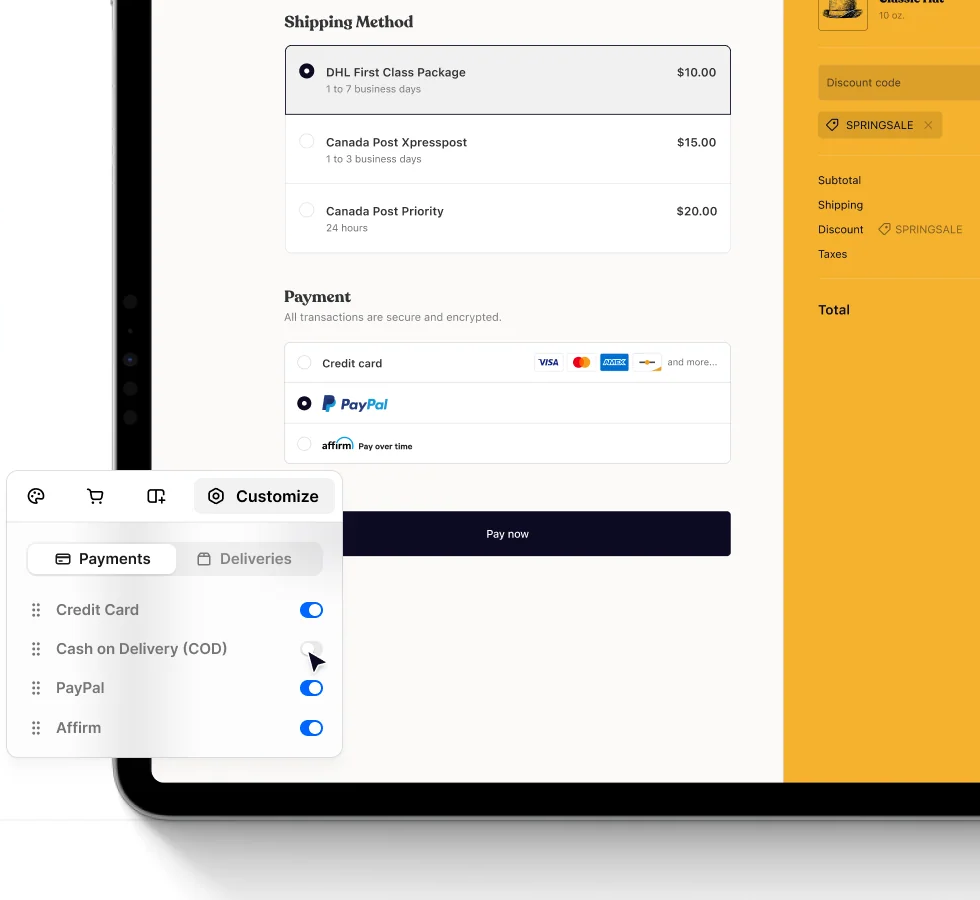
Shopify Plus is the managed option on this list. Shopify hosts the platform, and it's the Plus plan that adds the controls enterprise teams ask for first. Shopify's help center says Plus offers an unlimited number of B2B catalogs with direct assignment to companies and locations, and advanced checkout customization (checkout UI extensions, Shopify Functions and the Checkout Branding API) is available only on Plus.
Shopify Plus
Hosted enterprise platform with B2B catalogs, up to 10 stores and Plus-only checkout controls
Shopify Plus is a hosted platform with unlimited B2B catalogs, up to 10 stores per contract and checkout customization reserved for Plus.
In an enterprise workflow. A Plus contract includes up to 10 stores, one main store and nine expansion stores, at no extra license cost. That suits a brand that's running separate regional or wholesale stores, but Shopify's documentation is clear that the stores operate independently. Settings, products and inventory aren't synced by default, apps are billed per store and each store needs its own theme license. Expansion stores must use USD or INR as their billing currency, so check that against your regional invoicing. You'll have to plan the shared catalog, inventory and customer data layer yourself, usually through the Admin API, webhooks or Shopify Flow. If your team wants a custom front end, there's the Storefront API, or Hydrogen with Oxygen hosting at no extra cost.
- You want a hosted platform with B2B catalogs and DTC checkout in one admin
- Your team prefers extensions and Functions to owning transaction code
- You need natively synced data across many independent stores
- You must change core checkout and order logic beyond supported extension points
Validation, cost and who should skip it
What to validate. Run a company account through a negotiated price, a partial shipment and a refund, then compare the checkout total, the ERP invoice and the inventory count. Check your integration design against the documented API limits too. The GraphQL Admin API restores 1,000 points per second on Plus, against 100 on standard plans and 200 on Advanced, and a single query can cost at most 1,000 points. Shopify's variant creation throttle (10,000 per day once a store passes 500,000 variants) doesn't apply to Plus. Replay your real catalog size rather than a sample, because that's where sync jobs queue up.
Commercial fit. Shopify lists Plus from $2,300 USD per month on a three-year term and $2,500 USD per month on a one-year term, as of October 2026. If a third-party gateway is your primary payment provider instead of Shopify Payments, there's a 0.20% per-transaction charge on top. Add per-store app fees, theme licenses and your partner's time for ERP mapping before you compare Plus with a quote-only platform.
Who should skip it. Skip Plus if you need one store with natively synced data across many independent regional or brand stores, or if your checkout logic goes beyond what Shopify's extension and Functions model allows.
- Starting price
- From $2,300 USD/mo on a three-year term
- Best fit
- DTC-led brands that add a wholesale channel and keep engineering small
- Watch
- Expansion stores don't share data by default, and apps are billed per store
BigCommerce: hosted SaaS with an API-first B2B Edition
BigCommerce sits between a managed SaaS and an open platform. It's hosted, but its API-first design and B2B Edition suit teams that want to connect their own ERP and storefront. Performance is the enterprise tier, listed as custom pricing starting at $1,499 per month billed annually, with a dedicated customer success manager, custom payment terms and 24/7 phone and chat support. Scale accounts auto-upgrade to Performance at $2 million in trailing twelve month GMV, so the jump from a self-service plan to an enterprise contract can arrive on its own.
BigCommerce
Hosted SaaS with an API-first B2B Edition and custom enterprise contracts
BigCommerce Performance is a hosted enterprise plan with B2B Edition, REST and GraphQL APIs and custom payment terms.
In an enterprise workflow. B2B Edition has no published price. BigCommerce's page describes company credit management, purchase orders, cards and net terms per account, ordering on behalf of buyers, role-based catalog access and pricing set by parent company, subsidiary, department, buyer or role. It also lists multi-company hierarchies, a CPQ quoting engine, several buyer-specific storefronts on one back end and an open-source buyer portal. The developer docs show REST Management and REST Storefront APIs plus a GraphQL Storefront API for B2B Edition, so a developer can build quote and order flows into a custom buyer portal.
- You want hosted SaaS with REST and GraphQL access for your own ERP flows
- You need buyer pricing by company, department or role
- You need a named first-party ERP connector
- You need a published enterprise API quota before signing

Validation, cost and who should skip it
What to validate. The B2B page names partners such as Kensium for quotes and permissions, ShipperHQ for B2B shipping rates and Celigo and Patchworks for data sync, but it doesn't name a specific ERP. Ask which connector or iPaaS flow your ERP will use and who's maintaining it. Then test the API quota. The documented OAuth quota is 20,000 requests per hour on Core and Growth and 60,000 on Scale, while Performance limits are set by plan and resource, and some Performance clients run on an unlimited rate plan that still faces infrastructure limits. Don't size nightly syncs until you've got your real limit in writing.
Commercial fit. Performance from $1,499 USD per month billed annually is an entry point, and it's the contract that replaces the self-service rules. Ask whether B2B Edition, the payment provider's terms and any GMV conditions sit inside the quote, because BigCommerce's public pricing page doesn't price B2B Edition.
Who should skip it. Skip BigCommerce if you need a named first-party ERP connector or a published enterprise API quota. The B2B page doesn't name an ERP, and the Performance limits depend on plan and resource.
- Starting price
- Performance from $1,499 USD/mo billed annually
- Best fit
- Retailers and distributors that want hosted SaaS with open integration options
- Watch
- B2B Edition has no published price and Performance API limits vary by plan and resource
Adobe Commerce: the most configurable option, in more than one shape
Adobe Commerce is the most configurable platform here, and by Adobe's own documentation it comes in more than one shape. Adobe lists an on-premises edition, a PaaS option on cloud infrastructure, a SaaS option called Adobe Commerce as a Cloud Service, and Commerce Optimizer, a storefront and merchandising layer that sits on an existing backend. Adobe's documentation says the Cloud Service and Optimizer don't currently integrate, so treat them as separate architecture choices.
Adobe Commerce
B2B shared catalogs and quotes across SaaS, PaaS and on-premises options
Adobe Commerce offers B2B shared catalogs, quotes and company accounts across SaaS, PaaS and on-premises options.
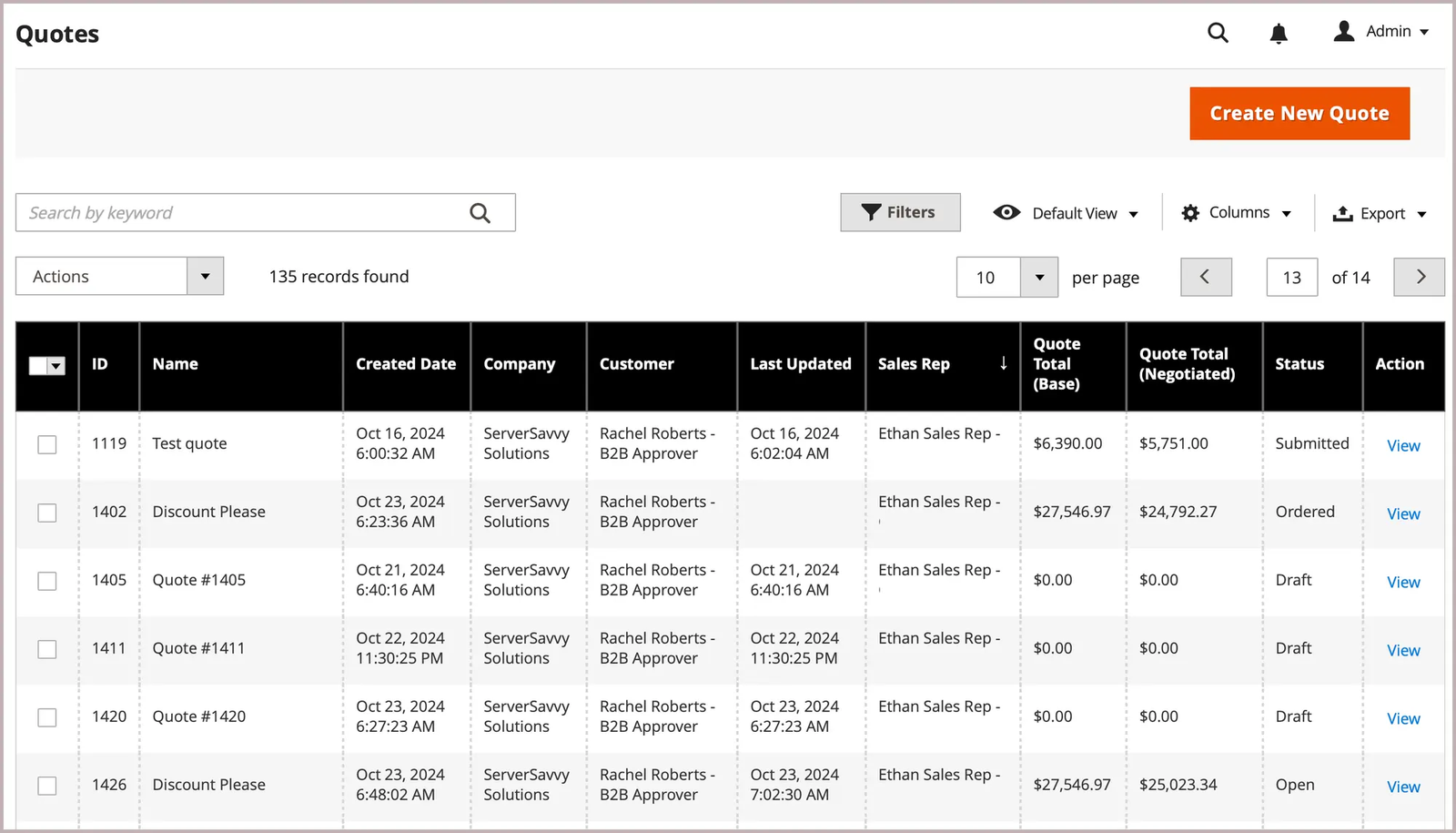
In an enterprise workflow. B2B features cover company accounts with hierarchies and roles, credit and pay on account, shared catalogs with per-company prices, negotiable quotes, purchase order approvals, requisition lists and Quick Order. On cloud infrastructure and on-premises, B2B is an extension that needs a separate license and installation. In the Cloud Service, core B2B company management and quoting are included by default. The web APIs are REST and GraphQL. On the PaaS option Adobe runs the hosted platform, while it's the merchant who maintains application code, configuration and extensions.
- Company-level catalogs, quotes and approvals justify a larger delivery program
- You have developers or an implementation partner to own code and upgrades
- You have no budget for integration, upgrades and a capable partner
- You want the Cloud Service and Optimizer combined in one product today
Validation, cost and who should skip it
What to validate. Ask exactly which Adobe product the quote covers (Cloud Service, PaaS or Optimizer) and whether B2B is licensed separately. Build a sandbox with a representative shared catalog, change a price and confirm that category permissions still resolve for each company. Then price the maintenance path, because it's the part that doesn't show up in a license quote. Have the implementation partner show how an extension gets updated without regressions. Hosting matters for global programs as well: Adobe documents that cloud infrastructure isn't available in China or Russia, where only an on-premises setup works.
Commercial fit. Adobe doesn't publish a price, and its pricing page routes you to a pricing request. Compare quotes for the same storefront count, environments and support level, and add your implementation partner's and developers' cost before you set the figure against a SaaS list price.
Who should skip it. Skip it if you've got no developers or implementation partner and you'd like the vendor to own custom code upkeep, or if you want one product that combines the Cloud Service with Optimizer today.
- Starting price
- Quote only, no published price
- Best fit
- Complex B2B catalogs and organizations with dedicated commerce engineering
- Watch
- B2B is a separately licensed extension on PaaS and on-premises
commercetools: API-first commerce services you assemble
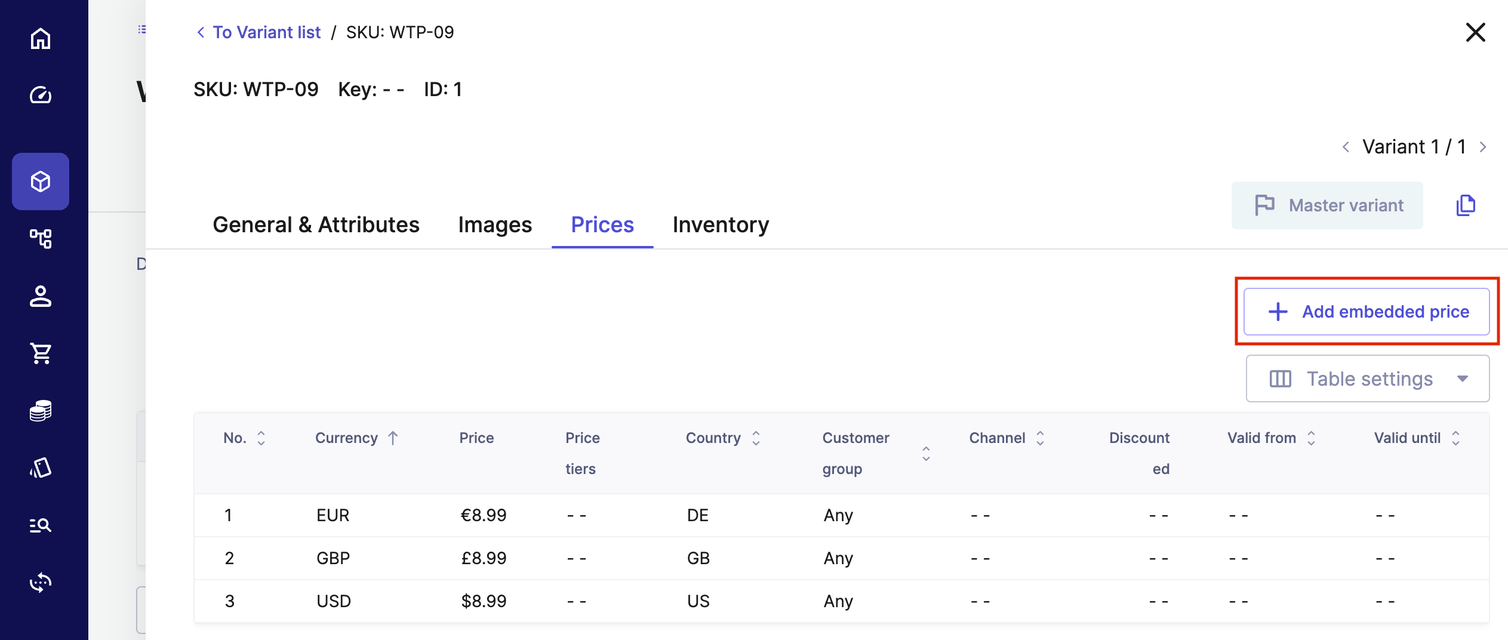
commercetools is an API-first commerce platform sold as SaaS, and you're the one assembling the storefront, search, content and integrations around its commerce services. The B2B model uses business units that represent companies or divisions, with associates holding roles and approval rules. Hierarchies run up to five levels, with up to 4,000 divisions under one top-level company. Carts, orders, quotes and shopping lists can reference a business unit, and commercetools describes quotes as legally binding custom offers. Its G2 score rests on only 16 reviews, so don't read the 4.6 as a trend.
commercetools
API-first SaaS with business units, associates and approval rules
commercetools is an API-first SaaS platform with business units, associates, approval rules and quotes for B2B.
In an enterprise workflow. The implementation guide advises one authoritative writer per data domain. The ERP or OMS typically owns the fulfillment lifecycle and contract prices, a PIM owns core product data, and account hierarchies and payment terms are often replicated into business units. That design suits large organizations with several channels, and it means the integration layer's yours to own. Event notifications go to cloud destinations such as AWS SQS, SNS and EventBridge, Azure Service Bus and Event Grid, Google Cloud Pub/Sub or Confluent Cloud, and delivery is at least once without guaranteed order.
- Channel-specific frontends and API ownership are strategic
- You can staff the integration and storefront build
- You want a turnkey storefront with minimal development
- You need a cost figure early: commercetools sells by custom quote and we found no verified US list price
Validation, cost and who should skip it
What to validate. Build the consumer that handles duplicate and out-of-order events, then break it on purpose and watch how reconciliation behaves. Check your catalog against the documented limits, which include 100 variants per product in the classic model, 10,000 categories, a 14 MB request body, 500 update actions per request and 25 API extensions per project. Many limits can be raised through support, but you'll want that agreed before launch, not during it. Order Search only indexes orders from the last three months, so confirm how your customer service team finds older ones.
Commercial fit. commercetools doesn't publish a price. It says its order-based model avoids the penalties of GMV-based pricing, and the pricing page lists add-ons such as Premium Support, Audit Log Premium and Advanced B2B APIs, which include business units and buyer approval flows. The SLA commits to 99.9% monthly availability with service credits of 10%, 25% or 50% as the sole remedy, and it excludes test and development projects. Ask whether the B2B APIs you'll need sit in the base package.
Who should skip it. Skip it if you haven't got engineers to build and run a storefront on an API-only platform, or if you need plain HTTP webhooks, since its subscription docs list cloud queues and event buses as destinations.
- Starting price
- Quote only, order-based model
- Best fit
- Engineering-led enterprises building separate channels and market experiences
- Watch
- Advanced B2B APIs are listed as a priced add-on
Salesforce B2C Commerce: multi-site retail inside the Salesforce stack
Salesforce B2C Commerce, the Commerce Cloud product that used to be Demandware, is built for consumer brands that run many sites and locales, usually alongside other Salesforce clouds. Salesforce's pricing page lists three editions: Growth with 5 sites and 10 price books, Plus with 100 sites and 3,500 price books, and Premium with the same limits. Premium adds Full Order Management, Data Cloud credits and CRM Analytics seats, and every edition shows Contact for pricing.
Salesforce B2C Commerce
Multi-site retail platform with Growth, Plus and Premium editions
Salesforce B2C Commerce is a multi-site retail platform sold in Growth, Plus and Premium editions, with a composable storefront option.
In an enterprise workflow. The vendor documents a composable storefront built on PWA Kit with Managed Runtime hosting, which sits on the Salesforce Commerce API, and it says new projects should use that API instead of the older OCAPI. You'll manage sites and locales from Business Manager. It also publishes a PCI responsibility matrix for Commerce Cloud, which separates the controls the vendor owns from the ones that come with what you build.
- Salesforce identity, service and marketing data already drive your operations
- You run many sites and locales from one platform
- Account-centric B2B procurement is the core buying problem
- You want to price the Growth, Plus or Premium edition without a sales call
Validation, cost and who should skip it
What to validate. B2B Commerce is a separate product on the Lightning Platform, so company accounts, quotes and negotiated price lists belong there rather than in B2C Commerce. If you sell to both consumers and companies, ask which product covers each flow and how identity is shared. Then follow a refund from the storefront to the customer record and the service case. Order Management appears only under Premium, so on other editions someone's got to build that link. The vendor documents HTTP 429 responses and load shedding for its commerce APIs, so test your peak-sale volumes against them.
Commercial fit. Every edition is quote only, Premium is billed annually, and the pricing page doesn't state a GMV percentage or any other billing unit. Ask for entitlements in writing: sites, price books, sandbox credits (Growth lists 1.2 million, Plus and Premium 2 million), Managed Runtime environments and the support tier.
Who should skip it. Skip it if account-centric B2B buying's your core need, or you'd rather see a public price. The vendor's own answer for B2B buyers is its separate B2B Commerce product.
- Starting price
- Quote only, billed annually on Premium
- Best fit
- Consumer brands already using Salesforce data and marketing systems
- Watch
- Full Order Management is listed only under Premium
OroCommerce: RFQs, price lists and company accounts for distributors
OroCommerce is a B2B commerce platform built around company accounts, price lists and sales-assisted buying. Oro offers Community and Enterprise editions, and its documentation says Enterprise adds multiple organizations, multiple websites, multiple currencies and multi-warehouse inventory. RFQs are a core flow: registered and guest users can create requests in the storefront, and the back office shows company, PO number and line items with target prices. Its G2 score rests on 37 reviews.
OroCommerce
RFQs, price lists and company accounts for manufacturers and distributors
OroCommerce combines RFQs, company accounts and price lists, with REST, JSON:API and GraphQL access for ERP integration.
In an enterprise workflow. Oro documents four standard integration points: integration modules, an API for third-party calls over HTTPS with OAuth and WSSE, a read-only database replica for BI and SFTP file exchange. The listed API types are REST, OpenAPI, JSON:API and GraphQL. Oro's own example has an ERP such as SAP exchange product, customer, price and inventory files daily over SFTP through middleware, while the ERP picks up RFQs and orders. That works well for batch-driven distributors but it's slower than an event-driven design, so decide how fresh prices and stock must be.
- B2B order governance, RFQs and approvals are the core buying problem
- Your ERP can exchange files or call an API through middleware
- You run a consumer brand without account workflows
- You need a multi-tenant SaaS with a published SLA

Validation, cost and who should skip it
What to validate. Reproduce a real RFQ with partial quantities, tiered prices and approval by a regional sales manager, then repeat it in a second customer account to confirm that prices don't leak across accounts. Confirm which edition holds the features you need, because multiple websites and currencies sit in Enterprise. Ask who's hosting the platform. Oro lists on-premises, self-hosted cloud and OroCloud on Google Cloud Platform or Oracle Cloud Infrastructure. Ask for the uptime SLA in writing.
Commercial fit. Oro lists no price, only a basis: licenses follow GMV. Get the exact tiers and what each includes in writing. Oro's documentation says basic production support is included in the license cost, while extra resources and infrastructure upgrades are billed separately.
Who should skip it. Skip it if you're a consumer brand without company purchasing rules, or if you need a vendor-run multi-tenant SaaS with a published SLA.
- Starting price
- Quote only, GMV-based
- Best fit
- Manufacturers and distributors with RFQs, negotiated pricing and repeat orders
- Watch
- Multiple websites and currencies are Enterprise features
How do B2B and B2C requirements change the platform choice?
B2B and B2C requirements change the platform choice because enterprise B2B and B2C selling need different account, pricing and service workflows even when the product catalog overlaps. A consumer retailer usually optimizes promotions, identity and checkout speed, while a distributor may need company hierarchies, negotiated quotes, credit terms and approval controls. Decide which model creates the most exceptions before you compare feature grids, because that's where the real differences sit.
For B2B, build a test customer with a parent company and two buying locations. Give each location its own permissions and contract prices, since that's what real buying teams have. Ask the implementation partner to demonstrate a quote revision, a partial shipment and a return. Check that the ERP receives the correct company and purchase order references. A single successful demo order clearly isn't enough when sales reps amend terms after the first quote.
For B2C, model a promotion across multiple markets with distinct tax rules and shipping methods. Test whether the storefront and customer service system agree on the order status after a failed capture. Look at the daily merchandising experience, including who's allowed to publish a campaign and who approves a price change. A platform with rich APIs can still frustrate a team that can't make routine changes without a developer.
If your shortlist is mostly about building a custom storefront on an API-first B2B platform, our guide to the best headless ecommerce platforms for B2B goes deeper on buyer identity, caching and frontend ownership. Mixed B2B and DTC businesses should decide whether one transaction engine or separate stores are more manageable. Shared inventory can simplify reconciliation, but different customer identities and pricing entitlements create risk. Write down which data must be shared and which must be isolated before you decide, and don't leave that call to the implementation partner.
What should a platform vendor prove about reliability and support?
An enterprise ecommerce vendor should prove the support boundary, incident response path and recovery procedure for your contracted edition. That's what you're buying, not the uptime figure. Hosting a storefront doesn't automatically mean the vendor owns every outage. A failing payment gateway, misconfigured app or stalled ERP export may sit outside the core platform's responsibility.
Ask to see a sample incident escalation and the contract's service credits or other remedies. Ask who can inspect order events, whether a merchant's team can replay a failed integration and how quickly support can reach the vendor's engineers. Require the implementation partner to explain how changes are deployed and rolled back, including what happens when a campaign goes live during an integration incident.
Run a table-top exercise with finance, support and fulfillment. A promotion has generated orders, but inventory reservations are delayed and some payment captures have failed. Assign each team a decision, a dashboard and a customer message, and agree who's got the final say. If nobody can say which orders are safe to ship, the architecture needs work regardless of the vendor's advertised uptime.
How should enterprise teams assess catalog and product-feed quality?
Enterprise teams should assess catalog and feed quality by checking whether a product has consistent identifiers, prices, currencies and availability across every destination. The same item can appear in a storefront, a B2B catalog and a marketplace feed, yet each channel may apply different business rules. A change to one system should produce a traceable update in the others, and you shouldn't need a spreadsheet to prove it.
Select a small sample of products with variants, bundles and regional prices. Change one attribute at the source and record when each destination's copy updates. Then intentionally remove a required field or duplicate an identifier. The test should show where the error's detected and who can fix it before a paid campaign sends traffic to an unavailable listing.
Product feed monitoring can detect changes and missing attributes, but it won't decide which customer contract price is correct. The commerce platform's owner and the product data owner must establish that rule. This division matters because a clean XML feed isn't evidence that checkout, tax and inventory will agree.
How should you model enterprise ecommerce platform cost?
Enterprise ecommerce total cost includes the license, implementation, transaction fees, integrations, support and the internal time spent keeping the store reliable. That's the number to compare, not the quoted license alone. The best cost model compares the same business workload across platforms rather than multiplying the headline subscription by twelve.
Build a three-year model with distinct one-time and recurring columns. Include catalog cleanup, customer and order migration, SEO redirects, middleware, payment contracts, tax engines, monitoring and accessibility remediation. Put a contingency against any integration with thin documentation. Your engineering manager should estimate the hours, not a vendor's sales representative.
A lower subscription can still be a poor purchase if the platform needs a custom app for every contract price, since that's where the maintenance cost lives. Equally, a high quote can be rational when it's replacing several brittle systems and the team's able to demonstrate the savings. Make assumptions visible so procurement can challenge them.
What are the common enterprise ecommerce migration failures?
Enterprise ecommerce migrations often fail operationally when teams lose price rules, inventory ownership, URLs or customer identity mappings. A safe cutover uses a frozen data mapping, rehearsed rollback and post-launch reconciliation. Treat the first return and the first wholesale reorder as launch tests, because they're the cases a demo never covers.
Product data. Export every SKU with variant, currency, category and channel assignment. Check duplicate identifiers and missing prices before import. Your storefront can look complete while a marketplace feed's silently rejecting items.
Customers and access. Map guest accounts, company hierarchies, consent and password reset flows. For B2B, verify who's allowed to see a negotiated catalog. For retail, check that historical order lookup still works for support agents.
Payments and fulfillment. Reconcile authorizations, capture, refunds and inventory reservations between the old and new systems. Document who's responsible for each failed webhook and the maximum acceptable delay. Run a mock peak-sale scenario with the same integrations enabled, and watch where it's slowest.
Search visibility. Preserve product URLs where practical and maintain a tested redirect map. Verify canonical tags, structured product data and crawlable category pages. A technical cutover isn't complete until merchandising can detect a broken landing page and finance can explain the order ledger.
- Approve an anonymized catalog and price-list test set
- Trace a wholesale or consumer order through ERP and refund
- Obtain the complete US license and support quote
- Name owners for failed integration events
- Rehearse redirects and rollback before cutover
- Confirm how the feed and storefront detect price drift
How should an ecommerce director make the final platform decision?
An ecommerce director should select the platform that passes the hardest operational tests at an acceptable three-year cost. The final decision needs sign-off from merchandising, engineering, finance and customer operations. Every unresolved workflow needs a named owner and a funded workaround before sign-off.
Use a weighted decision record rather than a generic feature checklist. Put order correctness and customer-specific pricing ahead of design polish when they're what drives margin. Keep an explicit no-go rule, written down before the demos start while nobody's attached to a vendor yet, for unproven refunds, missing security controls or a vendor that won't document its support boundaries.
For a business that relies on public product feeds, add a separate monitoring step. A feed checker can flag missing attributes, currency problems and duplicate identifiers before a channel rejects products, but it doesn't replace the platform's catalog or optimize channel listings. The platform selection should define who owns the feed and who's expected to act on an alert.
Frequently asked questions about enterprise ecommerce platforms
Enterprise ecommerce buyers usually need clear answers about published pricing, B2B fit, composable architecture and migration risk.
What is the best ecommerce platform for a large retail brand?
Shopify Plus is a strong starting point for a large retail brand that wants managed storefront operations, while Salesforce B2C Commerce deserves evaluation when Salesforce's data workflows are central.
How much does Shopify Plus cost in the United States?
Shopify Plus starts at $2,300 USD per month on a three-year term, or $2,500 USD per month on a one-year term, according to its October 2026 US pricing.
Does BigCommerce publish enterprise pricing?
BigCommerce lists Performance as custom pricing starting at $1,499 USD per month billed annually, so the final enterprise price comes from a contract.
Which enterprise ecommerce platform is best for B2B quoting?
OroCommerce and Adobe Commerce both document native quoting workflows, and BigCommerce B2B Edition and commercetools describe quotes too. Test customer-specific prices, approval steps and repeat orders before choosing.
Is composable commerce cheaper than a hosted ecommerce platform?
Composable commerce isn't automatically cheaper because teams have to build and run the storefront and connected services, so compare full implementation and support costs, since they're rarely equal.