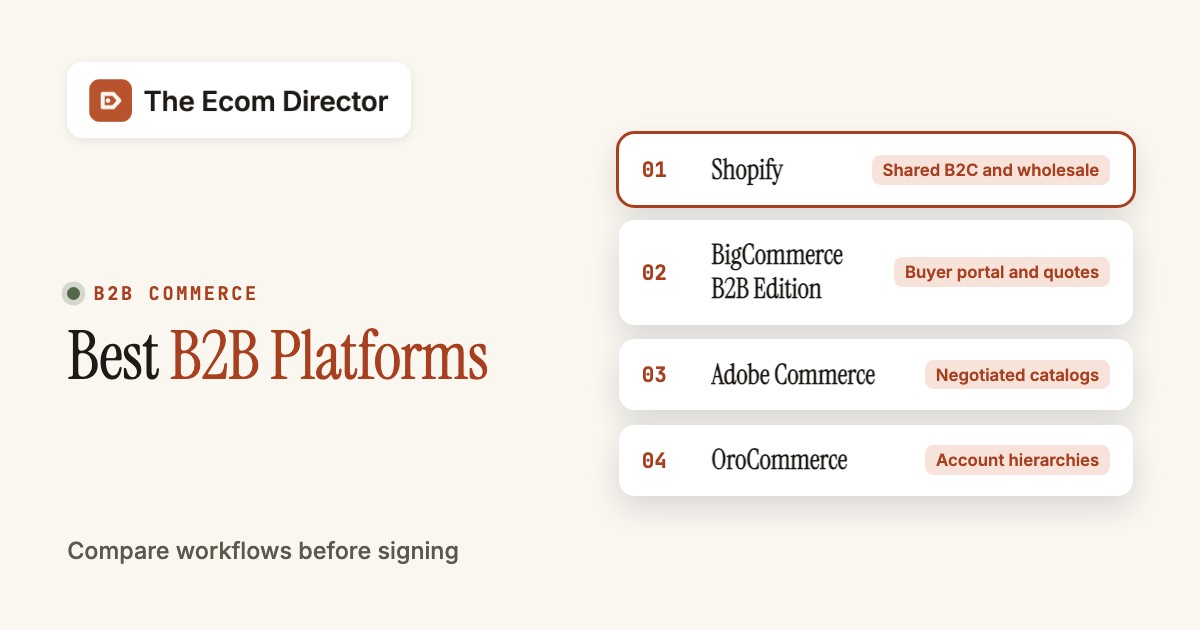
The best B2B ecommerce platforms depend on how your buyers place orders, not how attractive the homepage looks. BigCommerce B2B Edition is a strong fit for companies that need a buyer portal and quotes. Shopify works for merchants combining consumer and wholesale sales, Adobe Commerce and OroCommerce fit more complex account rules and commercetools suits engineering-led teams. A useful shortlist starts with company permissions, negotiated prices, approval workflows and ERP handoffs.
A B2B store can show the correct product and still fail the purchase. A buyer may need a purchase order number, approval from a manager, credit terms and a contract price that differs from the public catalog. The order desk then needs the resulting invoice and shipment in its back-office systems. That's where most B2B projects stall, and it isn't a storefront problem. Compare platforms on that complete chain. It's the chain that fails in practice, so that's what you'll test.
How we compared: The fits below come from vendor documentation and pricing pages read on October 26, 2026, not from hands-on tests. US prices appear only where the vendor publishes them.
Best B2B ecommerce platforms by buying workflow
The strongest shortlist separates wholesale portal needs from custom account modeling. Shopify fits combined retail and wholesale, BigCommerce emphasizes a business buyer portal and Adobe Commerce handles negotiated catalogs. OroCommerce suits sales-assisted distributors, commercetools engineering-led builds, Shopware teams with a strong implementation partner, Salesforce CRM-centered organizations and WooCommerce WordPress stores adding selective wholesale features.
 Shared B2C and wholesale storeShopifyBest when a consumer brand adds dealers and wants one admin for both channels.
 Buyer portal and quotesBigCommerceBest when buyers need a portal with shared lists, quotes and invoices.
 Negotiated catalogs and quotingAdobe CommerceBest when contract pricing depends on shared catalogs and negotiable quotes.
 Distributors with account hierarchiesOroCommerceBest when sales-assisted RFQs and layered company accounts drive orders.
B2B platform comparison at a glance
Compare the account model and pricing basis before scheduling demonstrations. Public entry prices don't imply that all B2B capabilities are included at that tier.
| Tool | Category | What it handles | Starting price |
|---|---|---|---|
| Shopify | Hosted ecommerce | Catalog to checkout and inventory | Basic $29/mo billed yearly |
| BigCommerce | Hosted ecommerce | Catalog to storefront and payments | Core $39/mo monthly or $29/mo annually |
| Adobe Commerce | Enterprise commerce platform | Shared catalogs and negotiable quotes | Custom quote; no verified public US list price |
| OroCommerce | B2B commerce platform | RFQs, price lists and company accounts | Custom quote; no verified public US list price |
 commercetools | Composable commerce | Business units and API-led carts | Custom quote; no verified public US list price |
 Shopware | Open commerce platform | B2B Components on the Evolve plan | Evolve commercial plan; US price requires quote |
 Salesforce B2B Commerce | CRM-connected commerce | Buyer entitlements and permission sets | Custom quote; no verified public US list price |
 WooCommerce | WordPress ecommerce | WordPress products to checkout | Free core; hosting, extensions and maintenance extra |
Vendor pages checked October 26, 2026. Custom quotes aren't public list prices.
Where the purchase process breaks
A platform evaluation should follow the handoffs between catalog, account permissions, order approval and ERP reconciliation. Each step has a distinct failure mode, and a feature list can't prove the full workflow.
- 1Catalog
- Shopify
- Adobe Commerce
Breaks when Who owns the contract price? - 2Buyer account
- OroCommerce
- Salesforce B2B Commerce
Breaks when Who can approve? - 3Quote and order
- BigCommerce
- Shopware
Breaks when Can a buyer revise? - 4ERP handoff
- commercetools
- WooCommerce
Breaks when Who reconciles?
Eight B2B ecommerce platforms examined
The entries below focus on practical account, pricing and order scenarios rather than a universal ranking. Each platform has a different trade-off between ready-made workflows and the engineering required to make them fit.
Shopify
Hosted commerce operations with location inventory and processor-dependent fees
Shopify is a hosted commerce platform that now serves some wholesale workflows without a Plus contract. A distributor can create company profiles, group buyers by location and set payment terms while keeping a direct-to-consumer storefront in the same administration area. The critical October 2026 distinction is between a few market-wide B2B catalogs on the regular plans and direct company-specific catalog assignments on Plus. Those aren't equivalent configurations when each account has its own contract price.
- you run a consumer store and want to add dealer ordering in the same admin
- a few market-wide B2B catalogs are enough for your wholesale pricing
- every company needs its own catalog assignment and you're not on Plus
- approvals and multi-entity purchasing rules must work out of the box
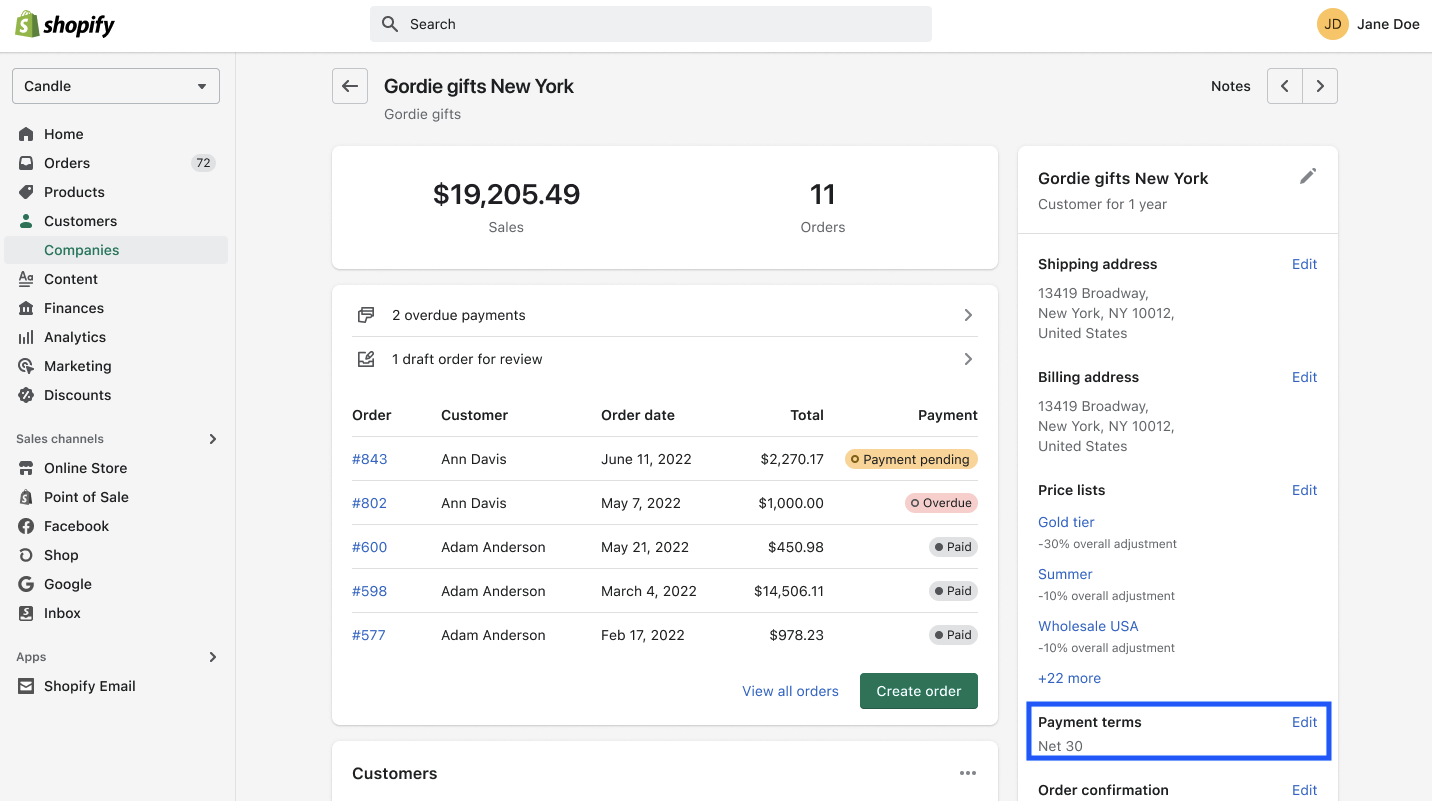
How the buying workflow works
Consider a consumer brand with a new dealer channel. Its ecommerce director can begin with company records and a small set of market catalogs, then ask sales operations to test the ordering experience with representative dealers. Once negotiated pricing needs to differ by individual company rather than broad market, the team must revisit plan eligibility and the design of catalog assignments. Moving up a plan is a pricing-governance decision, not just a bigger bill.
Shopify's operational attraction is one store for retail orders and wholesale accounts. Merchandising and customer service can work in familiar order screens, but the finance team still needs to verify how purchase orders, credit approval, payment reconciliation and taxes reach its ERP. A net-terms option on a checkout page doesn't itself prove that an external accounts-receivable process is synchronized. Request a demonstration that starts with a buyer account and ends with a reconciled invoice.
The proof-of-concept should include a company with multiple locations, an overdue account and a partial shipment, because a smooth retail checkout won't reveal those edge cases. Don't assume the Plus-only features you'll need are included, because they often aren't. Check the plan table first, since it's the quickest way to rule Shopify in or out.
- Starting price
- Basic $29/mo billed yearly
- Primary B2B job
- company profiles, B2B market catalogs, payment terms
- Pricing
- Basic $29/mo annually; Plus sold on a 1- or 3-year term, commonly cited from $2,300/mo in the US
BigCommerce
GMV-based plan thresholds and Open Payment Provider Fee
BigCommerce B2B Edition adds business-account workflows to the BigCommerce storefront rather than asking a wholesale seller to assemble them entirely from unrelated apps. Its buyer portal supports company administrators, senior buyers and junior buyers. A junior buyer can build a shared shopping list for approval while a sales representative can prepare a quote or place an order on behalf of an account. That's closer to a distributor's order desk than a normal consumer cart.
- buyers need a portal with shared lists, quotes and invoice access
- sales reps place orders on behalf of accounts
- you only need a password-protected wholesale catalog
- the contract price must come straight from an ERP you can't connect
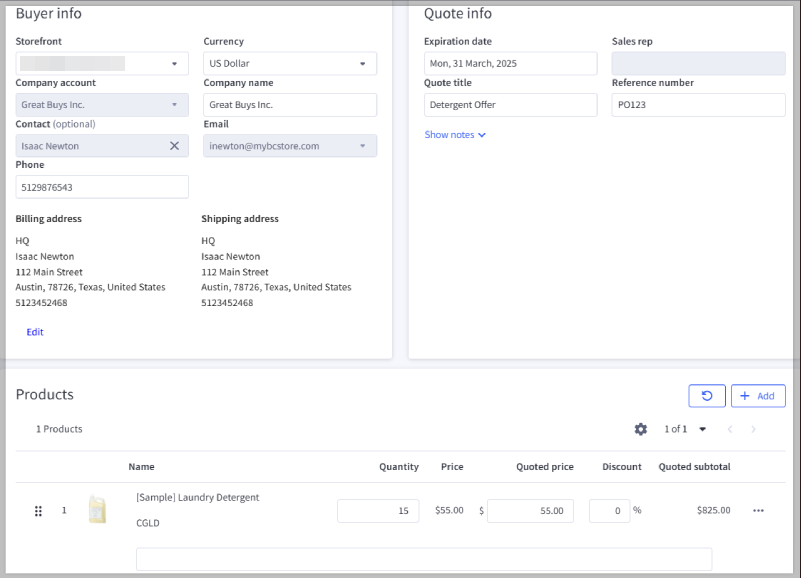
How the buying workflow works
For a parts distributor, the useful test is a repeat order that starts with a purchasing assistant and ends with a buyer manager's approval. Put an account-specific price on the order, have the sales rep adjust a quote and ask the buyer to settle an invoice. The portal's order history and address book should reduce email handoffs, but you must confirm which parts of the workflow depend on B2B Edition rather than a standard storefront subscription.
Pricing needs extra care. BigCommerce's self-serve Core, Growth and Scale plans charge an Open Payment Provider Fee on eligible orders processed through providers outside its embedded list, and the June 2026 plan change affects how plans are structured. Orders using its listed embedded providers aren't subject to that fee. The B2B Edition itself is quote-priced, so the self-serve Core price ($29/mo billed annually, $39/mo billed monthly) is the storefront entry point, not the B2B Edition price. Obtain the contracted edition, payment classification and order-volume terms together. Don't sign until they're all in writing.
During a pilot, test shared-list approvals and the finance export as rigorously as storefront design. A feature that looks native in a demo may still need custom integration to your actual ERP and credit policy. Ask what's included in the quote and what you'll pay separately. The portal, the payment fees and the ERP connector often aren't priced together, and that's where budgets drift.
- Starting price
- Core $39/mo monthly or $29/mo annually
- Primary B2B job
- corporate accounts, quote management, shared lists, invoice portal
- Pricing
- B2B Edition custom quote; Core storefront from $39/mo monthly
Adobe Commerce
Shared catalogs and negotiable quotes
Adobe Commerce is a customizable commerce platform with an integrated B2B extension for sellers that operate multiple company accounts and intricate product entitlements. Its shared catalogs can restrict which products a business sees and what it pays. Authorized buyers can initiate negotiable quotes from the cart, while sellers can initiate quotes in the administration area. That matters when a price is a conversation with an account manager rather than a universal checkout rule.
- contract pricing depends on shared catalogs and negotiable quotes
- you have developers or an agency to own code, upgrades and extensions
- a small operations team needs a mostly managed storefront
- you want a public list price before talking to sales
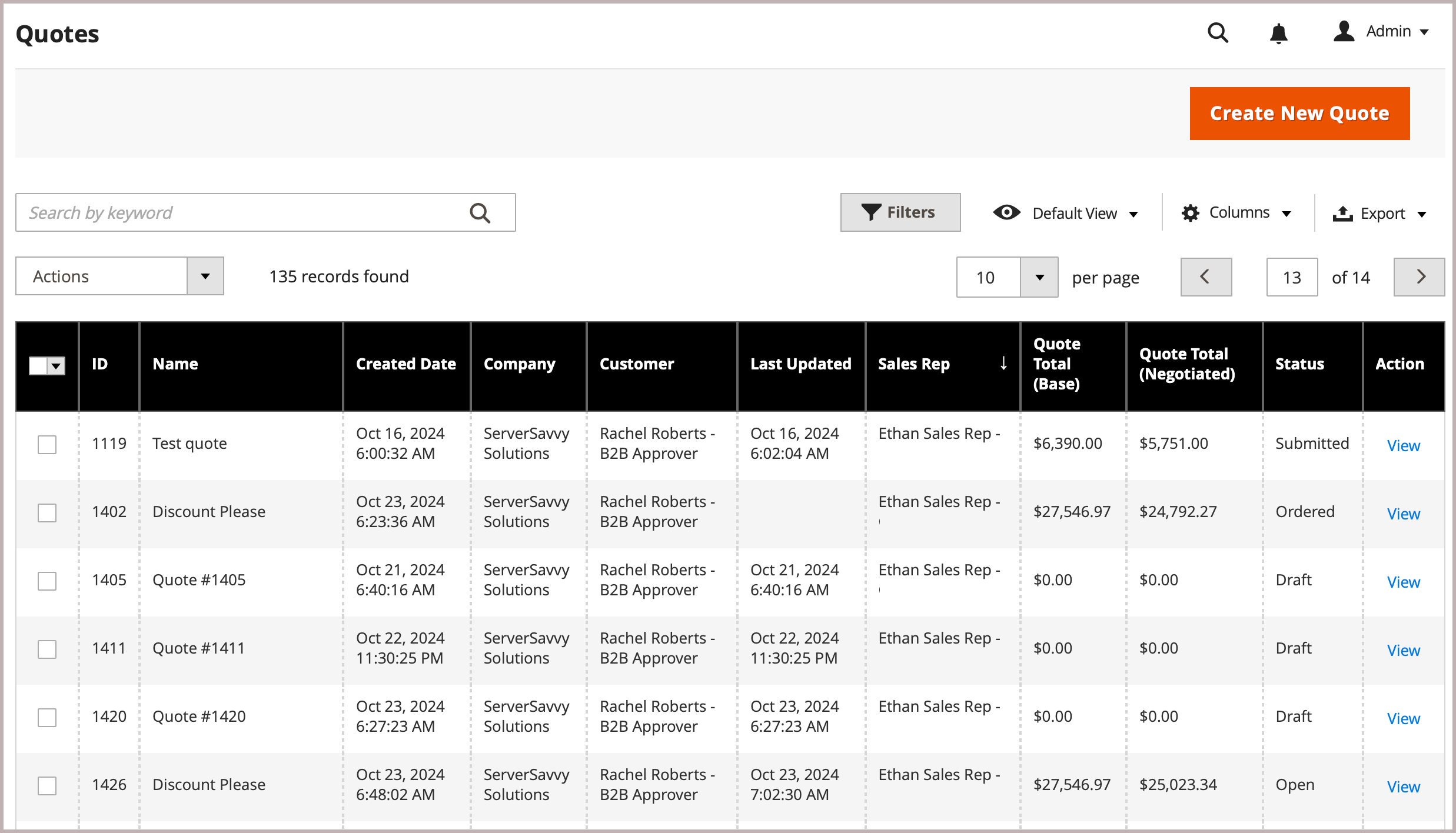
How the buying workflow works
Imagine an industrial supplier selling identical parts under different contracts to dealers and maintenance organizations. The commerce team needs a catalog rule that survives promotions, customer-group changes and regional restrictions. Sales needs to change quantities and discounts during quote negotiation, then pass the accepted order to fulfillment. Adobe's features provide building blocks, but the implementation partner still needs to map the contract system and inventory source that actually determine eligibility.
The major buying risk isn't a missing discount widget. It's the ongoing ownership of code, upgrades, extensions and integrations. Ask the agency to demonstrate a quote created by a buyer, revised by sales and converted to an order with the correct price and tax treatment. Then have it show the same flow after a catalog import. If the data model needs custom modules, require upgrade and regression-testing responsibilities in the statement of work.
Adobe doesn't publish a US list price for the B2B implementation, so compare written proposals on a consistent scope. You'll want the agency to show what's standard and what's custom code. That's clearly what drives upgrade costs later, and it isn't visible in a feature list.
- Starting price
- Custom quote; no verified public US list price
- Primary B2B job
- shared catalogs, company roles, negotiable quotes
- Pricing
- Custom quote; no verified public US list price
OroCommerce
RFQs, price lists and company accounts
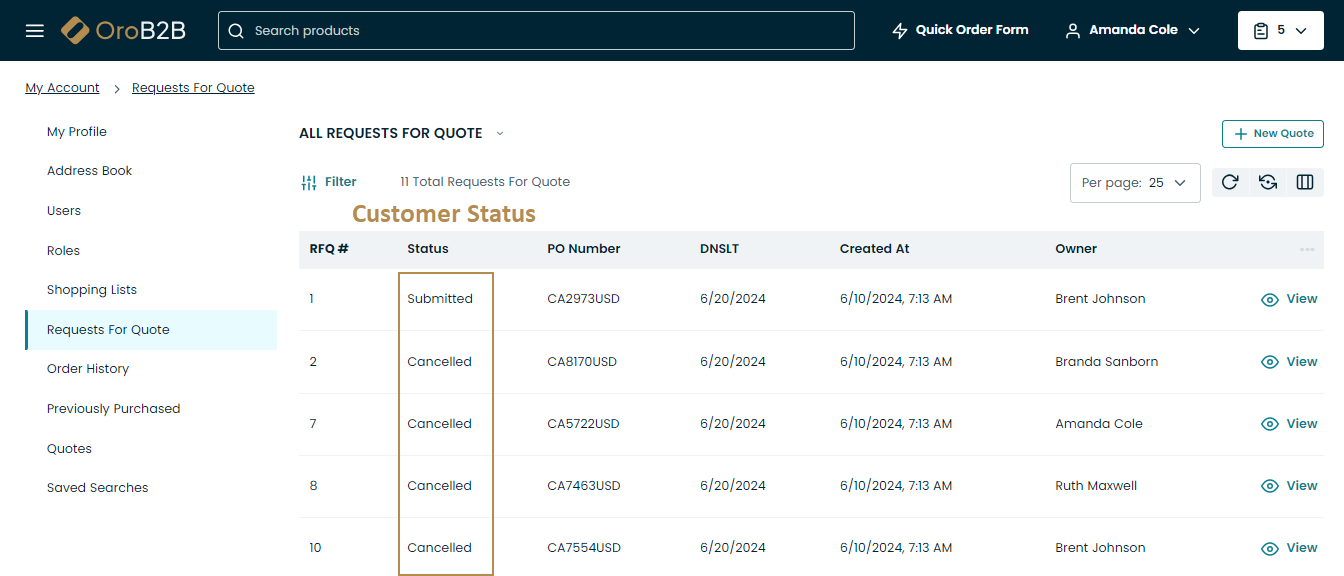
OroCommerce is built around wholesale and distribution rather than treating company buying as a variation of a retail cart. It supports company accounts, multiple organizations, customer-specific price lists and request-for-quote workflows. The platform also positions CRM and invoicing alongside commerce. For a business with layered sales territories and customer entities, those shared records can be more relevant than a polished theme marketplace.
- you sell through sales-assisted RFQs to company buyers
- customer-specific price lists and layered account structures drive your orders
- buyers mostly pay public prices by card
- nobody on your team can own approval and workflow configuration
How the buying workflow works
A typical use case starts with a parent account that buys through several regional branches. Each branch has different purchasing permissions, catalogs and shipping locations. The account manager wants a view of RFQs, approved prices and prior orders without manually reconciling separate tools. During selection, ask OroCommerce to demonstrate exactly how an account-level discount reaches an order and how an override is logged. Do not assume every ERP field will synchronize automatically just because the platform exposes APIs.
Oro's visual workflow builder is attractive when approvals vary by customer segment. It also raises a governance issue, because someone has to maintain those rules when a sales policy changes. Build a change log and require a nontechnical operator to update one approval threshold in a sandbox. Then confirm that the change affects the correct organizations but doesn't expose another account's catalog. That test is more informative than a broad list of supported business models.
Oro doesn't publish a US list price. Request a proposal that separates licenses, hosting, customization and ongoing support. Don't treat the RFQ list as the whole workflow. It's the buyer's view, and you'll still need the sales-side screens to see approvals and price overrides.
- Starting price
- Custom quote; no verified public US list price
- Primary B2B job
- corporate hierarchy, RFQs, workflow builder, CRM
- Pricing
- Custom quote; no verified public US list price
commercetools
Business units and API-led carts
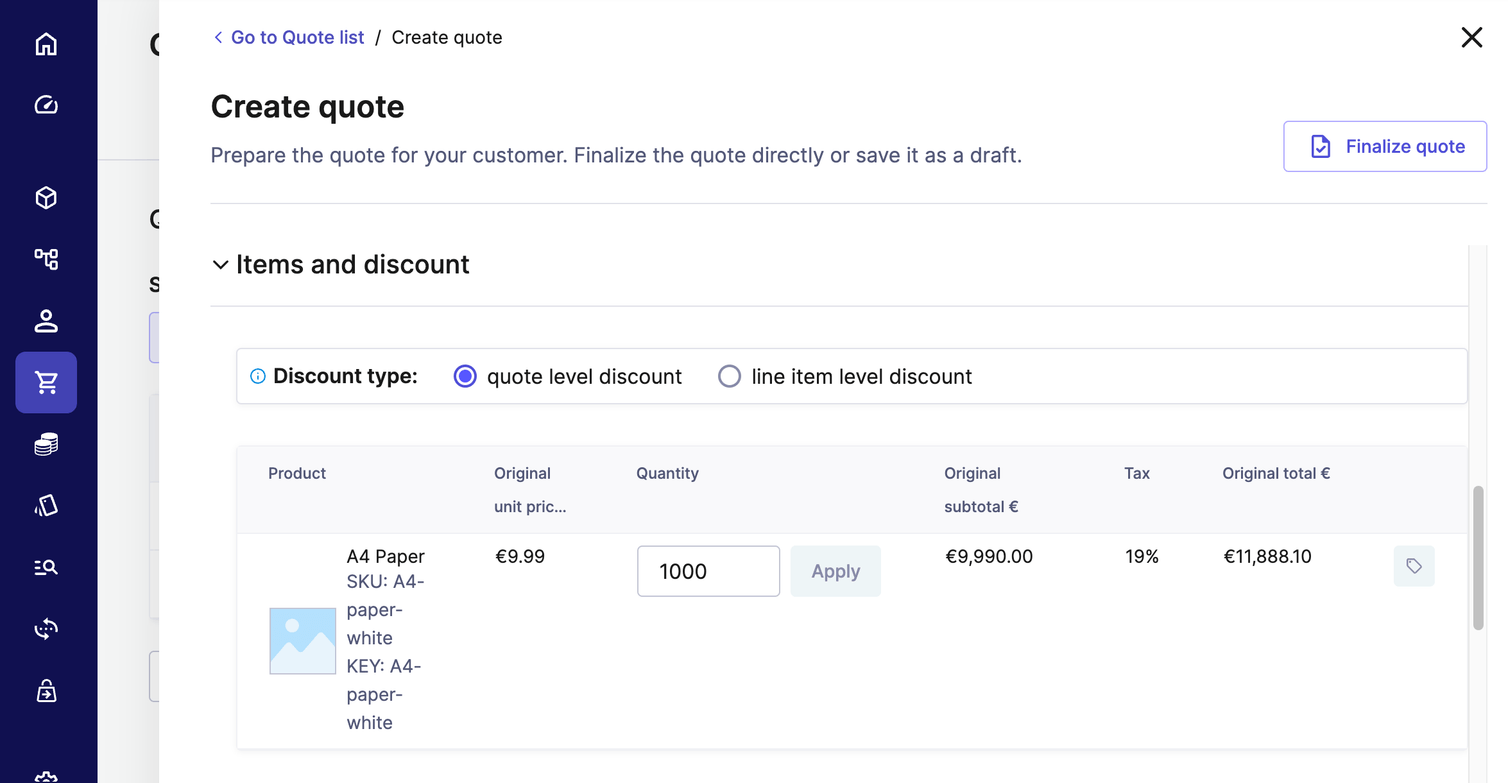
commercetools is a commerce platform for teams that want to compose their own buying experience from APIs and modular services. Its B2B model adds Business Units and Associate Roles to the same carts, orders and products used in consumer commerce. A cart can carry the business-unit context so permissions and assortments follow the organization buying the goods. This is useful when a manufacturer needs several channels to share the same commercial data.
- an experienced engineering team wants composable control of carts, business units and channels
- several channels must share the same commercial data
- you want a conventional wholesale portal with little custom development
- you can't budget for integration delivery and monitoring
How the buying workflow works
The implementation work is deliberate. Engineers model business units, choose channels and product selections for restricted assortments and connect the checkout to external services. The documentation describes customer-group assignments and warns that changing those assignments doesn't automatically recalculate prices in existing carts. That subtle behavior deserves a test: update a buyer's contract pricing while a cart is open, then verify how your integration forces the right recalculation before purchase.
commercetools also documents where its responsibilities stop. Budget enforcement, PunchOut, EDI, ERP payments and other enterprise workflows can cross an integration boundary. An API exposing a quote isn't the same as an end-to-end approved purchasing process. Ask the implementation team to name the system of record for contract prices, purchase approvals, tax, available-to-promise inventory and invoices. Every integration in the architecture should have a named owner.
A sales quote for the software is only one cost line: include integration delivery, monitoring, support coverage and the team's ability to maintain the buyer experience over time. It's an engineering project, so don't schedule the demo without the developers who'll build it. They'll spot integration gaps that a sales engineer won't mention.
- Starting price
- Custom quote; no verified public US list price
- Primary B2B job
- business units, associate roles, customer-specific prices
- Pricing
- Custom quote; no verified public US list price
Shopware
B2B Components on the Evolve plan
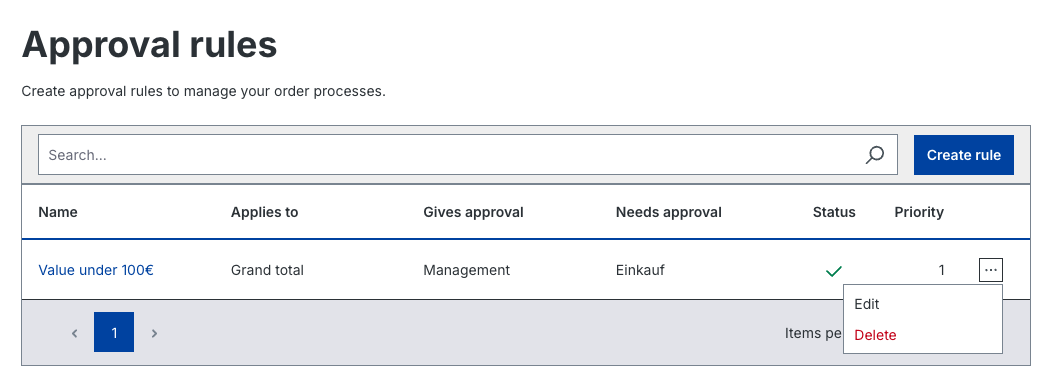
Shopware is a commerce platform with B2B Components designed for companies that need purchasing roles and quotation workflows. The vendor identifies Evolve as the plan that unlocks B2B Components, including quotes and purchasing approvals. That plan boundary matters more than the existence of a free community edition when the buying journey depends on business-account permissions. A distributor should compare the paid feature scope before building a proof of concept.
- you want configurable B2B components such as quotes and purchasing approvals
- you have a capable implementation partner
- you need a fixed US dollar price from a public checkout
- you want the B2B features without paying for the Evolve plan
How the buying workflow works
A practical Shopware evaluation begins with a buyer group, a negotiated price and an approval step. Let a purchasing assistant assemble a cart, route it to a manager and confirm that the correct catalog and conditions survive the approval. Next, have the sales team modify a quote and send it back. The goal is to expose which steps are configurable inside Shopware and which need an integration to the ERP or sales system.
Shopware's configurable model can suit merchants that want more control than a turnkey store but don't want to own every commerce service independently. The trade-off is the partner and hosting ecosystem: implementation quality, extension maintenance and operations coverage can dominate the subscription decision. Request a technical walkthrough of upgrades and permissions alongside the commercial demonstration. You'll avoid surprises that way, and it won't slow the deal. The ecommerce director should own the acceptance scenarios even if a development agency performs the build.
Shopware's pricing page lists Evolve from €2,400/mo excluding VAT and shows no dollar price for it, so we don't convert it. Obtain a written US quote and validate the exact B2B Components included. You'll want written confirmation of which B2B Components sit in the plan you're quoted. That's the detail teams most often miss, and it's indeed easy to fix before signing.
- Starting price
- Evolve commercial plan; US price requires quote
- Primary B2B job
- B2B components, quotes, purchasing approvals
- Pricing
- Evolve commercial plan; US price requires quote
Salesforce B2B Commerce
Buyer entitlements and permission sets
Salesforce B2B Commerce is an enterprise commerce offering connected to the Salesforce customer and sales environment. It supports account-based buyer entitlements, negotiated pricing and personalized catalogs. Salesforce documents buyer, buyer-manager and account-switcher permission sets, so an organization can model a person who buys for one account or supervises several. That is a practical fit when sales and service already use Salesforce as their account system of record.
- account managers already work in Salesforce and commerce should share that account data
- you need buyer, buyer-manager and account-switching permissions
- you're not committed to the wider Salesforce environment
- you want a simple standalone store
How the buying workflow works
For a wholesaler whose account managers live in CRM, the meaningful workflow begins before the cart. A sales representative maintains the account and its terms, the buyer signs in under the correct organization and a manager reviews the resulting order. The implementation must decide which records are mastered in CRM, commerce and ERP. Ask to trace one price-book change all the way to a buyer's cart and through the invoice feed. Both systems exist in the same Salesforce environment, but that doesn't guarantee a clean field mapping.
Permissions deserve particular attention. Salesforce's help documentation warns about the visibility implications of product records when default external access isn't private. An evaluation should include an account-switching test that proves a buyer can't discover products outside its entitlement. It should also include guest access, suspended buyers and a former employee whose permissions must be revoked. These are operational security requirements, not optional finishing touches.
Pricing is quote-based for the configuration in question; compare implementation, integration and licenses as a combined decision, with responsibility for buyer permissions explicitly assigned. There's no public price to anchor on, so don't skip the question of who'll own the buyer permission model after launch. It's the part nobody wants to inherit by default.
- Starting price
- Custom quote; no verified public US list price
- Primary B2B job
- account entitlements, buyer permission sets, price books
- Pricing
- Custom quote; no verified public US list price
WooCommerce
Merchant controls hosting and extensions
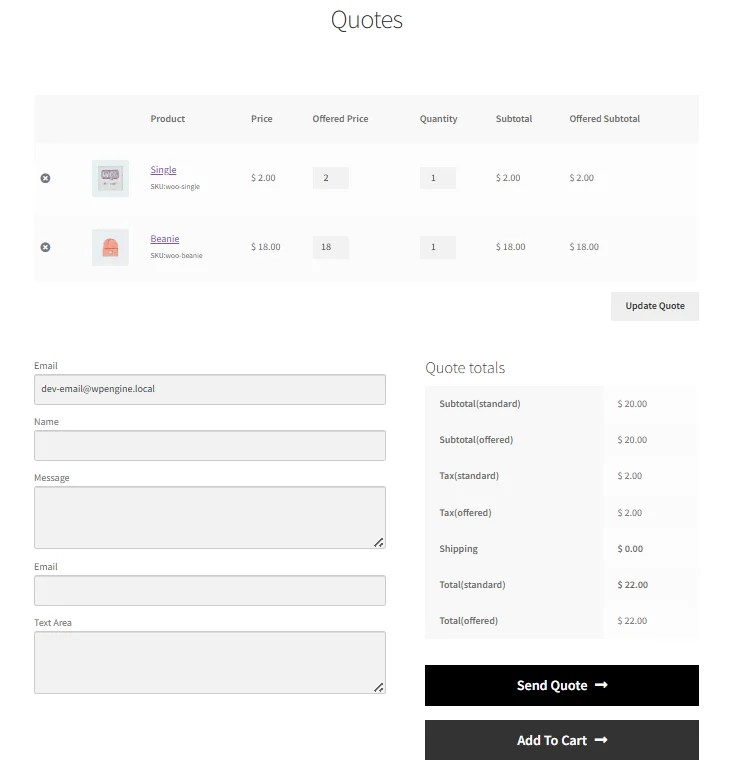
WooCommerce is an open-source commerce plugin for WordPress. Its core has no monthly platform subscription, but B2B behavior is typically assembled from extensions and store-specific configuration. Marketplace extensions offer role-based pricing, business registration, quote requests, shared carts and purchasing permissions. The resulting solution can be highly tailored, though it doesn't provide one universal native B2B workflow that every WooCommerce store inherits.
- you already run WordPress and want incremental wholesale features
- your team can maintain hosting, updates and extensions
- you expect vendor-managed hosting and upgrades
- you need one native B2B permission model without extensions
How the buying workflow works
For a specialty manufacturer already publishing content on WordPress, the advantage is incremental change. Keep the existing catalog, add a restricted wholesale role and test a quote request for a verified dealer. Then add quantity breaks and invoice payment only if those steps match the order desk's real process. The engineering team should document which extension controls each rule, because two plugins changing product visibility or prices can create confusing results.
The cost calculation starts with hosting, backups, security updates and extensions, not just the free license. WooCommerce's pricing page makes clear that the core is free and the other components are separate costs. A small store with a capable WordPress maintainer may be comfortable owning this stack. A large distributor with stringent uptime and integration requirements needs to account for developer support and the consequences of extension incompatibility after updates.
In the pilot, test a buyer role, an excluded product, a negotiated quote and a failed payment, then repeat after a staging update. The ongoing maintenance workflow is part of the purchase decision. Don't count on every extension to work together, because they won't always. You'll find out during the first staging update, so it's better to test that before launch.
- Starting price
- Free core; hosting, extensions and maintenance extra
- Primary B2B job
- customer roles, price rules, quote extensions
- Pricing
- Free core; hosting and paid extensions extra
How to choose a B2B ecommerce platform without buying the wrong workflow
A B2B platform should be selected against the hardest real purchase, the systems that hold contract prices and the team that will maintain it. Begin with buyer identity, move through the negotiated cart and finish with fulfillment and reconciliation. A platform that handles only the storefront portion may still be right, but the integration work must appear in the project plan.
Map the business account before comparing storefronts
Business accounts often have multiple buyers, shipping addresses and levels of approval. Create a test organization with a purchasing assistant, a manager and an account administrator. Record which role can see prices, edit a cart, approve an order and request a quote. Require the vendor to show what happens when a buyer changes roles or leaves the company. This reveals whether permissions are native, configurable or custom. If the vendor can't show it live, you shouldn't assume it's there.
Identify the owner of each price and inventory field
Contract prices can originate in an ERP, a CRM agreement or the commerce platform itself. Choose a single system of record and define the direction and frequency of synchronization. If prices change while a cart is open, document whether the cart recalculates before order placement. The same discipline applies to available stock, tax status, credit limits and shipping promises. Don't accept an integration diagram that omits failure handling. It's the failure path that costs you money, not the happy path.
Rehearse a quote and purchase order end to end
Use a realistic buyer account to request a quote, change quantities, receive a revised price, approve the purchase and place an order using the correct terms. Follow the order through the warehouse and invoice system. Ask how an exception is handled when the ERP rejects a customer ID or a shipment is split. The test should expose the person who owns each failure, rather than leaving an ambiguous support handoff. You'll learn more from one failed order than from ten smooth ones.
Compare implementation cost and operational ownership
A subscription is one line in a B2B commerce budget. The project may also require data cleanup, integrations, identity configuration, hosting, agency work, security review and ongoing release testing. Require vendors and agencies to price the same acceptance scenarios. Include a year of maintenance and a documented rollback plan. Don't forget that you'll pay for testing every release, too. The cheapest quoted license isn't necessarily the cheapest operating model. That's why you'll want the same scope priced everywhere.
A buyer acceptance script for your first platform demo
A useful B2B demo is a repeatable test, not a vendor's preferred slide deck. Ask each finalist to use the same account hierarchy, sample catalog and order scenario. Don't let a vendor swap in a simpler scenario halfway through. The steps below expose whether a platform handles buying rules itself or relies on external code.
Create a buyer company
Use two locations, different buyer permissions and an account-specific price.
Request and revise a quote
Have the sales rep change quantity and send the revised price for approval.
Approve and place an order
Use a purchase order number and the intended payment terms.
Reconcile in the back office
Verify inventory, invoice, shipping and customer identifiers in the ERP.
B2B ecommerce platform costs and the limits of price comparisons
B2B ecommerce costs include platform licensing, payment processing, integration delivery and the ongoing people needed to operate the stack. Public plan prices are helpful for the initial budget, but they aren't a substitute for a proposal that includes the actual B2B edition and required features. A lower entry-level storefront tier may lack the company-specific price assignments or approvals in your requirements.
Shopify's 2026 B2B change is especially important. Basic, Grow and Advanced now include several B2B features, but Plus still controls unlimited catalogs and direct company catalog assignments. BigCommerce changed its self-serve plan structure on June 1, 2026, and its Open Payment Provider Fee now distinguishes embedded from other payment providers. Adobe Commerce, OroCommerce, commercetools and Salesforce require commercial scoping rather than a guessed public list price. For Shopware, a US buyer should ask for a dollar quote rather than convert the euro-denominated Evolve listing.
To compare proposals fairly, calculate first-year total cost = platform subscription + implementation + data migration + integrations + hosting + support + payment fees. For the following years, remove one-time setup work only if the vendor has committed to no additional build requirements. Document each assumption and request a written owner for every integration. If an assumption isn't written down, it'll resurface as a change request. Treat any figure you can't tie to a written quote as a placeholder.
Where a product feed monitor fits in B2B commerce
A B2B platform isn't a product feed monitoring service. The Ecom Director's read-only feed checker can inspect a public XML, CSV or TSV product feed for missing attributes, price and currency issues and duplicate IDs, then monitor small public feeds for changes. It doesn't assign customer-specific prices, manage sales channels or replace an ERP. That distinction matters when a commerce team wants to catch catalog-data problems before downstream destinations consume a feed.
A practical handoff is to validate a public export after the catalog update, investigate the flagged rows in the source system and then rerun the check. The B2B platform still owns buyer permissions and transactional pricing.
Frequently asked questions about B2B ecommerce platforms
These answers clarify which B2B capabilities matter, where pricing starts and how to test the implementation.
What is a B2B ecommerce platform?
A B2B ecommerce platform lets companies buy from other companies with account-level pricing, permissions and purchasing workflows. The exact capabilities vary by edition and integration.
Can Shopify handle B2B without Plus?
Shopify supports company profiles, market catalogs and several wholesale features on Basic, Grow and Advanced. Direct company catalog assignments and unlimited B2B catalogs remain Plus capabilities.
Which platform supports negotiated quotes?
Adobe Commerce documents negotiable quotes, and BigCommerce B2B Edition offers quote workflows. Buyers should verify their exact quote approval and ERP handoff in a pilot.
How much does B2B ecommerce software cost?
B2B ecommerce costs range from public storefront subscriptions to custom enterprise proposals. Include implementation, integrations, hosting and ongoing support before comparing offers.
Do B2B platforms replace an ERP?
B2B commerce platforms don't automatically replace the ERP. Confirm which system owns prices, stock, credit terms and invoice records before buying.