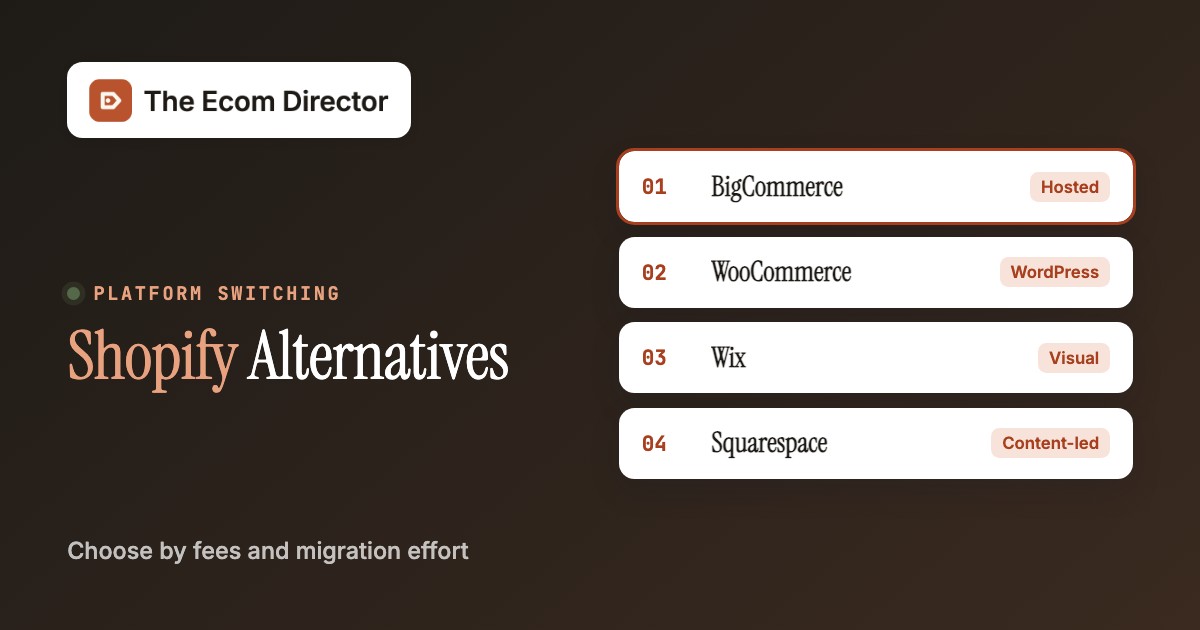
Shopify alternatives make sense when a specific cost, workflow or ownership constraint is large enough to justify replatforming. BigCommerce is a hosted SaaS alternative, WooCommerce gives WordPress teams more control, Wix and Squarespace suit simpler content-led stores, Ecwid can add ecommerce to an existing site and Adobe Commerce or Shopware support more customized operations. None is automatically cheaper once you've counted payment fees, integrations and migration work.
Before leaving Shopify, identify the exact failure: a payment-provider requirement, a catalog restriction, a missing B2B approval workflow, an app-stack cost or a need for code-level ownership. Whatever you pick shouldn't break inventory, returns or customer history, and it's got to fix the issue you named. A redesign alone isn't a good reason to move a working store, and it won't fix a broken workflow.
Research note: Prices and features come from vendor pricing pages and help centers checked October 26, 2026. We didn't hands-on test these platforms, and where a vendor publishes no US price, we say so instead of estimating.
Why teams switch away from Shopify
A Shopify migration is worth considering when a documented operational problem persists after a simpler fix. Payment-provider rules, app maintenance and company-specific B2B pricing are different problems, so the alternative should be chosen by the failure it solves.
Best Shopify alternatives by switching reason
Different reasons to switch lead to different products. BigCommerce offers another hosted store, WooCommerce changes who owns the code and Ecwid avoids a full site rebuild. Larger teams can compare Adobe Commerce and Shopware when B2B workflows drive the decision.
 Hosted SaaS with different payment-provider rulesBigCommercePick BigCommerce when you want to stay hosted but your Shopify bill is driven by plan thresholds or third-party gateway fees. Check the Open Payment Provider Fee against your real payment mix first.
 WordPress control and flexible ownershipWooCommercePick WooCommerce when you already run WordPress and have someone who owns hosting, updates and backups. The core plugin is free, the operating work isn't.
 Visual storefront for small catalog teamsWixPick Wix when a small catalog and fast visual editing matter more than inventory depth or ERP handoffs. A payment-enabled paid plan is required before customers can order.
 Content-led brands and curated storesSquarespacePick Squarespace when brand storytelling carries the sale and the catalog stays curated. Paid plans above Basic carry no commerce transaction fee, but card processing still applies.
 Commerce embedded into an existing websiteEcwidPick Ecwid when you want to keep an established site and bolt a store onto it instead of rebuilding everything.
 Custom enterprise commerceAdobe CommercePick Adobe Commerce when company accounts, shared catalogs and negotiable quotes justify an implementation program.
 Configurable commerce with a B2B optionShopwarePick Shopware when you have a developer partner and need quotes and purchasing approvals, which Shopware ties to its Evolve offering.
Shopify and alternatives side by side
Use this comparison as a first pass, not a verdict, then calculate the actual payment-provider and integration costs. Shopify's first as the incumbent so the cost of switching stays visible.
| Tool | Category | What it handles | Starting price | G2 rating |
|---|---|---|---|---|
 Shopify | Hosted ecommerce | Catalog to checkout and inventory | Basic $29/mo billed yearly | No reviews yet |
| BigCommerce | Hosted ecommerce | Catalog to storefront and payments | Core $39/mo monthly or $29/mo annually | No reviews yet |
| WooCommerce | WordPress ecommerce | WordPress products to checkout | Free core; hosting, extensions and maintenance extra | No reviews yet |
| Wix | Website builder | Visual editor to catalog and checkout | Paid commerce-capable plan; US checkout price varies | No reviews yet |
| Squarespace | Website builder | Content to store and checkout | Paid plan; US checkout price varies | No reviews yet |
| Ecwid | Embeddable ecommerce | Existing website to store | Venture $35/mo monthly or $29/mo annually | No reviews yet |
| Adobe Commerce | Enterprise commerce platform | Shared catalogs and negotiable quotes | Custom quote; no verified public US list price | No reviews yet |
| Shopware | Open commerce platform | B2B Components on the Evolve plan | Evolve commercial plan; US price requires quote | No reviews yet |
Shopify is the incumbent. Public prices refer to the stated billing term and may not include apps, hosting or merchant-specific fees. Checked October 26, 2026.
Seven Shopify alternatives with operational trade-offs
The following options solve different constraints, so there's no universal replacement winner. Evaluate each against the existing store payment mix, integrations, catalog and support requirements.
BigCommerce: hosted SaaS with different payment-provider rules
BigCommerce
GMV-based plan thresholds and Open Payment Provider Fee
BigCommerce is the closest operational substitute when a team wants a hosted storefront but is reconsidering Shopify's plan and payment structure. It offers an established catalog, promotions and checkout environment with a distinct enterprise path. Its June 2026 pricing revision is the decisive caveat: Core, Growth and Scale now carry an Open Payment Provider Fee on eligible orders, while orders through listed embedded providers don't incur that additional fee. Switching merely to avoid all platform-related payment fees can therefore fail.
- you want a hosted replacement and can map every payment method to an embedded provider
- your Shopify cost problem is plan thresholds and you can model eligible GMV
- the savings case depends on ignoring the Open Payment Provider Fee
- a niche Shopify app has no acceptable substitute

Migration and operating implications
Before migration, list every payment method and map it to BigCommerce's current embedded-provider roster. The ecommerce director should calculate exposure by the actual provider that processes each order, not by whether a logo appears in checkout. The same review needs plan thresholds, because a high-GMV merchant can't simply stay on the cheapest self-serve plan. Compare the written contract and a sample invoice against Shopify's current bill because older comparisons that say BigCommerce has no transaction fees are out of date.
Operationally, move a small but representative catalog first. Test variant mappings, redirects, discount stacking, refunds, subscription renewals and order export. Ask whether your ERP connector and shipping rules are already supported or need custom work. A hosted platform reduces infrastructure ownership, but it doesn't remove migration engineering. The proof of concept should reveal what breaks between order capture and the warehouse, not just whether the new theme looks attractive.
Choose BigCommerce when a hosted SaaS replacement and its B2B upgrade path match your workflows. Skip it when the savings case depends on ignoring Open Payment Provider fees or when a niche Shopify app has no acceptable substitute. The cleanest decision is a twelve-month comparison of subscription, eligible GMV fees, payment processing, integrations and staff effort.
- Starting price
- Core $39/mo monthly or $29/mo annually
- Switching job
- Hosted SaaS with different payment-provider rules
- Pricing
- Core $39/mo monthly or $29/mo annually
WooCommerce: WordPress control and flexible ownership
WooCommerce
Merchant controls hosting and extensions
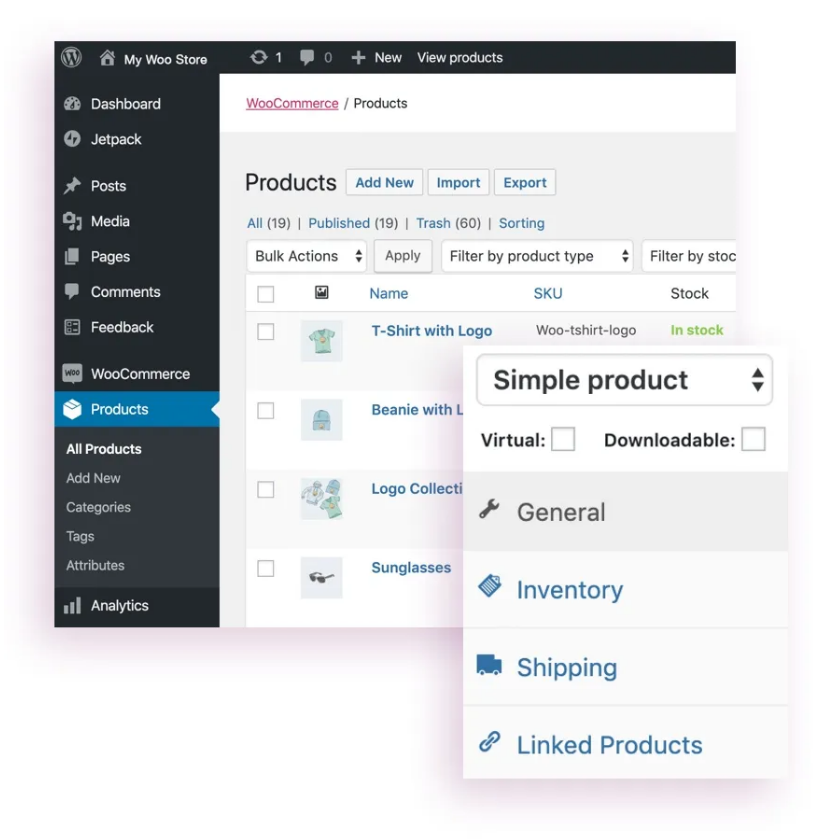
WooCommerce replaces Shopify's hosted subscription model with an open-source store built on WordPress. The core plugin is free, and the merchant chooses its host, theme, payment service and extensions. That flexibility is attractive when a store's content model or checkout behavior doesn't fit Shopify's boundaries. The same flexibility also shifts responsibility for performance, patching and recovery onto the merchant and its technical partners.
- you already have a reliable WordPress team
- you need code-level control or a content-heavy store
- nobody can own hosting, patching and backups
- rapid rollout matters more than customization
Migration and operating implications
Start with a technical ownership inventory. Someone must manage WordPress and plugin updates, backups, access controls, security incidents and monitoring. The ecommerce director should ask the current agency whether it can support those obligations and what response times are included. Without that commitment, a free platform license can become an expensive collection of emergency fixes. A hosted Shopify storefront and a self-hosted WooCommerce site aren't comparable on subscription alone.
The migration itself should be scoped as a data and behavior transfer. Product IDs, variants, customers, order history, tax settings and URL redirects need explicit mapping. Test a customer with several past orders and an active discount, then verify the corresponding record in the new store. If wholesale is important, evaluate which B2B extension owns company accounts, price lists and approval rules. Plugin overlap is a governance problem even when every extension works separately.
Choose WooCommerce if you already have a reliable WordPress team and need code-level control or a content-heavy commerce experience. Skip it if nobody can own hosting and maintenance or if rapid rollout matters more than customization. A fair cost model includes hosting, extension renewals, developer support and the hours spent keeping the site safe and fast.
- Starting price
- Free core; hosting, extensions and maintenance extra
- Switching job
- WordPress control and flexible ownership
- Pricing
- Free core; hosting, extensions and maintenance extra
Wix: visual storefront for small catalog teams
Wix
Site builder with variant inventory
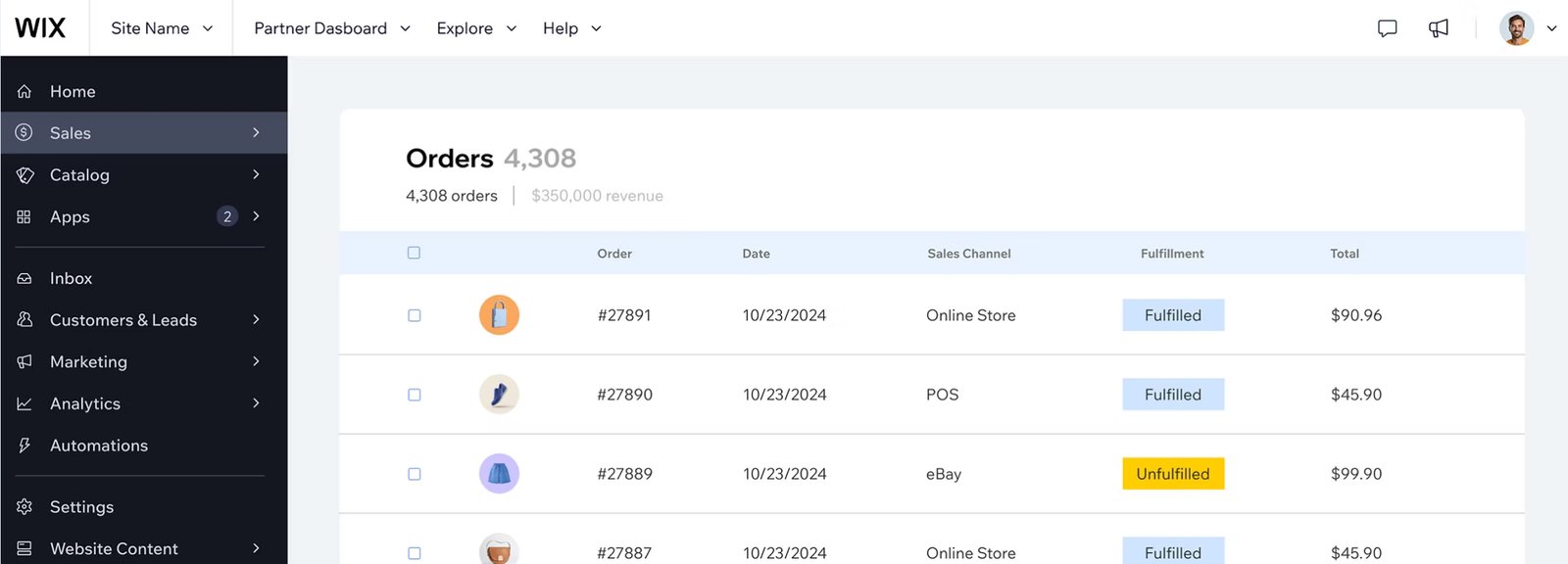
Wix is a website builder with ecommerce functionality, suitable when a small team values visual editing and a unified website more than intricate retail operations. Its editor can be useful for a service business that also sells products, a creator brand or a shop with a manageable catalog. Wix Stores can be configured before upgrading, but Wix's own help center says the store needs a payment-enabled plan before customers can place orders.
- your team wants design autonomy without a developer
- the catalog is small and the site is also a marketing website
- you run a complex multichannel operation
- you need fine-grained wholesale pricing
Migration and operating implications
A Shopify-to-Wix decision should begin with the real job of the site. If the storefront is primarily a marketing website with a modest shop, test landing-page editing, appointments, content blocks and the order checkout together. If the business instead relies on complex product variants, multi-location inventory and deep ERP integrations, write down those needs before the visual demo. A nice homepage isn't evidence that the fulfillment workflow will survive.
During a pilot, recreate your highest-traffic product page, an option-heavy product and a discounted bundle. Test mobile editing, tax calculation, shipping profiles and how the chosen payment processor settles funds. Wix plan eligibility and prices can vary by location and billing configuration, so capture the actual US checkout quote instead of carrying forward a price from an unrelated region. Treat apps and premium features as separate budget lines.
Choose Wix when your team wants design autonomy and straightforward selling without a dedicated developer. Skip it when the store is the core of a complex multichannel operation or requires fine-grained wholesale pricing. Migration should be justified by measurable editing speed and operational fit, not by assuming a site builder will automatically cost less than Shopify after add-ons.
- Starting price
- Paid commerce-capable plan; US checkout price varies
- Switching job
- Visual storefront for small catalog teams
- Pricing
- Paid commerce-capable plan; US checkout price varies
Squarespace: content-led brands and curated stores
Squarespace
Content-first commerce with Basic plan transaction fee
Squarespace is a design-focused website platform with commerce tools, well suited to merchants whose product catalog is relatively curated and whose brand storytelling carries the sale. Its commerce plans provide different transaction-fee and payment-processing structures. The official help center distinguishes the Plus and Advanced tiers, including different Squarespace Payments rates on domestic cards. The right comparison isn't simply the advertised monthly website fee.
- brand and content carry the sale
- the catalog is curated and checkout needs are simple
- you manage a large SKU catalog or unusual warehouse logic
- extensive B2B entitlements dominate the roadmap
Migration and operating implications
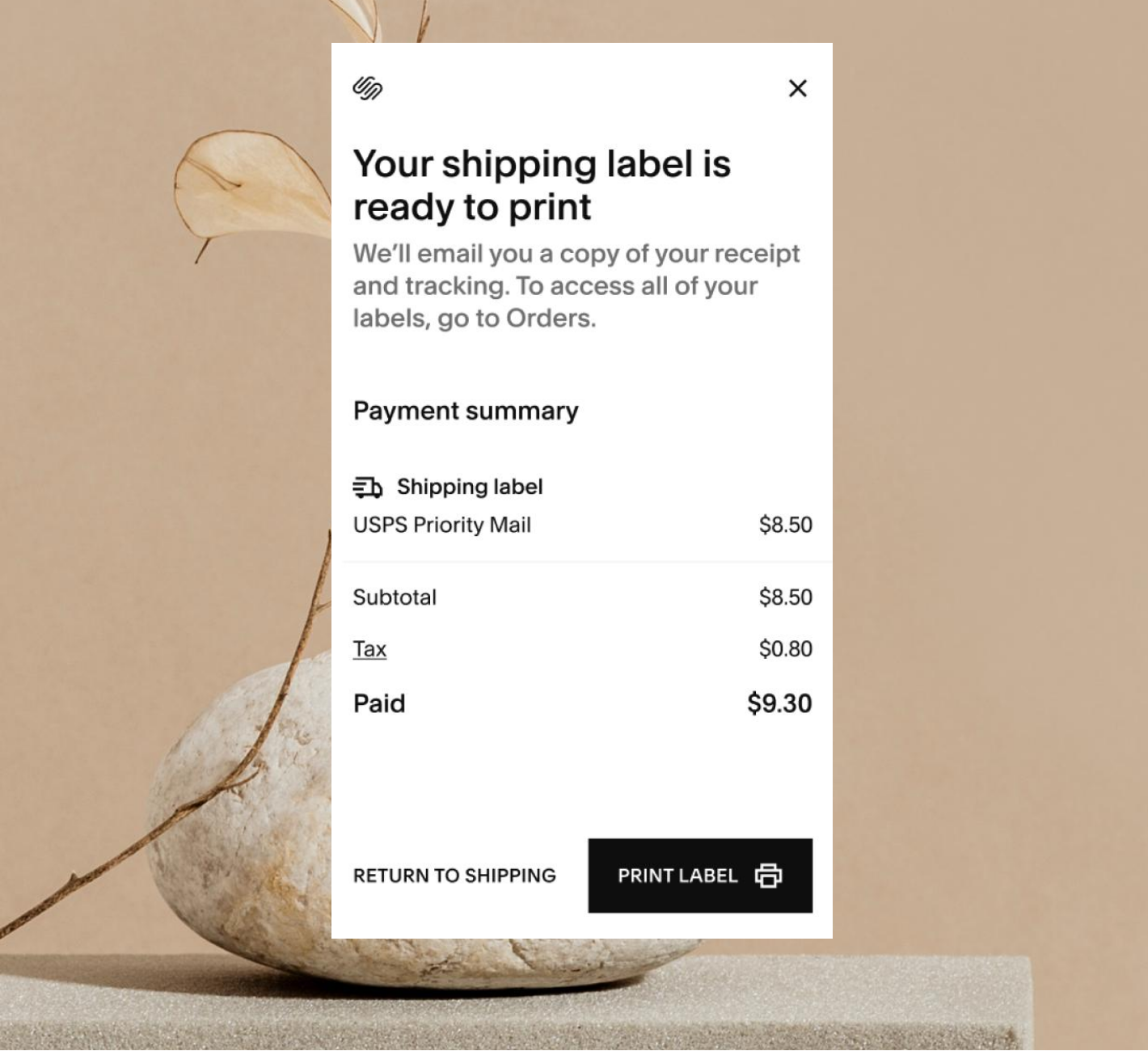
For a design studio selling a small set of physical goods and digital products, a migration pilot should reproduce the editorial landing pages and the checkout together. Test product options, subscriptions if applicable, shipping labels and digital delivery. Also check how the team publishes new collections and seasonal content. A storefront can be beautiful but still fail the operational test if a merchandiser can't update it without manual workarounds.
The fee model deserves its own spreadsheet. Separate the website subscription, any commerce transaction charge, the processor's card rate and the different treatment of digital products. The US help center says the Plus plan has no commerce transaction fee and a domestic-card Squarespace Payments rate of 2.7% plus $0.30, while Advanced lists 2.5% plus $0.30. Those aren't promises about every merchant's eligibility or payment mix, so verify the account-specific plan and processor before deciding.
Choose Squarespace for a content-led brand that values design and can operate within its commerce model. Skip it if a large SKU catalog, unusual warehouse logic or extensive B2B entitlements dominate the roadmap. Measure the ongoing editorial and merchandising workflow, not only the ease of launching the first storefront.
- Starting price
- Paid plan; US checkout price varies
- Switching job
- Content-led brands and curated stores
- Pricing
- Paid plan required; US price in checkout, no commerce transaction fee above Basic
Ecwid: commerce embedded into an existing website
Ecwid
Embedded store and Business-tier variation stock
Ecwid is a commerce system that can be added to an existing website, which makes it a different kind of Shopify alternative. Rather than rebuilding the whole content site around a store, a merchant can preserve its established web presence and add a catalog and checkout. That's attractive for a community organization, local service business or content publisher that sells a limited product line alongside its main work.
- you want to keep an existing website and add a store
- the product line is limited and sits next to other content
- the store is your main digital product and needs a tightly integrated journey
- you can't maintain two connected systems

Migration and operating implications
The important distinction is what remains outside Ecwid. Your website builder, analytics implementation and content management system still need owners. Test the customer journey across the existing site and embedded store: navigation, tracking, consent, cart behavior and order confirmation. A seamless visual embed can conceal fragmented reporting or inconsistent customer support. Ask who maintains the product catalog and where order status becomes visible to the operations team.
Ecwid updated paid-plan pricing in March 2026. Its official support page lists the US Venture plan at $35 per month when billed monthly or $29 per month with annual billing. The right tier depends on features and catalog needs, so verify the current account's eligibility and total add-on costs. A small plan price doesn't resolve whether the embedded checkout can meet your inventory and fulfillment requirements.
Choose Ecwid when the business wants to keep an existing site and add straightforward ecommerce without a complete replatform. Skip it when the store is the main digital product and needs a tightly integrated, highly customized shopping journey. Migration should compare the cost of maintaining two connected systems against the cost of a full commerce-first site.
- Starting price
- Venture $35/mo monthly or $29/mo annually
- Switching job
- Commerce embedded into an existing website
- Pricing
- Venture $35/mo monthly or $29/mo annually in USD
Adobe Commerce: custom enterprise commerce
Adobe Commerce
Shared catalogs and negotiable quotes
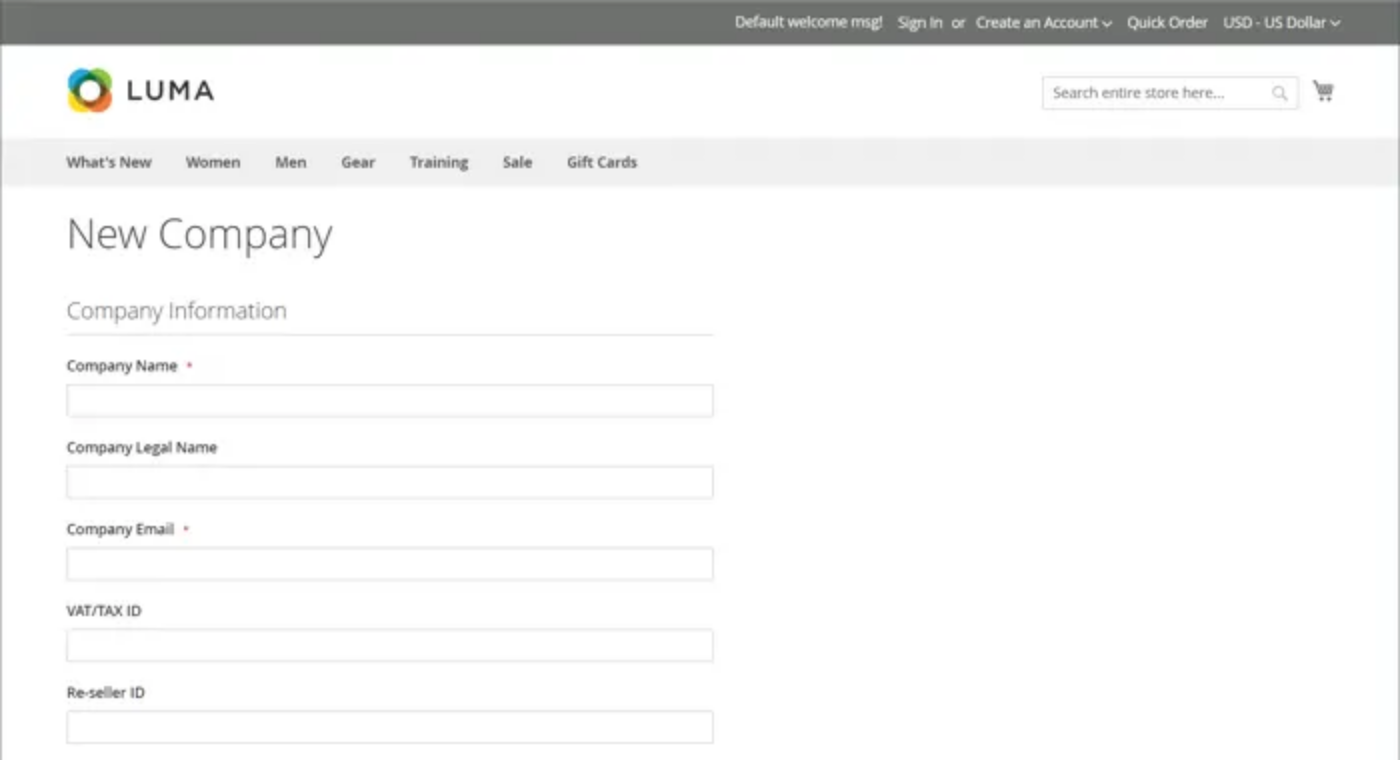
Adobe Commerce is a different class of Shopify replacement: a customizable platform for merchants with complex catalog rules, negotiated pricing and specialized integrations. Its B2B extension supports company accounts, shared catalogs and negotiable quotes. Those features can matter to a manufacturer or distributor whose buying process can't be expressed as a standard retail cart. They also require a capable implementation and maintenance model.
- you need company accounts, shared catalogs and negotiable quotes
- you have an internal technical owner and an implementation partner
- your Shopify pain is a few monthly app subscriptions
- you need a fast, low-effort rollout
Migration and operating implications
The most useful migration exercise is to pick the hardest customer account rather than the easiest product. Recreate its price agreement, restricted assortment, purchasing roles and approval path. Then test an order that changes quantity during quote negotiation and needs a different shipping location. The point is to determine which rules can be configured and which demand custom code. A demo that only shows catalog browsing won't answer the investment question.
Adobe's customizability shifts the economics toward build and run costs. Compare implementation partner estimates for integration, test automation, hosting, release management and incident response. Insist on a change-control plan for extensions and a data migration rehearsal. If the ecommerce team doesn't have an internal technical owner, even a strong partner can leave a knowledge gap when promotions, prices or product rules change.
Choose Adobe Commerce when customization and B2B workflow depth justify an enterprise program. Skip it if your Shopify pain is limited to a few monthly app subscriptions. Adobe doesn't publish a US list price for the configuration a B2B store needs, so request a written quote and budget the implementation separately.
- Starting price
- Custom quote; no verified public US list price
- Switching job
- Custom enterprise commerce
- Pricing
- Custom quote; implementation budget required
Shopware: configurable commerce with a B2B option
Shopware
B2B Components on the Evolve plan
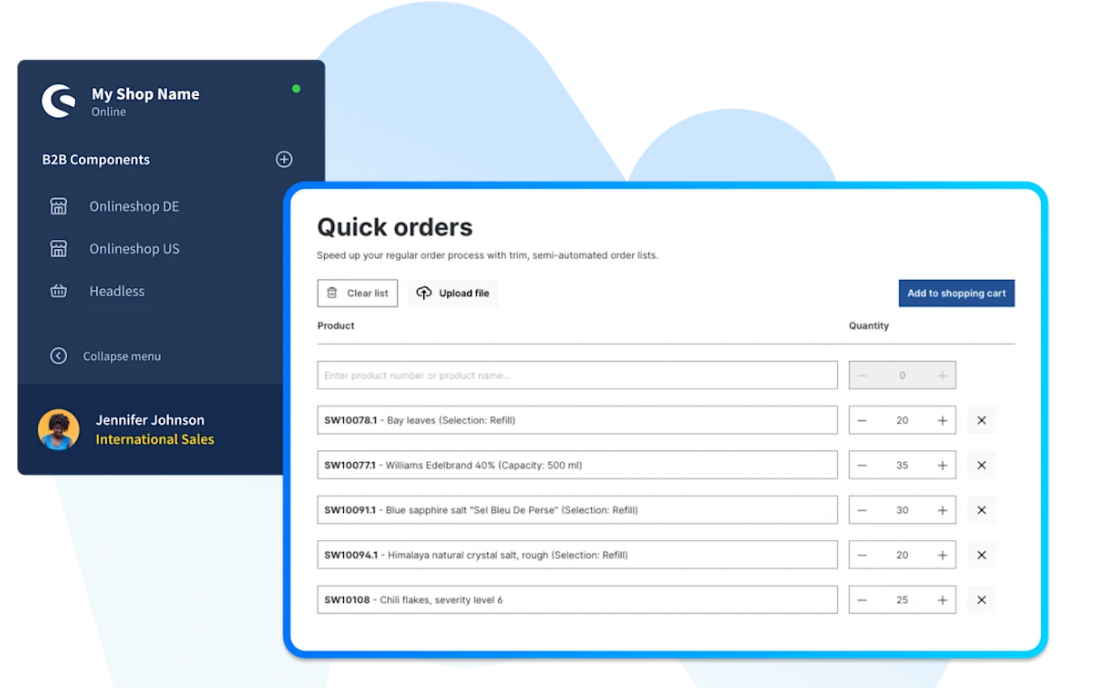
Shopware is a commerce platform with a flexible storefront and optional B2B Components. It can be a Shopify alternative when a merchant wants a configurable product and account model without choosing a fully API-composed architecture. Shopware's own pricing materials associate purchasing approvals and quotes with its Evolve offering. A company evaluating wholesale features must therefore confirm the commercial edition, not assume those workflows exist in every installation.
- you need quotes and purchasing approvals on a configurable platform
- you already have an agency familiar with Shopware
- you need a fully hosted store with almost no implementation effort
- you expect B2B features on the lowest tier
Migration and operating implications
For a regional distributor, test account-specific pricing, quote revisions and buyer permissions using real sample data. Make a sales representative edit a quote and a buyer manager approve an order. Then check how the same order reaches fulfillment and accounting. The goal is to determine how much behavior is handled in the platform versus a custom integration or extension. That split drives both implementation effort and long-term support cost.
Shopware may be attractive when a merchant already has a developer or agency familiar with its ecosystem. The team should evaluate hosting, extensions, support response times and upgrade testing as part of the contract. An apparently low software entry cost isn't meaningful if the B2B requirements force a higher tier and a sizable integration project. Require a written feature matrix against the current Shopify workflows.
Choose Shopware when configurability and B2B purchasing are more important than preserving Shopify's managed operating model. Skip it if the business needs a fully hosted store with almost no implementation effort. Shopware's publicly visible Evolve price is in euros, so a US buyer should request a direct dollar quote rather than use a converted number as a vendor list price.
- Starting price
- Evolve commercial plan; US price requires quote
- Switching job
- Configurable commerce with a B2B option
- Pricing
- Commercial US price by quote; B2B Components on Evolve
Why merchants look for Shopify alternatives
Merchants usually start looking beyond Shopify because a specific constraint has become operationally expensive. The common questions involve payment-provider fees, limits on company-specific B2B catalogs, app dependence and the desire to own the storefront code. Each issue needs a different remedy, and some can be fixed without changing platforms.
Payment-provider economics aren't the same as subscription prices
Shopify charges third-party transaction fees when a merchant uses a qualifying outside payment provider. Shopify Payments orders don't incur those additional third-party fees. BigCommerce also introduced a distinct Open Payment Provider Fee on qualifying self-serve orders in June 2026. Its embedded providers are treated differently. A merchant comparing the two needs the actual payment mix and eligibility rules, not a claim that one platform always charges a surcharge and the other never does.
App subscriptions can hide workflow design problems
An app inventory is useful only when it includes the job each app performs, who owns it and what breaks if it disappears. Some stores pay for overlapping promotion, reporting or feed features. Others have a single critical integration that can't be replaced safely, and that's the one to protect. Export the list of apps and classify each as required, redundant or uncertain. Test the uncertain group in a sandbox, because it isn't a saving until nothing breaks.
B2B requirements need a company-level test
Shopify expanded B2B access to Basic, Grow and Advanced in April 2026, so older comparisons saying all native wholesale features require Plus are outdated. Company-specific catalog assignment and unlimited catalogs remain Plus-level differences. A distributor should compare its actual contract-price structure against those boundaries. A generic "B2B supported" label on any platform isn't enough.
How to calculate whether switching platforms pays off
A Shopify replacement should be evaluated as a cash-flow and operational project. Separate the ongoing subscription from payment fees, apps, integrations, hosting, staff time and the one-time migration. Then add the risk of downtime, search visibility loss and order-data errors. Don't hide these costs in a generic implementation estimate.
Don't trust a single scenario, because a percentage fee costs more in absolute terms in a busy month. Use three scenarios: the current business, a busy seasonal month and the projected next-year mix of wholesale and retail orders. For each, record gross sales, order count, average order value, payment providers and paid extensions. Recalculate after changing only one variable, such as the share of orders using an outside gateway. A platform that looks cheaper in the current mix may be more expensive when a new wholesale channel launches.
Three mistakes that make a migration cost more than it should
Migrations that go over budget tend to share three gaps. They didn't price the payment mix, so the "cheaper" platform wasn't cheaper. They didn't test the ERP or warehouse handoff until launch week, and that's when it's expensive to find out. And they didn't keep the old store running for reconciliation, so refunds and customer-service lookups couldn't be traced. None of this is exotic, and you'll avoid most of it by running the pilot against your hardest order instead of your easiest one. If it's not in the test plan, it's going to show up on an invoice.
A practical Shopify migration sequence
A platform switch is successful when customers can find products, buy them and receive orders with correct financial records. Start with a data export and a complete inventory of current integrations. Build the new store in a nonpublic environment and map product IDs, variants, tax rules, customer accounts and order status values. Test redirects before moving the domain, since it's much harder to fix them once traffic has dropped.
Don't copy every historical workflow blindly, because you'd be paying to recreate old workarounds. Some automations exist only because of an old app limitation. Use the migration to simplify the stack, but don't change anything you can't explain, and record each intentional change and get the business owner to approve it. Keep the previous store accessible for reconciliation. You'll need it until returns, refunds and customer-service lookups have been tested.
- Export products, variants, customers and historical order records.
- Map every old product and collection URL to its intended destination.
- Recreate discount, tax, shipping and payment rules in a test store.
- Confirm order and inventory synchronization with the fulfillment system.
- Test customer login, returns, refunds and a failed payment.
- Compare payment-provider fees and app subscriptions using actual invoices.
- Record rollback owner, launch approval and post-launch monitoring.
When keeping Shopify is the better financial decision
It's often sensible to keep Shopify when the current pain can be solved without moving the store. A merchant with rising app bills should first identify which subscriptions are unused, duplicated or priced for a larger plan than the team needs. A payment-fee complaint should start with an invoice and a processor-eligibility review. A wholesale team should verify Shopify's current B2B capabilities before assuming that every requirement forces a Plus upgrade. The point isn't to defend the incumbent; it's to avoid paying for a migration that doesn't fix the underlying process.
An effective stay-versus-switch decision has an explicit threshold. Write down the annual operating cost of the current store, the expected operating cost of each replacement and the one-time migration bill. Then state what improvement justifies the disruption. The threshold might be fewer manual order corrections, lower payment-related expense or a critical customer-account workflow that the current platform can't support. Without a measurable requirement, a new storefront can become an expensive redesign with the same operational weaknesses.
Ask the operations team to list the workflows that must not regress. The list should include product updates, inventory synchronization, returns, tax handling, fraud review, discount logic and order exports. A candidate platform that improves design editing but breaks the warehouse handoff is a poor fit for a fulfillment-heavy merchant. Conversely, a simple store with no custom integrations may benefit greatly from a site builder that gives nontechnical staff more editorial autonomy.
Search visibility and customer records during a Shopify migration
Search traffic can be damaged by a platform switch even when the replacement is technically capable. Before changing domains or URL structures, export a list of important product and collection pages, identify their intended new locations and prepare permanent redirects. Preserve useful product descriptions and structured data where appropriate, then test the canonical tags and indexability of the new pages in staging. The launch checklist should include a rollback owner and a post-launch search monitoring plan. Don't assume rankings will carry over; they won't unless the redirects are tested.
Customer and order records require a separate migration plan. Determine which records are necessary for customer service, finance and returns, then decide whether they must be imported or can remain in a secure read-only archive. Don't promise that stored payment methods or account passwords can be moved unchanged; those capabilities depend on the payment provider and authentication setup. Verify the new account activation flow before emailing customers.
The final acceptance test shouldn't stop at the homepage, so follow a real order from product discovery to delivery. Confirm that the product is discoverable through its new URL, its price is correct, the payment method works, inventory is decremented and customer service can locate the order. Repeat the test with a refund and a return. A migration isn't complete when the new homepage appears. It's complete when the team can run its normal operations and reconcile what happened.
Which Shopify alternative fits which operating problem
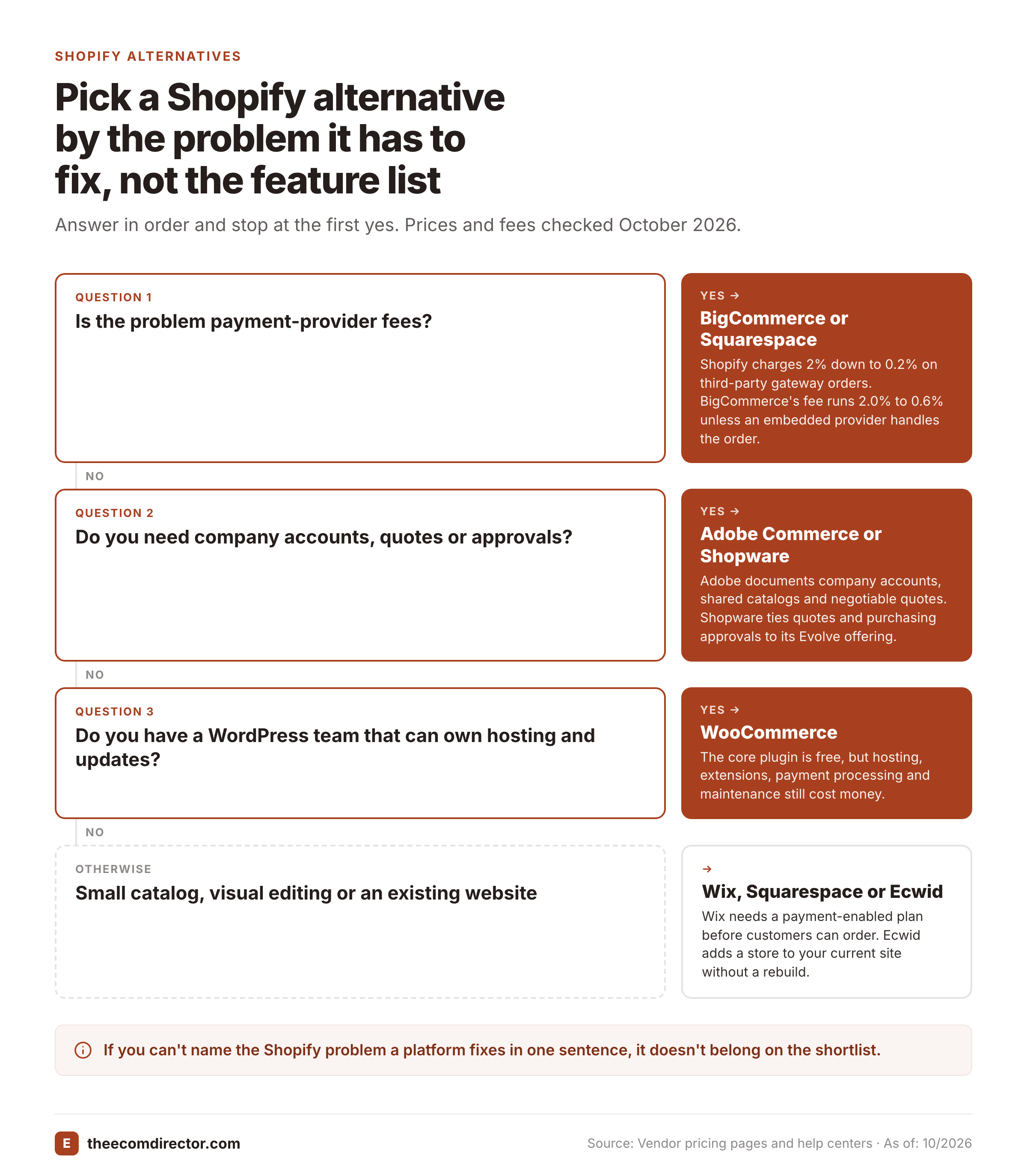
Frankly, most switching decisions come down to one thing Shopify can't do for you today, and it's rarely the theme. Once you've written that down, the shortlist shrinks fast, and you'll stop comparing platforms on features nobody asked for. You shouldn't need a spreadsheet of forty criteria; three will get you further.
If the problem is payment fees
Shopify's third-party gateway fee runs from 2% on Basic down to 0.2% on Plus, and it doesn't apply to orders processed through Shopify Payments. BigCommerce hasn't removed the issue, it's moved it. Since June 2026 its Open Payment Provider Fee runs at 2.0% on Core, 1.0% on Growth and 0.6% on Scale for eligible orders, and embedded providers are exempt. So the plan price isn't the number that matters; the processor behind each order is. Squarespace takes a different route: Core, Plus and Advanced carry no commerce transaction fee, and Plus and Advanced charge 2.7% or 2.5% plus $0.30 on domestic cards through Squarespace Payments, so you'll still pay for card processing.
If the problem is B2B
Shopify's April 2026 change put native B2B on Basic, Grow and Advanced, so it's worth re-testing before you leave. What's still Plus-only is unlimited catalogs and direct catalog assignment to companies. If you need company accounts, shared catalogs and negotiable quotes, Adobe Commerce documents all three, and Shopware ties quotes and purchasing approvals to its Evolve offering. Either way, you'll need an implementation partner, and you won't get a US list price without a quote.
If the problem is ownership or editing
WooCommerce is the pick when you want code-level control, as long as someone owns hosting and updates. Wix and Squarespace suit teams who'd rather edit visually, and they're clearly a poor match for ERP-heavy fulfillment. Ecwid fits when the website already exists and shouldn't be rebuilt around a store.
A one-sentence filter for your shortlist
If you can't name the Shopify problem a platform fixes in one sentence, it doesn't belong on the list. That's not a scoring system, it's a filter, and it's far cheaper than a failed migration. Of course, a platform can pass the filter and still fail the pilot, which is why the acceptance checklist above matters more than any comparison table.
Shopify alternatives by business model
The best alternative depends on what the store actually does, and that's why one ranking can't serve everyone. A lean content-led brand has different constraints from a distributor negotiating prices with hundreds of accounts. BigCommerce is worth a hosted SaaS comparison, WooCommerce fits teams that already maintain WordPress and Ecwid can be useful when the store is a secondary feature of an existing site. Adobe Commerce and Shopware should be considered only when their customization and B2B workflows justify the implementation commitment.
There's no universal winner, and you're not obliged to pick the most powerful option. It's fine to stay small. The decision should be recorded in a one-page scorecard with the current Shopify pain, replacement capability, migration effort, owner and acceptance test. A platform doesn't earn a place on the shortlist because it's popular. It has to address a specific bottleneck in your operating model.
How product feeds affect a Shopify replatform
Product feed quality often becomes visible only after a platform migration, when IDs, currencies, attributes and product availability are mapped into a new export. The Ecom Director's feed checker can inspect public XML, CSV or TSV feeds for missing attributes, duplicate IDs and price or currency issues, then show changes between versions for a small number of monitored feeds. It doesn't move catalogs or publish feeds to channels.
A sensible use is to capture a baseline public feed before the migration, inspect the new export and investigate changes in the source store. The commerce team still owns data mapping, channel configuration and the go-live decision.
Frequently asked questions about Shopify alternatives
These answers separate license cost from operating responsibility and help identify when a switch is justified.
What is the closest Shopify alternative?
BigCommerce is the closest hosted alternative: it keeps the managed model, but its Open Payment Provider Fee and plan thresholds differ from Shopify's. Compare your actual payment mix and integrations before switching.
Is WooCommerce free?
WooCommerce core is free to download and use. Hosting, extensions, payment processing and technical maintenance still cost money.
Can Wix replace Shopify for an online store?
Wix can support a smaller online store when its payment-enabled plan and catalog features meet the business requirements. Test fulfillment and integrations before committing.
Which Shopify alternative works with an existing website?
Ecwid can add commerce to an existing website without replacing the entire content system. Check how checkout, analytics and inventory will connect.
Does BigCommerce charge transaction fees?
BigCommerce charges an Open Payment Provider Fee on eligible orders through open providers on self-serve plans. Orders through listed embedded providers are exempt from that specific fee.
Is Shopify worth leaving only to save on app costs?
Usually not. If you're paying for overlapping or unused apps, audit them first, because that's a fix you can make without a migration. Move platforms when a workflow can't be solved where you are.
Which alternative suits B2B and wholesale?
Adobe Commerce and Shopware both document company-level features such as quotes, but you'll need a partner and a vendor quote. Shopify's April 2026 update also brought native B2B to Basic, Grow and Advanced, so it's worth re-testing before you leave.
Will my customers' passwords and saved cards move over?
Don't count on it. Stored payment methods and account passwords depend on the payment provider and authentication setup, so plan an account activation flow and test it before you email customers.