 Google and Meta feedsSimprosysFour product-count tiers from $4.99 a month, 4.9 from 4,964 reviews.
 Several feeds per storeMultifeedFree plan, expression-based attributes, 2 to 6 feeds on the first paid tiers.
 Custom feed formatsMulwi200+ templates and a free plan; $15 a month covers 1,000 products or 2,500 variants.
 Channel-specific rulesDataFeedWatchRules engine and feed quality score from $64 a month.
 Localized, multi-market catalogsChannableShopify Markets importer and no-code if/then rules, priced by item tier.
 Managed feed operationsFeedonomicsQuote-based service with a dedicated feed manager.
| Tool | Category | What it handles | Starting price | G2 rating |
|---|---|---|---|---|
| Simprosys | Google and Meta feed app | Shopify catalog to Google and other shopping destinations | $4.99 per month up to 500 products; $8.99 up to 1,000; $13.99 up to 5,000; $17.99 up to 10,000 | 4.9 (Shopify App Store, 4,964) |
| Multifeed | Multiple Google feeds | Shopify catalog to localized shopping feeds | Free; $5.95 per month for 1,000 products and 2 feeds; $15.95 for 3,000 and 4 feeds; $25.95 for 10,000 and 6 feeds | 4.9 (Shopify App Store, 1,124) |
 Nabu | Google Shopping feed app | Shopify catalog to shopping channels | Free up to 10 orders per month (100 products); Grow $39.90 per month; Advanced $99.90; Plus $249.90 | 4.7 (Shopify App Store, 536) |
| Mulwi | Custom Shopify feeds | Shopify catalog to configurable product feeds | Free; Pro 1 $15 per month; Pro 2 $19; Pro 3 $38 (Basic Shopify prices) | 5.0 (Shopify App Store, 623) |
| DataFeedWatch | Rules-based feed platform | Shopify product data to channel-specific feeds | Shop $64 per month; Merchant $84; Agency $239; Enterprise $599 | 4.7 (138) |
| Channable | Multichannel feed platform | Catalog rules and destination-specific feed exports | Core Standard EUR 59 per month, Plus EUR 79, Pro EUR 89 at 5,000 items; modules from EUR 30 | 4.5 (54) |
 GoDataFeed | Feed syndication platform | Product catalog to advertising and marketplace feeds | Lite $39 per month; Plus $99; Pro $199; Premium $399 | 4.7 (16) |
| Feedonomics | Managed feed operations | Product catalog to managed channel feeds | Quote-based; no public price | 4.4 (376) |
 The Ecom Director Our product | Product feed checks and monitoring | Checks product feeds before they reach Merchant Center and compares each new version | $9/month | No reviews yet |
Prices are the vendors' listed plans in November 2026 and change with catalog size and Shopify plan.
The best Shopify product feed management software depends on where you sell and how much control you need over product data. Simprosys suits a Google-first store, Multifeed handles several feeds from one catalog, and Mulwi covers custom feed formats at a low price. DataFeedWatch and Channable add rules and localization for several channels, and Feedonomics sits at the managed, quote-based end for large catalogs.
What is product feed management software?
Product feed management software turns a store's product data into the files or API feeds that shopping ads, marketplaces and comparison sites require. For a Shopify store it reads the catalog, maps each attribute such as title, price, GTIN and availability to the format a destination expects, applies rules, and sends the result on a schedule. Most tools also report errors that a destination such as Google Merchant Center returns, so you can fix them in one place.
Which Shopify feed tool should you choose?
Choose a tool based on channel coverage, catalog size, rule complexity, regional requirements and who owns feed errors. A small store advertising on Google doesn't need the workflow of a merchant maintaining localized catalogs across several marketplaces.
| Need | Start with | Check before committing |
|---|---|---|
| Google and Meta feeds from a small catalog | Simprosys, Nabu | Product tiers, order thresholds and add-on fees |
| Several feeds with different scopes | Multifeed | Feed count and metered extra runs |
| Custom feed formats at a low price | Mulwi | Variant caps and Shopify-plan pricing |
| Channel-specific rules and feed scoring | DataFeedWatch, Channable | SKU or item tiers, channel allowances |
| Ad channels plus marketplaces with order sync | GoDataFeed | Channel add-ons and plan minimums |
| Managed feed operations | Feedonomics | Written scope, recurring services and quote |
How do Shopify feed management tools differ?
Shopify feed apps and dedicated feed platforms solve overlapping but distinct problems. A Google-focused app concentrates on mapping Shopify product data to shopping destinations and fixing Merchant Center errors. A broader platform adds transformation rules, destination-specific exports and governance across several sales channels. Marketplace order management isn't a feature every tool has, so confirm it per plan.
The 8 best Shopify product feed management tools
Simprosys
Shopify feed app for ecommerce teams managing product data across sales or advertising destinations.
Simprosys Google Shopping Feed is built around one job: getting a Shopify catalog into Google and the other shopping destinations it lists. Those include Google Shopping and free listings, Facebook and Instagram, Pinterest, Microsoft Advertising and Google Local Inventory Ads. Prices are by product count, starting at $4.99 a month for up to 500 products.
Shopify's listing shows four tiers: $4.99 a month for up to 500 products, $8.99 for up to 1,000, $13.99 for up to 5,000 and $17.99 for up to 10,000. Annual billing takes 10% off. Every tier has a 21-day free trial, and there's no free plan. The cheapest tier already includes three multi-currency, language or country feeds plus Pinterest, Meta and Bing feeds, so a small store doesn't pay extra for the second destination.
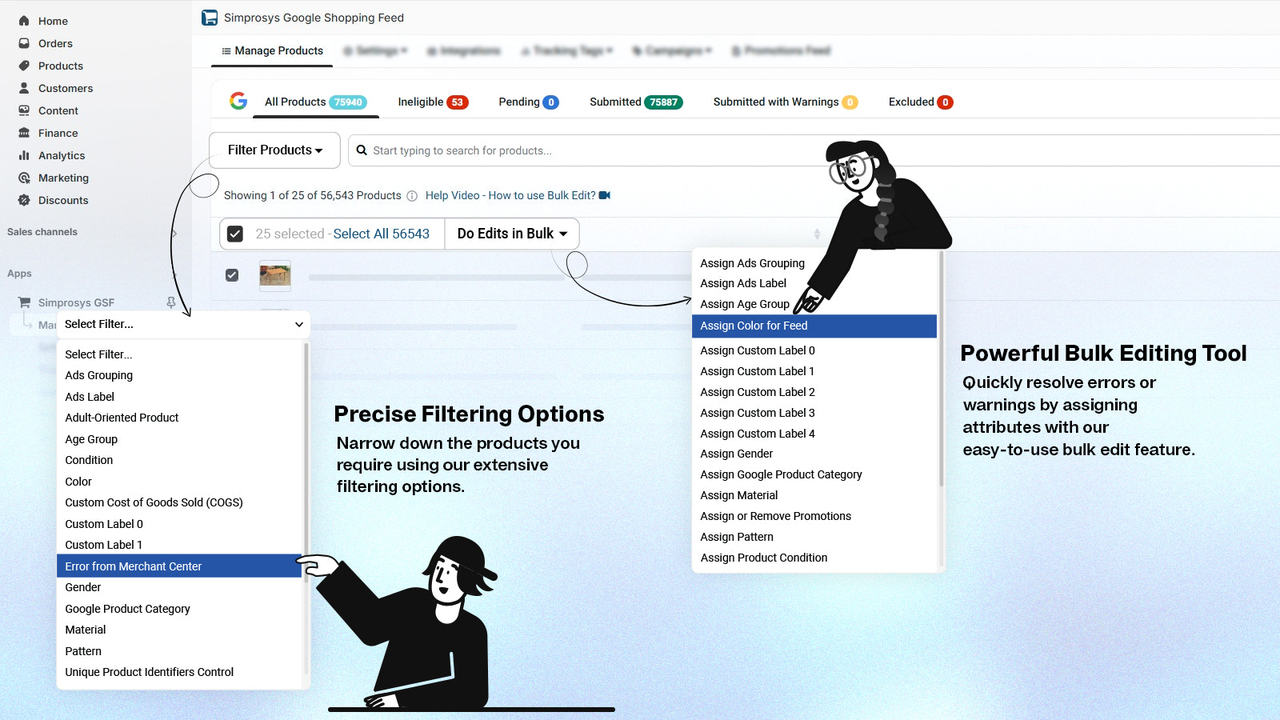
The working screens are bulk editing and automated feed rules. Manage Products groups items into Ineligible, Pending, Submitted and Excluded tabs and filters by errors returned from Merchant Center, so you can find every product with a bad GTIN in one view. Feed rules assign values such as age group, gender, shipping label, excluded destination and custom labels 0 to 4 when a condition matches. The app also manages Performance Max and Microsoft campaigns and supports Consent Mode V2 and server-side GA4 tracking, which matters if you'd rather not run a separate tracking setup.
- you mainly advertise on Google and Meta and want Simprosys's feed rules plus bulk edit in one app
- you have under 1,000 products and want Simprosys's $8.99 tier or lower
- you need marketplace feeds with order sync, which Simprosys doesn't offer
- you can't accept Simprosys's usage-based add-on fees for XML or extra markets feeds
- Users like
- Fast live-chat support and handling of large multi-market catalogs
- Users dislike
- Billing surprises at product limits and sync problems after the trial
- Source: Shopify App Store, 4,964 reviews
How it works in practice
Check the add-ons before you pick a tier. The listing prices an XML feed at $1.75 a month on the smallest tier and $3.15 on the 1,000-product tier, and markets feeds beyond the three included cost $0.50 to $1.80 per feed a month depending on tier. AI feed optimization is $1.00 per 25 products as a one-time charge. All charges are billed in USD every 30 days.
Reviews are clearly positive: 97% are five stars and 1% are one star. The praise is for live chat support that fixes sync problems quickly and for handling several markets and large catalogs. The complaints are specific and worth reading. Several 2026 one-star reviews say syncing paused after the trial or that a re-sync doubled a feed from about 20,000 to about 40,000 listings, which led to disapprovals. Another reports a $203.97 charge after hitting the product limit and moving to a higher tier. The app launched on August 16, 2017, and it isn't a Built for Shopify app.
Simprosys fits a merchant who mainly advertises on Google and Meta and wants rules and diagnostics without a separate platform. It's less suited to marketplace feeds with order sync, where the later tools in this list are built for the job.
Pick Simprosys if you're mostly on Google and Meta and you don't want to learn a rules language. Skip Simprosys if you're after marketplace feeds with order sync. It isn't a rules engine for ten channels, and you'll want to watch the product count that decides your tier, because that's where surprise bills start.
- Starting price
- $4.99 per month up to 500 products; $8.99 up to 1,000; $13.99 up to 5,000; $17.99 up to 10,000 (21-day trial)
- Free trial
- 21 days
- Launched
- August 16, 2017
- Built for Shopify
- No
Multifeed
Multimarket Shopify feeds for ecommerce teams managing product data across sales or advertising destinations.
Multifeed Google Shopping Feed, built by Woolytech, is the pick when one store needs several different feeds. It has a free plan, a Built for Shopify badge and a 4.9 rating from 1,124 reviews, and it prices by product count and number of feeds. Feeds can go to Google, Meta, TikTok, Snapchat, Yahoo Ads and custom channels in Merchant API, CSV, TSV, XML or JSON.
The free plan covers 10 products and 1,000 variants, with one feed. MultiFeed-1K costs $5.95 a month for 1,000 products and 2 feeds, MultiFeed-3K is $15.95 for 3,000 products and 4 feeds, and MultiFeed-10K is $25.95 for 10,000 products and 6 feeds with personal feed setup help. Paid plans have a 7-day free trial. The vendor's own pricing page lists 12 tiers, from a $10.95 plan with 2,000 products and 3 feeds up to $75.95 for unlimited products, variants and feeds, so a larger catalog has room to grow without changing app.
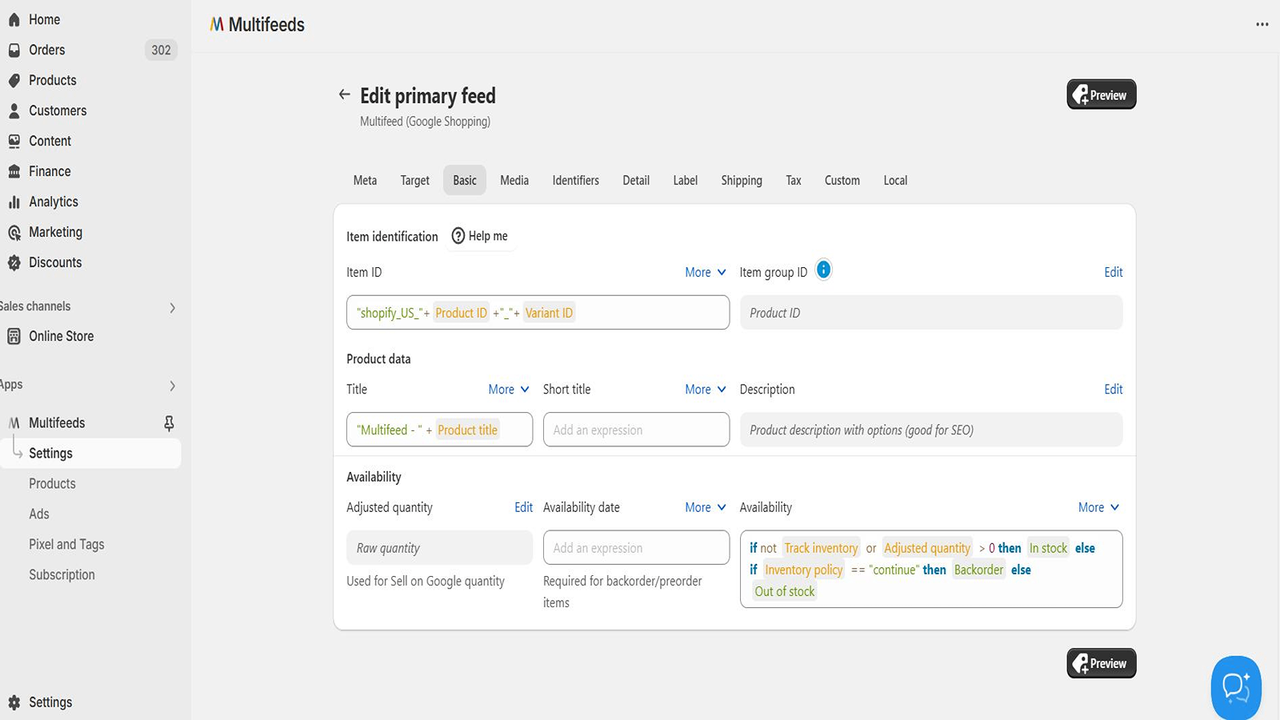
The feed editor is expression based. You build the item ID, title, availability and other attributes from if/then expressions over product fields, across tabs for Meta, Target, Basic, Media, Identifiers, Detail, Label, Shipping, Tax, Custom and Local. A typical use is an ID such as the market code plus the product ID plus the variant ID, so the same product gets a distinct ID in each country feed. Metafields and metaobjects are unlimited on every plan, including the free one.
- you need several feeds with different currencies, languages or product subsets from Multifeed
- you want Multifeed's expression-based attribute control and its free plan to test it
- you only need one standard Google feed, so Multifeed's expression editor adds little
- you plan scheduled runs and don't want Multifeed's metered extra-run fees
- Users like
- Fast, knowledgeable support and flexible expressions
- Users dislike
- Billing confusion after uninstall and a user interface that is not always intuitive
- Source: Shopify App Store, 1,124 reviews
How it works in practice
The dashboard shows Merchant Center status by country with approved and invalid items, and run history lists each feed run as a success or partial result with the error text, for example an invalid GTIN value. That helps when you're debugging a feed per market rather than for the whole store. Feeds can run on a schedule, but extra runs are metered: the first run of the day is free, and the in-app screen lists extra schedules at $0.03 per 1,000 products per run and extra renewals at $0.30 per 1,000 products per run. Multiply that by your catalog size before you schedule hourly runs.
The app launched on April 20, 2020, and 96% of its ratings are five stars. Reviewers praise fast, knowledgeable support, including a named agent who fixed a feed-save outage and coordination with Google. The complaints are about billing after uninstalling or a trial authorization, a 2026 server issue that blocked feed saves for several days, and a user interface that one reviewer called not always intuitive. The developer replies that no charge applies inside the 7-day trial.
Multifeed suits stores that sell in several countries or segments and need different titles, currencies or product subsets per feed. If you only need one Google feed, the extra expression editor is more tool than you need.
Pick Multifeed if you're running a feed per country, since that's what its tiers count. Skip Multifeed if one standard Google feed is all you'll ever run. You won't use the expression editor much, and you'd be watching metered run fees that simpler apps don't have.
- Starting price
- Free (10 products); $5.95 per month for 1,000 products and 2 feeds; $15.95 for 3,000 and 4 feeds; $25.95 for 10,000 and 6 feeds
- Free trial
- 7 days
- Launched
- April 20, 2020
- Built for Shopify
- Yes
Nabu
Shopify shopping feed app for ecommerce teams managing product data across sales or advertising destinations.
Nabu for Google Shopping Feed, made by AdNabu, is a Built for Shopify app with a 4.7 rating from 536 reviews, and its pricing works differently from most of this list because the free tier depends on order volume. The free plan covers up to 100 products and one target country. Paid plans cover unlimited products and countries, yet the real question is how many orders you process each month.
On Shopify's listing the Explorer plan is free for up to 10 orders a month and $19.99 a month above that. Grow is $39.90 a month or $399 a year, with unlimited products, orders and countries, AI optimization, bulk edit with export and import, multi-language and currency feeds and two marketplaces. Advanced is $99.90 a month with 20,000 AI credits, four marketplaces plus XML feeds, product review integrations, hourly sync, five feed rules and headless support. Plus is $249.90 a month with unlimited marketplaces, instant sync from Shopify to Google, a dedicated account manager and 24/7 priority support. Every paid plan has a 14-day free trial.
The vendor's own pricing page uses different names and cents: Starter, Basic at $39.99, Advanced at $99.99 and Plus at $249.99, and it states the free-tier overage as $4.99 plus 6 cents per order above 10 orders. The price you'll pay is the one shown at checkout inside Shopify.
- you want Nabu's AI-assisted titles and per-country feeds without per-product fees
- your Shopify catalog is large but your order volume is modest, which suits Nabu's order-based tiers
- you process many orders on a small catalog, where Nabu's order thresholds cost more
- you don't want order volume to influence your Nabu plan
- Users like
- Responsive support that investigates the account
- Users dislike
- Multi-currency variant mismatches and the order-based free tier
- Source: Shopify App Store, 536 reviews
How it works in practice
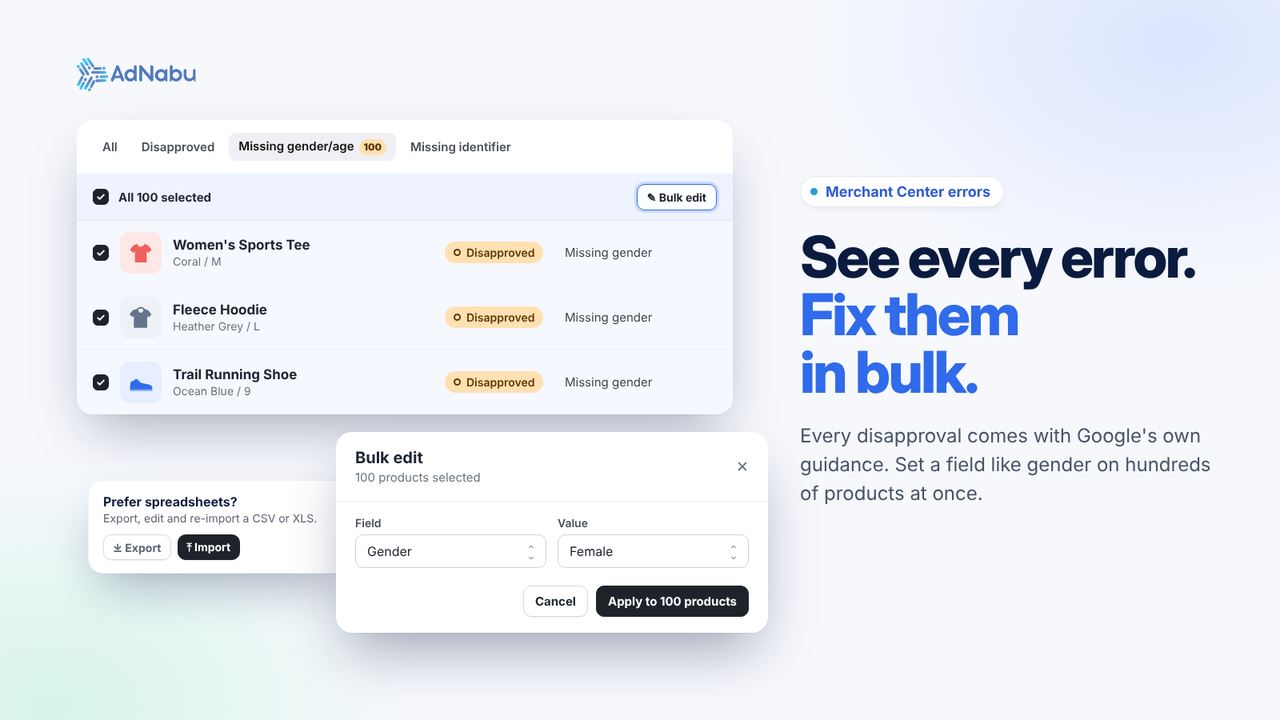
The working screens are a feed health score with Merchant Center disapproval detection, AI fix suggestions and bulk edit. One example is setting a missing gender value on 100 products at once, then exporting or importing the sheet. Feed rules use if/then logic to change titles, exclude products or map metafields without touching the Shopify data. Instant Shopify Sync pushes price and stock changes to Merchant Center quickly, and Markets support builds a feed per country with its own currency and language. The vendor lists feeds for Facebook and Instagram, Pinterest, Bing, TikTok, Snapchat and X as well.
Reviews are 93% five stars and 4% one star, and the app launched on March 26, 2020. A Google Merchant Center professional praised the support for investigating the account, and one merchant reported 50 feeds with 19,000 products each running cleanly. The complaints are about multi-currency variant data that triggered a price mismatch warning in Merchant Center in a September 2026 review, an order-based free tier that one reviewer disliked and a January 2026 review claiming a plan was upgraded without consent. Several other one-star reviews are one-liners with little detail.
Nabu suits stores that want AI-assisted title work and per-country feeds without per-product fees. If you run a busy store on a thin catalog, the order thresholds can cost more than a product-count plan.
Pick Nabu if you've got a big catalog but few orders, because that's where its order-based tiers cost least. Skip Nabu if you'd rather not model order volume. It's the one tool here where a busy month can change your plan, and you can't judge the price from the catalog size alone.
- Starting price
- Free for up to 10 orders per month (100 products); Grow $39.90 per month; Advanced $99.90; Plus $249.90 (14-day trial)
- Free trial
- 14 days
- Launched
- March 26, 2020
- Built for Shopify
- Yes
Mulwi
Shopify product feeds for ecommerce teams managing product data across sales or advertising destinations.
Mulwi Shopping Feeds is a flexible low-cost app. It has a 5.0 rating from 623 reviews, a Built for Shopify badge and more than 200 ready-made feed templates, including Google Shopping, Meta, Bing, Pinterest, TikTok, Awin, Rakuten, Idealo and ChatGPT. You can also build a custom feed in XML, CSV, TXT or XLSX.
The free plan allows up to 50 products or 100 variants and 2 feeds, without feed customization, so it works as a test of the templates rather than of the attribute editor. Pro 1 is $15 a month for up to 1,000 products or 2,500 variants and 2 feeds, with customization and instant sync of product changes. Pro 2 is $19 a month for 2,500 products or 5,000 variants and 5 feeds, and adds automatic feed translations and support for your primary Shopify Market. Pro 3 is $38 a month for 10,000 products or 20,000 variants and 10 feeds, with full Shopify Markets, price lists and AI category mapping. Paid plans have a 7-day free trial and are billed every 30 days, or at 20% off on annual billing.
Those prices are the Basic Shopify tier. Mulwi sets its price by your Shopify plan, and the vendor's pricing page shows $29 for Pro 2 and $39 for Pro 3 on the Grow tier, so a store on a higher Shopify plan pays more. Advanced 1 and 2 at $76 and $119 appear on mulwi.com only, for up to 50,000 products with order import and priority support.
- you need a feed format the Google-first apps don't produce and Mulwi's 200+ templates cover it
- you want to test Mulwi's custom feed output on its free plan
- you want a guided setup without writing Mulwi expressions
- you have many variants and Mulwi's variant cap would be hit before its product cap
- Users like
- Fast, expert support that builds or fixes custom feeds
- Users dislike
- Setup can feel hard without a technical background
- Source: Shopify App Store, 623 reviews
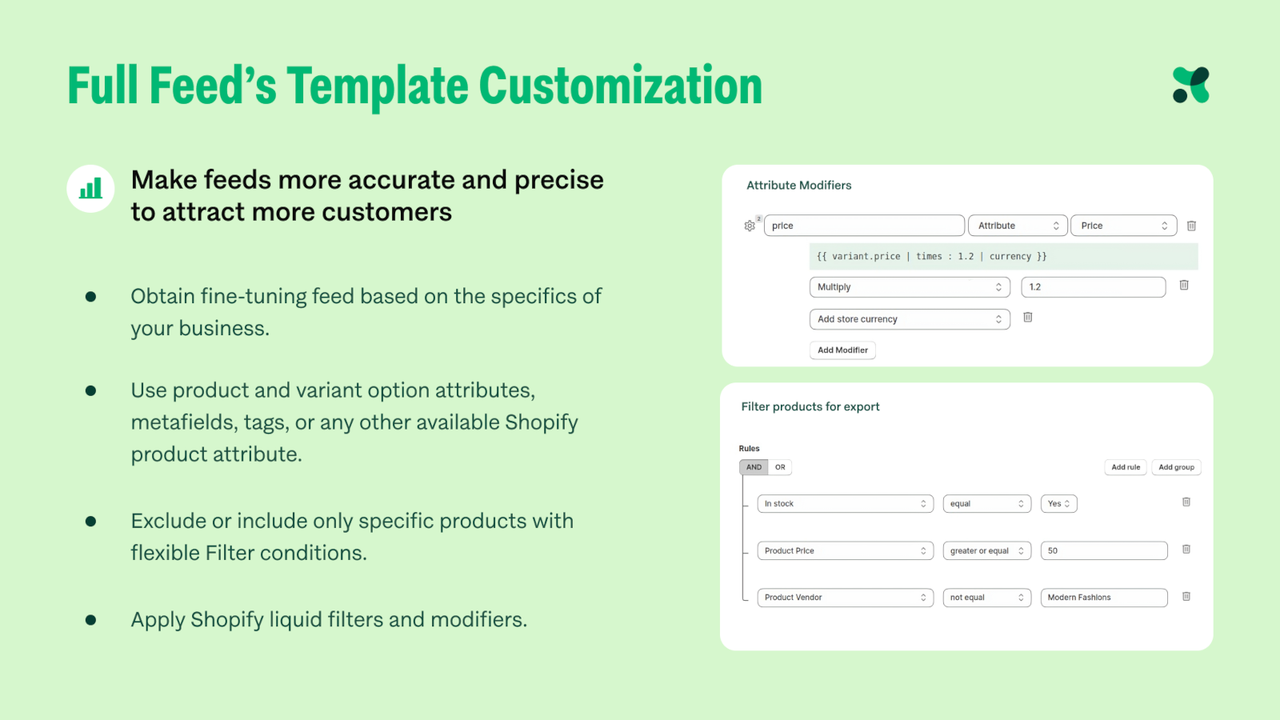
How it works in practice
The core of the product is the template editor. Attribute modifiers change a value with a formula, such as multiplying a price by 1.2 and adding the store currency, and Shopify liquid filters, dynamic conditions and expressions give finer control. Product filters with AND and OR rules include or exclude items, for example only in-stock products above a price, and you can export from a chosen stock location. Metafields, metaobjects and variant option attributes can be mapped into feed fields. Feeds refresh instantly or on an upload interval of 1, 3, 6, 12 or 24 hours, and a quality control view lists errors, warnings and improvements with email notifications.
Support is the main theme in the 97% five-star reviews: reviewers describe fast, expert help that builds or fixes a custom feed, including for Awin, ChannelEngine and Google Shopping. The criticism is thin, but it's there. Two low-star reviews said setup was hard, and the developer replied that those reviewers hadn't contacted support. A technical background helps when you write expressions. The app launched on July 26, 2019.
Mulwi fits a store that needs a feed format the Google-first apps don't produce, or that wants to test custom output on the free plan before paying. Count variants first, because an apparel catalog can hit the variant cap long before the product cap.
Pick Mulwi if you've got an unusual feed format and you're happy to tune attributes yourself. Skip Mulwi if you don't want to write expressions at all. The editor takes formulas, liquid filters and conditions, but it's built for people who like to tune attributes, and you'll still need to check each feed's output yourself.
- Starting price
- Free (50 products); Pro 1 $15 per month; Pro 2 $19; Pro 3 $38 (Basic Shopify prices, 7-day trial)
- Free trial
- 7 days
- Launched
- July 26, 2019
- Built for Shopify
- Yes
DataFeedWatch
Feed optimization platform for ecommerce teams managing product data across sales or advertising destinations.
DataFeedWatch is the rules-driven option, with the earliest Shopify App Store launch in this comparison, on April 12, 2013. It holds a 4.7 rating from 342 Shopify reviews and 4.7 from 138 on G2. It's aimed at merchants who transform product data for several channels and want that logic in a rules engine instead of in Shopify.
Shopify's listing prices four plans. Shop is $64 a month for 1,000 SKUs, 3 channels and 1 shop. Merchant is $84 for 5,000 SKUs, 10 channels and 2 shops. Agency is $239 for 30,000 SKUs, 150 channels and unlimited shops, and Enterprise is $599 for 100,000 SKUs. Extra products cost $5 per 1,000 on Shop, $3 on Merchant, $2.50 on Agency and $2 on Enterprise. Annual billing takes 17% off and every plan has a 15-day free trial. There's no free plan.
The vendor's website shows euro prices of 54, 74 and 219 for the first three plans and lists Enterprise by quote. If you buy through Shopify, the listing's dollar prices apply.
- the same Shopify catalog needs different titles and labels per channel in DataFeedWatch's rules engine
- someone on your team will own DataFeedWatch's feed rules
- your catalog already works through Shopify's native Google integration
- you need a free plan, which DataFeedWatch doesn't have
- Users like
- Flexible rules and hands-on support
- Users dislike
- Onboarding quality and a learning curve for advanced setups
- Source: G2, 138 reviews
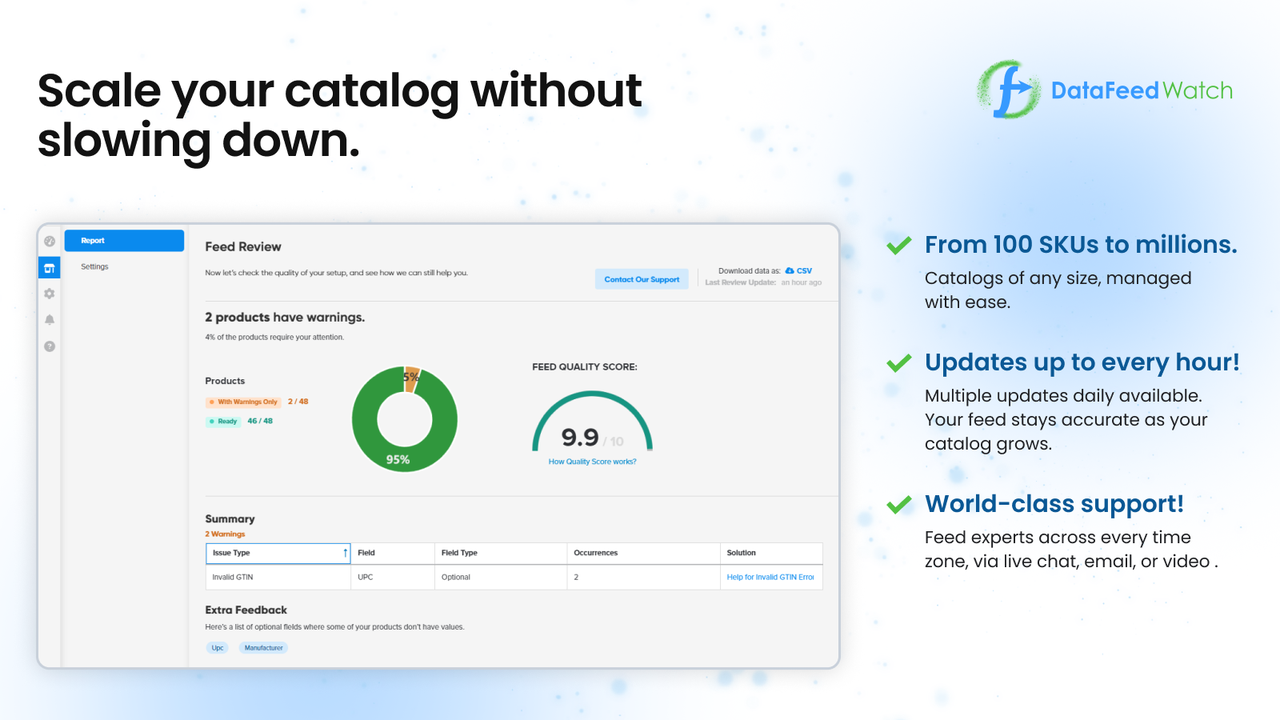
How it works in practice
The rules engine takes conditions with AND and OR logic, lookup tables and regex, and can write custom labels from performance data, for example labels for ROAS bands. Rules can be copied across shops, channels and clients, which is why agencies use the Agency plan's master rules. The Feed Review screen scores a feed out of 10, shows how many products carry warnings and lists problems such as an invalid GTIN with the field and the number of occurrences, before the data reaches Merchant Center.
Other features are AI title and description optimization in 10 languages, AI category assignment, filling of missing color, size, gender and age values, variant handling with item group IDs, metafields and metaobjects, and Shopify Markets with local prices. Channels include Google Merchant Center, Meta, Bing, TikTok, Pinterest, Criteo, Awin, PriceRunner and custom CSV, XML, TXT or JSON feeds, with syncs as often as hourly.
In reviews, 90% are five stars and 5% are one star. The recent ones praise named support agents and flexible rules, while the low-star reviews, mostly from 2018 to 2025, describe rushed onboarding, an offer of paid setup and hard-to-reach support. An Italian store found that AI features were limited by language at the time. Uninstalling the app doesn't cancel the DataFeedWatch account, which caused billing confusion for some merchants. It isn't a Built for Shopify app.
Choose DataFeedWatch when the same catalog needs different titles and labels per channel and someone on the team will own the rules.
Pick DataFeedWatch if you've got messy data and you're ready to keep a rule library. Skip DataFeedWatch if you don't have anyone to own the rules. Honestly, a rules engine that nobody maintains drifts out of date, and you're paying from $64 a month for something that isn't running itself.
- Starting price
- Shop $64 per month (1,000 SKUs, 3 channels); Merchant $84; Agency $239; Enterprise $599 (15-day trial)
- Free trial
- 15 days
- Launched on Shopify
- April 12, 2013
- Built for Shopify
- No
Channable
Multichannel feed management for ecommerce teams managing product data across sales or advertising destinations.
Channable is a feed management platform built in Utrecht in 2014 that reaches far beyond Shopify. Its site says it adapts products to more than 3,000 channels, which is the vendor's own count and not a guarantee of equal depth on each. G2 shows 4.5 from 54 reviews, and the Shopify App Store lists 37 reviews.
Pricing is public and depends on the number of items. At the 5,000-item tier, the Core plans are EUR 59 a month for Standard, EUR 79 for Plus and EUR 89 for Pro, and the free trial has no time limit. Standard includes if/then rules, quality checks, AI categorization and one data sync a day. Plus adds up to three syncs a day, AI product attributes and shared rules. Pro adds up to 24 syncs a day, rule versioning, activity logs and analytics. Modules cost extra: marketplaces from EUR 30, creatives from EUR 30 and PPC from EUR 48. Shopify's listing says from $89 a month. These prices are for the 5,000-item tier, and other item counts are priced differently.
- you sell in several countries and on marketplaces at once through Channable
- you want Channable's no-code if/then rules with market-specific prices
- you only need a single Google feed, where Channable adds cost without benefit
- Channable's item-tier plus module pricing would outgrow your budget
- Users like
- Ease of setup, clean interface and support
- Users dislike
- Price growing with item tier and modules, and a learning curve
- Source: G2, 54 reviews
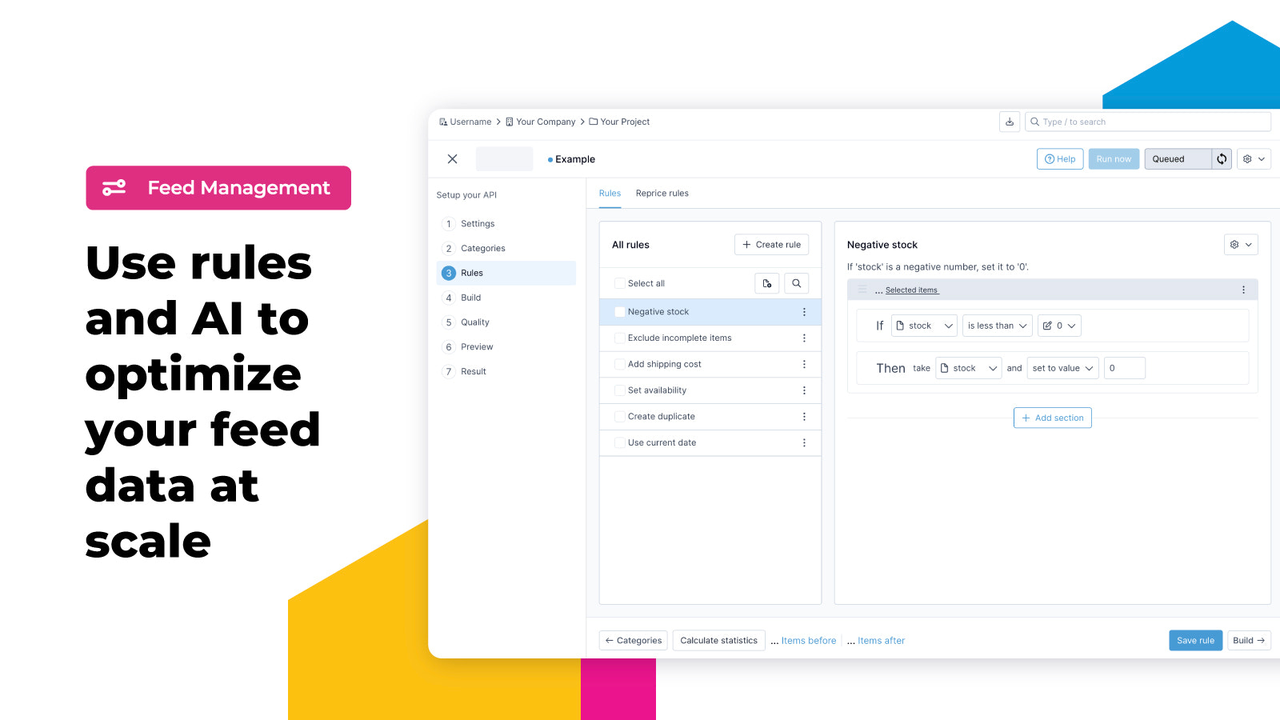
How it works in practice
Since January 22, 2026, Shopify Markets is the default importer. You install the Channable app from the Shopify App Store, choose Shopify Markets as the import method and pick a market with a catalog. It imports metafields, variant metafields and metaobjects, extra languages with translated metafields and a price per country, such as a separate Belgian price field. The rule editor is no-code: you build if/then blocks and preview items before and after the rule. For example, a rule can set stock to 0 when it's below zero or exclude incomplete items. AI can set up feeds, map fields, categorize products and translate or generate attributes.
G2 reviewers like the ease of setup, the clean interface, the support and the customization. They complain about the price, which grows with the item tier plus modules, and about a learning curve. Shopify reviewers mention slow support replies, and one says the install is hard for non-technical users. A vendor reply attributed one delay to the Shopify migration.
Channable fits a team selling in several countries and on marketplaces at once, where the cost of a broader platform is justified by the number of channels. For a single Google feed it's more platform than you need.
Pick Channable if you're selling on marketplaces in several countries, since that's where it earns its price. Skip Channable if you only need one Google feed, since you'd pay for reach you won't use. It's also harder to budget, because the price follows the item tier and the modules you add.
- Starting price
- Core Standard EUR 59 per month, Plus EUR 79, Pro EUR 89 at 5,000 items; modules from EUR 30
- Founded
- 2014
- Free trial
- No time limit
- Shopify App Store reviews
- 37
GoDataFeed
Product feed syndication for ecommerce teams managing product data across sales or advertising destinations.
GoDataFeed is a feed syndication platform with templates for more than 60 channels, covering both advertising destinations such as Google, Meta, Pinterest, TikTok and Bing and marketplaces such as Amazon, eBay and Walmart. Plans run from Lite at $39 per month to Premium at $399, with a 14-day free trial.
Pricing is by SKU count and channel type. Lite is $39 a month for 1,000 SKUs, one PPC channel and one catalog sync a day. Plus is $99 for 5,000 SKUs, 4 PPC channels and 4 syncs a day. Pro is $199 for 20,000 SKUs, 8 PPC channels, 1 marketplace, 16 syncs a day and order sync. Premium is $399 for 40,000 SKUs, 4 marketplaces and 24 syncs a day, with unlimited PPC channels on Shopify's listing but 20 on the vendor's pricing page. Extras are $5 per additional 1,000 SKUs and $29 per additional PPC channel, and extra marketplaces cost $99 each with a Pro plan minimum. There's a 14-day free trial and no free plan.
For the 900-product, 1,800-variant example later in this guide, Lite plus one block of extra SKUs and two extra PPC channels comes to $102 a month, while Plus covers it at $99.
- you send one catalog to ad channels and marketplaces through GoDataFeed
- you want GoDataFeed's rules and order sync in the same place
- you only run a single Google feed, which GoDataFeed's 60+ channel templates don't help
- Users like
- Supportive team and AI titles that saved time
- Users dislike
- Early Shopify app mapping problems reported in a 2024 review
- Source: G2, 16 reviews
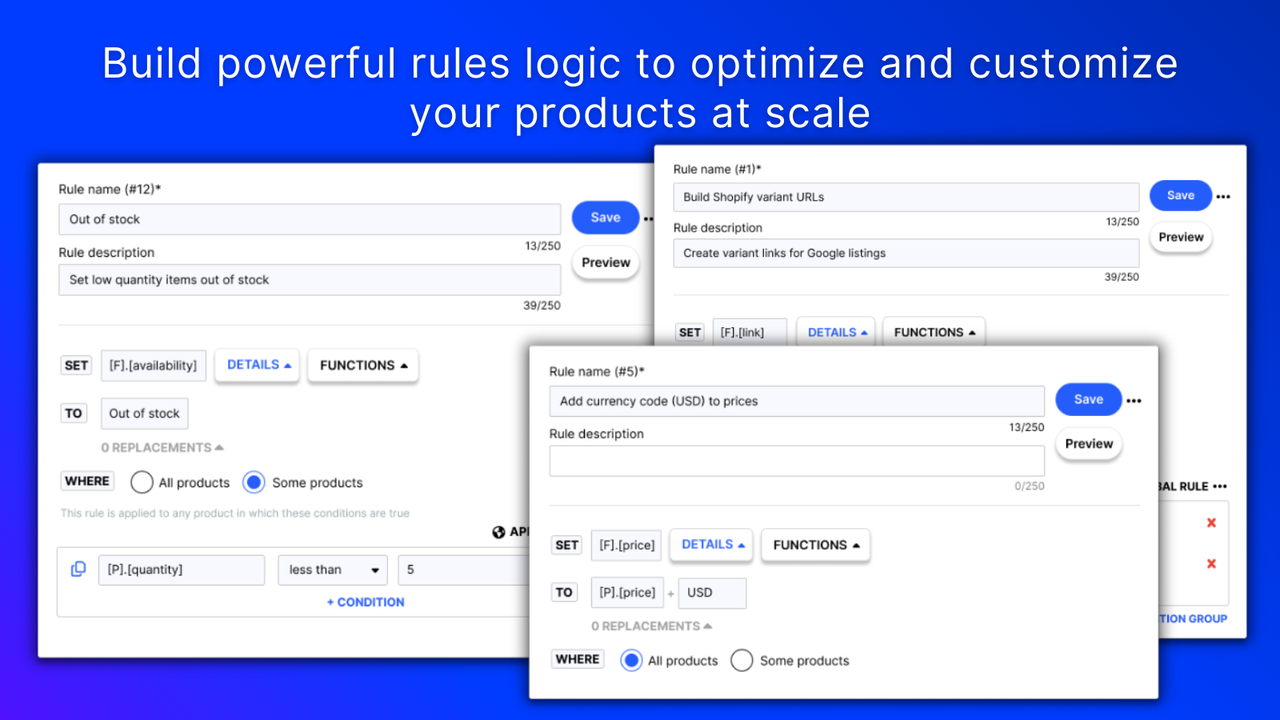
How it works in practice
The rules editor works in SET, TO and WHERE logic with a preview. Typical rules set availability when quantity falls below 5, build Shopify variant URLs and add a currency code to prices. A prebuilt rule library called FeedPilot adds an approval step. The mapping screen shows the feed fields for a channel and how many rules touch each one. Diagnostics list errors, warnings and optimization notes per SKU, such as a missing image link or a title over 150 characters. Imports bring in products, variants, metafields and inventory from Shopify, and AI titles, descriptions and categorization go through an approval step.
On higher plans, a marketplace orders view lists synced orders from Google, Amazon US and eBay with their sync status, which is the order-sync side that feed-only apps don't have.
The reviews that exist praise a supportive team that set up feeds for non-experts, while another reviewer says AI titles saved hours. The three one-star reviews date from 2020 to 2024: one called the Shopify app half baked because Google categories weren't imported and field mapping was overwritten on updates, which the vendor disputed. The app launched on December 13, 2019, and isn't Built for Shopify.
GoDataFeed fits a team that sends one catalog to both ad channels and marketplaces and wants rules and order sync in the same place. A small store with a single Google feed doesn't need it.
Pick GoDataFeed if you're sending one catalog to ad channels and marketplaces, and you'll want order sync too. Skip GoDataFeed if you're not selling on marketplaces. There's no free plan, the review base is small, and a store with one ad channel doesn't need what's built for 60 of them.
- Starting price
- Lite $39 per month (1,000 SKUs); Plus $99; Pro $199; Premium $399 (14-day trial)
- Free trial
- 14 days
- Launched on Shopify
- December 13, 2019
- Built for Shopify
- No
Feedonomics
Managed feed operations for ecommerce teams managing product data across sales or advertising destinations.
Feedonomics is the managed option. It's owned by BigCommerce, now operating under the Commerce name, and it sells feed management together with a dedicated feed manager rather than only a self-serve tool. It has no public price list, and its two Shopify apps are free to install but say that external charges may be billed by Feedonomics separately.
The pricing page says plans are tailored to SKU count, channel type, number of channels and service level, and that Feedonomics doesn't take a percentage of revenue. It offers a free feed audit. No free trial is stated, so ask for a written quote.
The two Shopify apps, Feedonomics Listing and Orders and Feedonomics for Advertising, launched on September 10, 2025. The Shopify page says you can integrate a store with more than 2,000 global shopping destinations, while the listings themselves say hundreds of channels. Both apps show zero reviews on Shopify, but G2 gives a usable rating: 4.4 from 376 reviews.
- you run a large catalog and want Feedonomics to handle feed operations for you
- you can justify a quote-based Feedonomics contract
- you have a few hundred products and one Google feed, where Feedonomics costs far more than a self-serve app
- you want a public price list, which Feedonomics doesn't publish
- Users like
- Responsive support and onboarding
- Users dislike
- Complex interface and cost
- Source: G2, 376 reviews
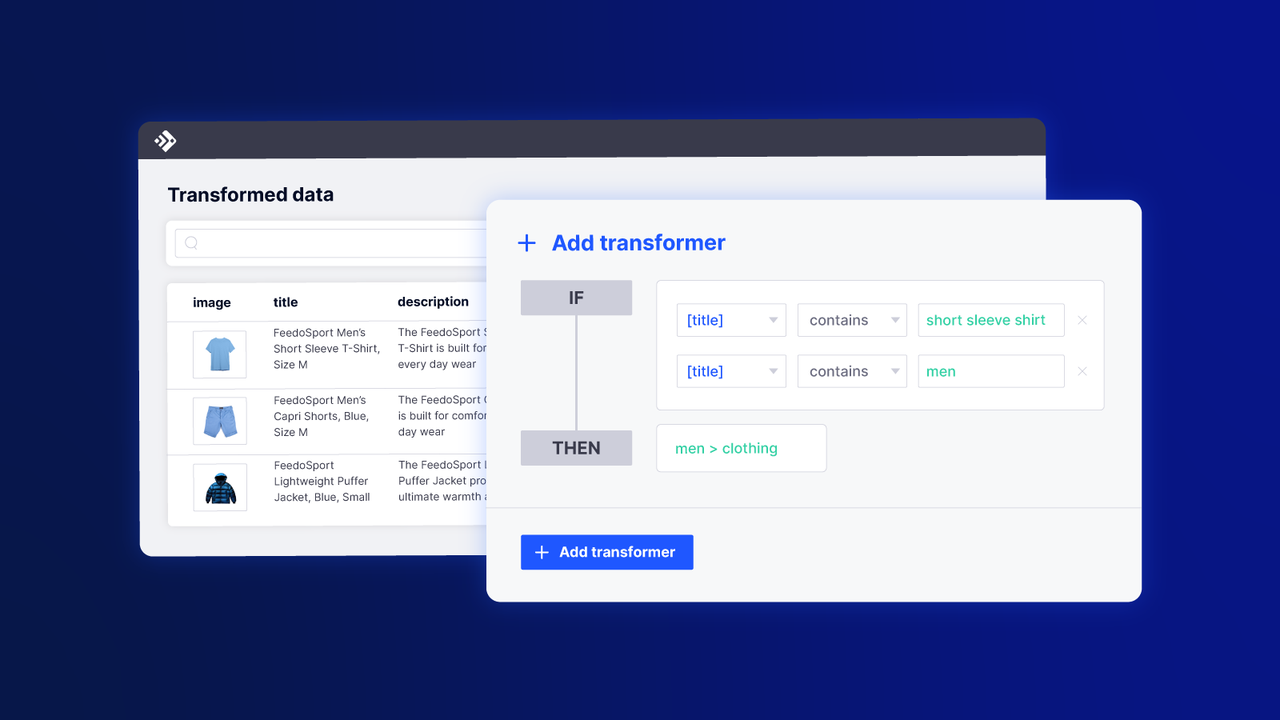
How it works in practice
The transformation tool is a rule builder with if/then conditions, for example a rule that maps any title containing short sleeve shirt and men to a men's clothing category, shown above a table of transformed data. The Shopify page also lists AI-powered categorization, order and product update sync between Shopify and the channels you list on, and inventory buffer and allocation rules to prevent overselling. Hands-on implementation, a dedicated feed manager and round-the-clock support are the core of the offer.
G2 reviewers praise responsive support and onboarding and the flexibility of the transformers. The negative themes are a complex interface with a learning curve, slow support in some reviews and the cost, with one reviewer calling it a bit expensive.
Feedonomics fits a large catalog or a team that wants feed operations handled for it and can justify a quote-based contract. For a Shopify store with a few hundred products and one Google feed, a self-serve app costs far less. Ask for the setup scope, the recurring managed services, the destinations covered and the limits in writing before you compare it with a monthly app price.
Pick Feedonomics if you're running a large catalog and you've no wish to manage feeds yourself. Skip Feedonomics if you can't justify a contract you haven't seen priced. There's no public price, and a small catalog won't use the managed service you'd be paying for.
- Starting price
- Quote-based; no public price
- Parent
- BigCommerce (Commerce)
- Shopify apps launched
- September 10, 2025
What does Shopify feed software cost as your catalog grows?
A feed-management budget includes the base subscription, the catalog or variant allowance, the number of destinations and the labor needed to correct errors. Compare each candidate against the same inventory rather than its cheapest tier. Take a store with 900 products, 1,800 variants, three advertising destinations and two localized feed outputs. Simprosys counts products, so its 501 to 1,000 product tier at $8.99 a month fits. MultiFeed-1K at $5.95 a month allows 1,000 products and 2 feeds, which covers the two localized outputs. Mulwi's Pro 1 at $15 a month allows 1,000 products or 2,500 variants, so the 1,800 variants fit, but its 2 feeds are all it includes and the price is for the Basic Shopify plan.
The SKU-based tools land differently. DataFeedWatch's Shop plan at $64 a month allows 1,000 SKUs, so if it counts the 1,800 variants as SKUs you'd move to Merchant at $84 or pay $5 per extra 1,000 products. GoDataFeed's Lite at $39 plus $5 for the extra SKUs plus $29 for each of two extra PPC channels comes to $102 a month, against $99 for Plus. Nabu's Grow at $39.90 a month removes product and order limits altogether. The offers aren't directly comparable because the counting units and included features differ, so ask each vendor whether variants count as products or SKUs, and test the real destinations before you commit.
Which feed tool fits which kind of store?
If you're a small store that sells mostly through Google and Meta, you'll do fine with Simprosys or Multifeed. They're cheap and quick to start, and the usual pain point is a tier change when the catalog grows or a metered add-on. Pick Simprosys if you want rules and bulk edit in one place, but choose Multifeed if you're running several different feeds, since its plans count feeds as well as products.
If your data is messy, it's usually the rules that decide the winner. Mulwi has a free plan for testing templates and paid plans with attribute formulas, yet you'll need patience with expressions. DataFeedWatch and GoDataFeed cost more, but they're built for teams who keep a rule library and want feed scores or order sync. Channable is the one that doesn't stop at Shopify: if you're selling on marketplaces in several countries, its price makes sense, while a single-channel store won't see the value.
Nabu is the odd one out. It doesn't charge by catalog size alone, so check last month's order count before you pick it. Feedonomics is for the merchant who isn't looking to run feeds at all and doesn't mind a quote. Whatever you choose, don't skip the sample test, because it's the only way you'll find out how a tool counts your variants.
Which feed errors should you test before buying?
In Google Merchant Center and similar destinations, test identifier mismatches, missing brand and GTIN fields where required, incorrect availability, sale-price conflicts, variant duplication, localization and rejected destination categories. A useful acceptance test takes a sample with a single-variant product, a multi-variant product, a discounted product, an out-of-stock item and a product excluded from one market. Compare Shopify's source values, the feed generated by Simprosys, DataFeedWatch or any other tool, and the values Google Merchant Center received. Record whether a correction needs an edit in Shopify, a feed rule or a support request.
When should you choose a Shopify app over a feed platform?
Choose a focused Shopify app when a small team's destinations are limited and it can resolve most errors in the existing Shopify workflow. Evaluate a broader feed platform when channel-specific transformations, multiple stores, localized catalogs and shared ownership become recurring work. A managed offering makes sense when you're finding that catalog cleanup and destination changes consume substantial internal time.
How should you migrate without disrupting product listings?
To migrate without disrupting listings, inventory the active destinations and existing feed owners first. Export a baseline of product identifiers, prices, stock and destination status. Configure a small test feed in the new tool, whether that's Multifeed, Mulwi or Channable, and inspect its output before enabling it as the live source. Validate variant identifiers and country-specific fields, then switch one destination at a time with a documented rollback path. Avoid submitting two competing feeds for the same products without knowing the destination's priority rules.
- 1Export baselineWhat to do Record IDs, prices, stock and destination status.
- 2Test sampleWhat to do Check variants, identifiers and availability.
- 3Inspect destinationWhat to do Review diagnostics and rejected items.
- 4Switch with rollbackWhat to do Change one destination at a time.
Frequently asked questions
Is Shopify's native Google integration enough?
It's often enough for a simple Google catalog. A specialized tool matters when you need custom rules, extra feeds or regional mappings.
What is the difference between a product and a variant limit?
A product is a parent item and variants are its sizes or colors. Vendors count products, variants or SKUs differently.
Can one feed serve every channel?
Not reliably. Destinations don't share the same fields, categories or policy attributes.
Do apps fix Merchant Center disapprovals automatically?
Not automatically. Tools help map fields, but they can't make policy decisions or repair bad source data.
Should I choose the lowest starting price?
No. Compare plans at your catalog size, variant count, feed count and channel mix.
Do these tools synchronize marketplace orders?
Some do, such as GoDataFeed on higher plans and Feedonomics, but the Google-focused apps don't.